|
12-05-02
Listbox Auto-Find by
Erick Tejkowski
When you use the REALbasic Listbox control, sometimes it's nice to offer an "auto-find" feature.
As you press keys on the keyboard, the Listbox should attempt to locate any rows that display text
that matches the pressed keys. The REALbasic Listbox doesn't perform this functionality, but it's not difficult
to implement it yourself. This week we'll show you how.
Prep
capitals, states, currentkeys
Launch REALbasic and open the Code Editor for the default window - Window1.
Add three properties to the window by choosing Edit-New Property.
- LocateState(state as string)
- PopulateStates
- PopulateCapitals
This project is a little US-centric, in that it displays the states and capitals of the UNited States.
(Sorry, international readers!)
Build the Interface
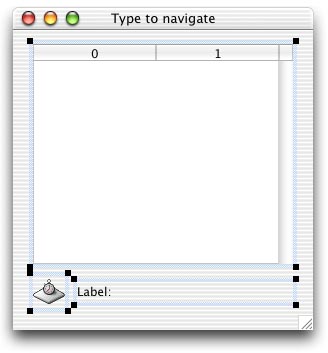
To create the interface for this project, open Window1 and add a Listbox, a Timer, and
a StaticText control. Set the Timer's Period to 2000 in the Properties Window. Then, rearrange the
various controls in the window to look like this.
Add the Code
To set things up, add the following code to the Open event of Listbox1.
Listbox1.Open
Then, add the following code to the KeyDown event of the Listbox. This is
where we track the keys that a users presses. As they press keys, we keep a running
sequence of those keys. We also check to see if there is a match in
the list using the LocateState method.
Listbox1.KeyDown
Next, add a little code to the Action event of Timer1. This resets the sequence of
keypresses once every 2 seconds.
Timer1.Action
Finally, add the code for the three methods you created earlier. One method
does the search for a match between keypresses and the Listbox contents. The other two methods
populate the Listbox with state and capital names.
LocateState
Populate States
PopulateCapitals
Conclusion
That's it for this week.
As usual, you can
download the completed project
instead of typing it in.
See you next week!
12-03-02
REALbasic News
by
Erick Tejkowski
REALbasic on the Drew Carey Show!
 Last Friday (Nov 29),
REALbasic made its prime time television debut
, when it
"appeared" on The Drew Carey Show. In the episode, Drew hires a teen to help him
learn how to program (an iBook, no less, but I digress).
After some brief hemming and hawing about the
process of programming with C++, the tutor says that it would be easiest to
simply convert the project to REALbasic for Drew. Drew responds with a punch line that went like this:
"...somehow REALbasic still sounds too hard". Go REAbasic!
Last Friday (Nov 29),
REALbasic made its prime time television debut
, when it
"appeared" on The Drew Carey Show. In the episode, Drew hires a teen to help him
learn how to program (an iBook, no less, but I digress).
After some brief hemming and hawing about the
process of programming with C++, the tutor says that it would be easiest to
simply convert the project to REALbasic for Drew. Drew responds with a punch line that went like this:
"...somehow REALbasic still sounds too hard". Go REAbasic!
EssentialDialog
American Dream Partnership has
released
EssentialDialog version 1.0.
With a single line of code,
REALbasic developers can create a dialog box with the icon, text, and
buttons of choice. The dialog automatically sizes to match its text,
and most aspects of the dialog's appearance may be set programmatically.
The main advantage is the pure convenience of using EssentialDialog.
Even beginners can put up a dialog within seconds, without the need to
populate variables and set attributes. Of course, EssentialDialog
contains more advanced features, and can grow as the developer's
experience and needs grow.
AVC plugin
Alfred Van Hoek has posted another video-related plugin:
AVC Plugin.
If you're working with FireWire cameras and would like to know
when a camera is plugged in and other fun stuff, check it out!
Palette 1.1
The La Jolla Underground has announced the immediate
availability of Palette 1.1.
Palette is a free painting program that even children should find
easy to use. It was Made with REALbasic.
UTool 1.0
Lars Jensen spent a little time cleaning up and documenting a generic application
template that he uses called
UTool.
Its purpose is to save you time in creating a
polished single-window "utility" style application (as opposed to a
document-based app, such as Thomas Reed's Doc App template).
You get windows (main and help) that remember their positions between
sessions, preference storage/retrieval, a decent-looking about box with
clickable URLs, and platform-appropriate behavior for Classic, X, and
Windows (especially all those yucky menu details). The focus is on
simplicity and ease of customization.
|