|
6-21-01
REALbasic Prereleases - Living on the Edge... by
Erick Tejkowski
REAL Software has always made preview releases of REALbasic readily available for anyone to download. For example, you can currently
download REALbasic 3.5a2. Although prerelease versions are unsupported and
unfinished, they give you a good idea about what new features are forthcoming.
Normally, our ResExcellence REALbasic tutorials stick with using release versions of REALbasic, but this time the gossip is just too juicy to ignore. This
week we are going to live on the edge and use a prerelease version of REALbasic. Keep in mind that prerelease software makes no
guarantees about how well it works. This means that it might not perform as you expect, it might crash REALbasic, and heck, if may even crash your machine. Further, since this is prerelease software, functions available now may not even make it into the final release.
If you feel brave enough to take the plunge, read on.
New Features
So, what's all the excitement about? Great new features, that's what! REALbasic 3.5a2 gives us a glimpse of some
exciting new functionality. Some of the big additions include:
- Regular Expressions
- 3D support
- Microsoft Office automation
- A secret "soon-to-be-announced" feature
Regular Expressions
Until now, REALbasic users have had to rely on an assortment of user-created code to use regular expressions in REALbasic. If you're unfamiliar
with regular expressions, they permit you to do complex search and replace functions using a set of standard rules. This is a very welcome addition to
REALbasic. An example project demonstrating regular expressions is included with the REALbasic 3.5a2 download.
3D Support
REALbasic 3.5a2 hosts another great new feature: 3D graphics. The new version adds support for Quesa, an open source
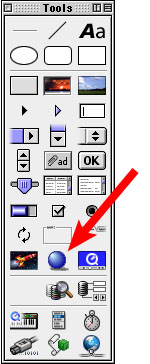
3D graphics engine that is compatible with Apple's QuickDraw 3D. This is accomplished using the new View3D control, pictured below. Again, REAL provides a demo
of the functionality with the REALbasic 3.5a2 download. Don't forget, these new features are not only unfinished, but also undocumented.
Microsoft Office Automation
Perhaps the biggest news about the prelease versions of REALbasic 3.5 is the inclusion of Microsoft Office capabilties. REALbasic can now
interact with Microsoft Word, Excel, and PowerPoint. This opens all kind of interesting possibilities for automating your workflow. Since this is a new feature, it is undocumented.
You can, however, get an idea of where REAL Software is going with Office Automation by doing a little investigation. Usually, I would suggest that you take a
peak inside the Office Automation plugins using RB Plunger. Alas, RB Plunger doesn't work with these new plugins. Next stop.... a resource editor. Use an editor that permits you to
look at the data fork for clues about the function names in the plugin. Finally, if you are less daring, you can use REALbasic's own auto-completion feature to learn about the plugin
functions.
For example, look at the code from REAL's example Word Automation project:
Dim word as wordApplication
Dim doc as wordDocument
word = new wordApplication
doc = word.documents.add
doc.range.text = editfield1.text
doc.activeWindow.caption = "ResExcellence is cool!"
You can probably guess that this code creates a new Word document, adds text to it from
an EditField, and finally gives the document a title: "ResExcellence is cool!". This code also gives you a few clues about what other features might exist.
For instance, enter:
doc.
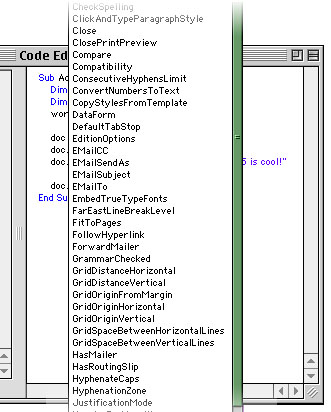
and press Tab. If everything goes as planned, you should see something like this:
This list should give you an idea of just how much functionality is coming to REALbasic. Scroll down the auto-completion list, find the "Save" method, and press Return.
When you run this code, Word will now attempt to save the document. You can play with the other methods in a similar fashion, but you will have to do some guessing
about how different methods work, since these features are so far undocumented.
Secret Feature
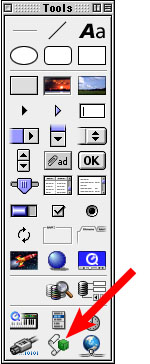
REAL Software has made public statements that they will soon introduce a new "secret" feature in a prerelease version of REALbasic 3.5. They gave no clues, except to say that
there is a hint in the Toolbar (see below). The control is entitled "RBScript". Keep an eye on this one!
6-19-01
REALbasic News
by
Erick Tejkowski
Hey buddy, can you spare a Euro? NélixA recently posted a handy made-with-REALbasic (MWRB)
application named EuroTable.
EuroTable is a currency calculator for converting Euros
to a variety of currencies. It even works with VAT.
Lucky 13.
MonkeyBread Software announced the immediate availability
of 13 REALbasic plugins.
Some of the offerings include:
- Get and set resolutions for all attached monitors.
(OS 8/9, X, and Windows)
- Access the icons of folders, files and disks.
- Fake key presses.
- Compare two FolderItems.
Need to Bulk Up? A new REALbasic tool is on the scene: RBulk Builder.
"RBulk Builder is a Batch Building companion for the REALbasic application.
With it, you can automatically launch different builds, changing the
name, the platform, the language and even constant values for each
one.
It is designed for people that need to build many different binaries
(different platforms, localized, demo/light versions...) from a
single source project file."
File Manager Plugin. REALbasic übergeek, Thomas Tempelmann, has upgraded his oh-so-useful FileMgr plugin to
Version 1.3.1. It fixes a bug related to CD volumes.
Windows Modem code. Nick Loveday has posted a nice code example for
executing PPP connections on Windows
from RB apps. I haven't seen
an example like this before, so be sure to add it to you RB code collection.
This week on campus. This week's REALbasic University tutorial
expands on last week's animation project by showing you how to code a
Shooting Gallery game in REALbasic. Fun stuff!
|