|
05-02-02
Dock Your Passwords by
Erick Tejkowsi
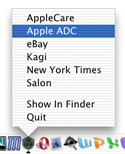 If you're like me, you have a dozen passwords that you use for a variety of
sites on the Internet. After your collection grows beyond a few passwords,
it becomes very difficult to memorize them all. Today we'll built a quick little
utility that displays your favorite sites in the OS X Dock. Selecting a site
will place your password for it on the clipboard.
If you're like me, you have a dozen passwords that you use for a variety of
sites on the Internet. After your collection grows beyond a few passwords,
it becomes very difficult to memorize them all. Today we'll built a quick little
utility that displays your favorite sites in the OS X Dock. Selecting a site
will place your password for it on the clipboard.
Introduction
Today's project requires that you first go to Will Cosgrove's site to download his
Carbon Events Plugin. He charges a nominal fee to use the
plug-in, but it's well worth it if you are a Mac OS X developer. The plug-in adds all sorts of
useful OS X functions to REALbasic. The demo plug-in will let you see how it works and is functional enough
to complete this tutorial.
Interface
The interface for today is very stripped down. In fact, there really isn't an interface except for the
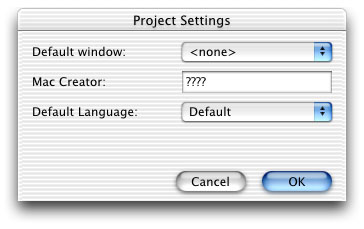
the items listed in the Dock. After installing the plug-in in the Plugins folder, launch REALbasic and select Edit-Project Settings.
Choose "None" from the "Default Window" popup menu.
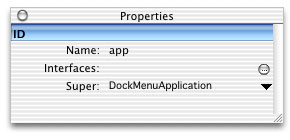
Next, create a new class by selecting File-New Class. Name the class "app" and choose "DockMenuApplication"
for the Super property.
Source Code
The code for today's project is also pretty simple.
We will add a list of our favorite sites (sites that require passwords) to the
popup menu of our application's Dock icon. Navigate to the Open event of
the app class and enter the following code:
AppendDockMenuItem "AppleCare"
AppendDockMenuItem "Apple ADC"
AppendDockMenuItem "eBay"
AppendDockMenuItem "Kagi"
AppendDockMenuItem "New York Times"
AppendDockMenuItem "Salon"
Finally, navigate to the HandleDockMenu event of the app class and add this code:
dim s as string
dim c as clipboard
c=new clipboard
s = GetDockMenuItemText(index)
select case s
case "AppleCare"
c.SetText "123"
case "Apple ADC"
c.SetText "456"
case "eBay"
c.SetText "789"
case "Kagi"
c.SetText "abc"
case "New York Times"
c.SetText "def"
case "Salon"
c.SetText "ghi"
end select
This list of passwords is fake, but you get the idea. Whenever a user chooses, say, AppleCare from the Dock menu,
the HandleDockMenu event fires giving us the dock menu item's index. We then use that index to learn about the
text that is contained in that menu item and act accordingly by pasting a "password" to the clipboard.
A resourceful REALbasic programmer will notice that this project can be improved in many ways. Generally it is a bad idea
to hard code information like passwords and web site names. These clearly would have a better home in a text file.
That way you could add more links to the list later and the application will just display them. For the sake of this demo,
we chose to hard code the information.
Conclusion
Well, that's it for this week! As usual, you can download the finished project in case you get stuck.
Have fun and see you next week!
4-30-02
REALbasic News
by Erick Tejkowsi
URLAccess Plugin 2.0
Alfred Van Hoek has updated his URLAccess Plugin to version 2.0.
URLAccess plugin has been successfully used in the "Registrator" (a
decryptor application). The new feature that was added in this version of
the plugin is the setting and getting of URLproperties and supports
HTTPURLMethods such as "GET", "SET", "POST" and other. You can post
searches, and above all, it works flawlessly with the HTMLrendering Plugin.
The versatility of URLAccess Plugin leads to numerous new possibilities,
including development of a light-weight webBrowser application that may
compete with other web browsersS URLAccess plugin requires MacOS 8.5 or
higher.
Download it here.
db Reports
Now available! db Reports 3.0 by Aaron Bratcher is a great way to
view the data in your REALdatabases.
Version 3.0 adds new features like more band options and bug fixes.
Download it here.
ResPloder and Radio Poster
The La Jolla Underground is pleased to announce the immediate
availability of ResPloder 1.5, a resource utility, and Radio Poster 1.1, a blogging tool.
Check them out!. They are made with REALbasic, of course!
Carbon Events Plug-in
Will Cosgrove has posted an a small revision of his popular Carbon Events Plug-in. This version
fixes a bug that would cause a crash on pre-8.5 systems.
It's available here.
QuickTime Effects
Have REAlbasic's QTEffects class been giving you headaches with unexpected crashes? Help is on the way! Dave Grogono, of REAL Software, posted
this message to the RB-NUG email lists:
There are some significant improvements and changes to our QT support that
have been made during the 4.5 alpha process. A fix for this crash is among
the improvements. None of the changes have yet made it into a publicly
released alpha but 4.5a9 will probably include them.
|


 Boot Panels



