|
1-16-03
Using Sheets in REALbasic by
Erick Tejkowski
For some time now, REALbasic programmers have been on the sidelines with the Carbon developers
when it came to the new interface elements of Mac OS X. While Cocoa geeks impressed their friends
with native sheet and drawer support, REALbasic users had to resort to tricks, workarounds, or third party
solutions to work with sheets. Drawers and that metallic look were completely off limits for REAlbasic users.
The forthcoming release of REALbasic 5.0
aims to change all of that. New in version 5.0 is support for sheets, drawers, and those nifty metallic windows.
This week, we'll look at how easy to implement some of these new features.
Build the Interface
NOTE: This demo requires
REALbasic 5.0 or higher.
It will not work with earlier versions of REALbasic.
Launch REALbasic. When it opens, you'll find a default window named Window1 in your Project window.
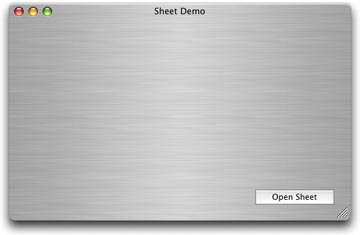
In the Property window, change its Frame property to 9 - Metal Window. Then,
add a BevelButton to this window, as shown below.
Next, choose File-New Window to create a new window named Window2.
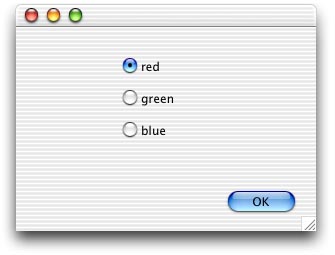
In the Property window, change its Frame
property to 8 - Sheet Window. Add a PushButton to the window and a few dummy controls. These extra controls
won't do anything. They're just there for looks. In my example, I added three radio buttons.
Add the Code
Double-click the BevelButton in Window1 and add the following code to its Action event.
Window2.showModalWithin self
This code displays Window2 as a sheet within Window1 (self) when the user clicks the button.
Finally, add this one-liner to the Action event of the PushButton in Window2.
self.close
That's it for this week. Choose Debug-Run to see your work.
Conclusion
As usual, you can
download the completed project.
See you next week!
1-14-03
REALbasic News
by
Erick Tejkowski
REALbasic 4.5 wins 4 stars
Macworld UK reviewed REALbasic 4.5 and
awarded it a 4 star rating.
"In terms of power, REALbasic is way ahead of programs such as Revolution
and SuperCard, and is much easier to use than tools such as CodeWarrior for
making robust commercial applications. It's a strong contender for wearing
the mantle of "programming for the rest of us" that used to belong to HyperCard."
REALbasic 5.0 Announced
REAL Software announced that REALbasic 5.0 will be released in the next month or so.
This version includes various bug fixes and many new features. The big news for this version, however,
is the fact that it will run on Window computers. Check it out!
CGIs for Mac OS X
TOO MUCH SPACE ANNOUNCES RELEASE OF DTPcgi 1.0 FOR REALBASIC
Too Much Space has announced
the immediate availability of DTPcgi for REALbasic.
DTPcgi is a small C application that is used as an intermediary between a web browser and a
REALbasic application so that REALbasic applications can act as a full
fledged cgi under MacOSX.
DTPcgi is currently working on MacOSX. There are no plans for a Win32
release.
Simple Video Splicer
Simple Video Splicer (SVS) is a basic video editing tool for
cropping/joining movies, images, and audio.
SVS and it's source can be found at http://www.chipersoft.com/svs.html
ResizeWidget
ResizeWidget 1.1 from Charles Yeomans is now available.
You can get the
demo version here.
Version 1.1 adds support for bevel button widgets in MacOS builds.
There are a few other internal tweaks as well.
1-7-03
REALbasic News
by
Erick Tejkowski
Audio and Video Capture
BEST Software Design has updated their
popular BESTCapture Plug-in
for capturing audio and video with your REALbasic applications.
Version 1.1 are several new video properties ( like hue, contrast, brightnes, etc..) and gives you the abillity
to save and restore hardware settings programmatically.
A REALbasic Switcher
REALbasic got mentioned recently in Apple's Switch campaign. Check it out!
Palm Converter
Mšštjelitt Palm Converter is a small RB application
that enables Mac users to read various Palm files. Currently
supported formats are
- Memo
- Memo32
- Hours
- Expense
- Treo/VisorPhone Call Logs
MPC is a free application, available here.
FTP Suite
Pyramid Designs
announced a bug fix update to FTP Suite,
a set of classes and code modules
that allows FTP operations to be implemented in REALbasic applications.
Release 1.1 of FTP Suite fixes a bug introduced in version 1.1 that caused
errors when trying to transfer some types of folder structures to a server.
This is a free upgrade to all 1.0 Professional, Hobbyist and Source Code
licensees.
Drag-and-drop 3D Scene Creation
The first public version of SceneBench (Classic only for now) is
available for download.
SceneBench is a utility whose goal is to make it easier to work with
REALbasic's 3D capabilities. You can drag models or pictures to a scene and
then move, scale, or rotate them, spin them around, etc. Each scene is a
document that can be saved and re-opened in the usual way.
Its main contribution to the world of RB3D is instant "live" feedback as you
manipulate objects, lights and their properties (including those of the
RB3DSpace itself), using the mouse and/or keyboard.
12-03-02
REALbasic News
by
Erick Tejkowski
REALbasic on the Drew Carey Show!
 Last Friday (Nov 29),
REALbasic made its primetime television debut
, when it
"appeared" on The Drew Carey Show. In the episode, Drew hires a teen to help him
learn how to program (an iBook, no less, but I digress).
After some brief hemming and hawing about the
process of programming with C++, the tutor says that it would be easiest to
simply convert the project to REALbasic for Drew. Drew responds with a punchline that went like this:
"...somehow REALbasic still sounds too hard". Go REAbasic!
Last Friday (Nov 29),
REALbasic made its primetime television debut
, when it
"appeared" on The Drew Carey Show. In the episode, Drew hires a teen to help him
learn how to program (an iBook, no less, but I digress).
After some brief hemming and hawing about the
process of programming with C++, the tutor says that it would be easiest to
simply convert the project to REALbasic for Drew. Drew responds with a punchline that went like this:
"...somehow REALbasic still sounds too hard". Go REAbasic!
EssentialDialog
American Dream Partnership has
released
EssentialDialog version 1.0.
With a single line of code,
REALbasic developers can create a dialog box with the icon, text, and
buttons of choice. The dialog automatically sizes to match its text,
and most aspects of the dialog's appearance may be set programmatically.
The main advantage is the pure convenience of using EssentialDialog.
Even beginners can put up a dialog within seconds, without the need to
populate variables and set attributes. Of course, EssentialDialog
contains more advanced features, and can grow as the developer's
experience and needs grow.
AVC plugin
Alfred Van Hoek has posted another video-related plugin:
AVC Plugin.
If you're working with FireWire cameras and would like to know
when a camera is plugged in and other fun stuff, check it out!
Palette 1.1
The La Jolla Underground has announced the immediate
availability of Palette 1.1.
Palette is a free painting program that even children should find
easy to use. It was Made with REALbasic.
UTool 1.0
Lars Jensen spent a little time cleaning up and documenting a generic application
template that he uses called
UTool.
Its purpose is to save you time in creating a
polished single-window "utility" style application (as opposed to a
document-based app, such as Thomas Reed's Doc App template).
You get windows (main and help) that remember their positions between
sessions, preference storage/retrieval, a decent-looking about box with
clickable URLs, and platform-appropriate behavior for Classic, X, and
Windows (especially all those yucky menu details). The focus is on
simplicity and ease of customization.
|


 Boot Panels