|
2-28-02
ResExcellence Stego Machine by
Erick Tejkowsi
Stegonography is the discipline of hiding information in files. Today we will
build a simple stegonography machine. With it you can hide a secret message within an image.
Give the decoder to your friends or family and they can read your secret message.
Intro
If you would like to know more about the study of stegonography, the web has many resources
about the topic. This introduction
is a good start if this is a new topic to you. The basic idea behind stegonography is that you can
hide data within various types of computer files. Since presumably no one is looking for this data
in the place or manner you hid it, the data remains secret. Only those who know your method or who have a decoder
can retrieve the information from its hiding place. To demostrate, we are going to
hide a short message (<100 characters long) within a 100x100 image.
Build the Interface and Add the Code
Launch REALbasic, open Window1 and add the following items:
- Canvas
- PushButton - named "EncodeButton"
- PushButton - named "DecodeButton"
- EditField - LimitText = 99
Next create two properties, by selecting the Edit-NewProperty menu:
		p as Picture
		r as RGBSurface
Navigate to the Paint event of Canvas1 and enter the following code
g.drawpicture p,0,0
Then, enter this code into the Open event of Window1.
dim i,j as integer
dim r as rgbSurface
p=newpicture(100,100,32)
r=p.rgbSurface
for i=0 to 99
for j=0 to 99
r.Pixel(i,j) = rgb(rnd*255,rnd*255,rnd*255)
next
next
Add this code to the Action event of the EncodeButton:
dim i,n as integer
dim s as string
dim f as folderItem
//the message
s=editfield1.text
//length of the message
n=len(editfield1.text)
//write the length of the msg
//in pixel (0,0)
p.graphics.pixel(0,0) = rgb(n,n,n)
for i=1 to n
//find the ascii number of each
//character in the message
n = asc(mid(s,i,1))
//set the red portion of
//successive pixels to the ascii
//value of that position's character
p.graphics.pixel(i,0) = rgb(n,rnd*255,rnd*255)
next
//save the encoded picture message
//as a PICT file.
f = GetSaveFolderItem("image/x-pict","Encoded Image")
if f<>nil then
f.saveAsPicture(p)
end if
editfield1.text=""
canvas1.refresh
Finally, place this code in the Action event of the DecodeButton:
dim i,n as integer
dim s as string
dim f as folderItem
dim c as color
dim pp as picture
//save the encoded picture message
//as a PICT file.
f = GetOpenFolderItem("image/x-pict")
if f<>nil then
//open a picture
pp = f.openAsPicture
//draw this new picture
//on the canvas
p.graphics.drawpicture pp,0,0
r=p.rgbSurface
c = r.Pixel(0,0)
canvas1.refresh
//find the red value
//of the pixel (0,0)
n = c.red
editfield1.text=""
for i=1 to n
//loop thru the pixels in the top row
//and build ascii characters based on
//the red value of each pixel
s = chr(r.pixel(i,0).red)
editfield1.text = editfield1.text+s
next
end if
Conclusion
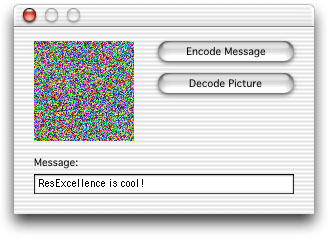
That's it! Select Debug-Run to test your work. Enter a message in the EditField and press the EncodeButton. You will be asked
to save the resulting image to your hard drive. Later, press the DecodeButton to open the encoded image file
and the decode the message within. Some important things to rememeber for this project:
- Save the image in PICT format only. If you try to save the image in something like JPEG, you stand the chance of
altering your hidden message. The PICT format will retain the color information, which is vital here.
- There are many other ways to hide your message in the image. Try writing the message in diagonal lines through the image,
by using every other pixel, or by manipulating color information. As you can see, the possibilities are limitless and
devising a sophisticated design will only protect your data that much more.
The completed project might look something like this:
You can download the finished product here. See you next week!
2-26-02
REALbasic News
by Erick Tejkowsi
3D Tutorial
If you use REALbasic, but opted for the downloadable version instead of the CD, don't miss this
3D FAQ. It is written by
Joe Strout (a REALbasic developer) and was until now only available on the REALbasic CD. The FAQ
demonstrates many techniques for getting started with 3D in REALbasic. Check it out!
Political Fun
The web is a weird place. When you have a spare minute, stop by and take the
World's Smallest Political Quiz.
Once you taken it and read the background behind its meaning, download a REALbasic project that
will help you to visualize the political spectrum. Keep in mind that ResExcellence makes no endorsement of a political party.
This is just for fun.
How does one say...?
Looking for a phonetic spelling of a word? Head on over to this Canegie-Mellon site
where you can find out. They also have a downloadable text-only version of their dictionary, which might
come in handy for your REALbasic projects. For example, try downloading this REAL Database that holds the full dictionary.
Finally, since it's been a slow week in REALbasic news, take a look at some interesting REALbasic-related links:
|


 Boot Panels