|
6-14-01
REALbasic Tips and Tricks by
Erick Tejkowski
This week we are going to break from tradition. Instead of the usual tutorial, we will take a look at
some useful REALbasic tips and tricks.
Tip 1
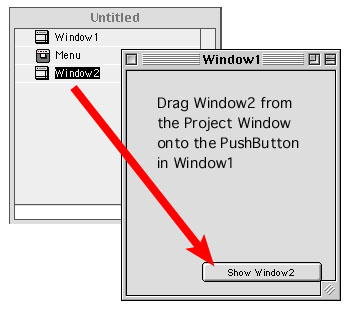
REALbasic, like any well-respected Mac app, makes interesting use of drag and drop.
For example, you can drag a window (named Window1, for this example) from the the Project Window
onto a PushButton in the Window Editor. When you release the mouse, the following code
automatically appears in the Action Event of the PushButton:
Window2.Show
Some other drag and drop functions you can use in REALbasic:
- Drag pictures, sounds, AppleScripts, and REALbasic components directly into the Project Window.
- Select some text in the Code Editor and drag it to the desktop. The code becomes a Text Clipping instantly. Drag it back into the Code
Editor to reuse it later.
- Drag code examples from the Language Reference (in REALbasic) directly into the Code Editor. Instant functionality - no typing required!
- Normally you drag a control from the Toolbar to the Window Editor. Did you know that you can also drag controls to the Code Editor as well?
When you do, the controls name appears in the Code Editor.
Tip 2
If you are the musical type, perhaps you have tried out the REALbasic NotePlayer. If so, you know that to
play a note you supply a note number (between 0-127) and a volume (also 0-127), like so:
NotePlayer1.PlayNote(60, 127)
This code plays a note (Middle C) at full volume. To stop the note, simply play it again with a volume of zero:
NotePlayer1.PlayNote(60, 0)
If you spend any time at all working with the NotePlayer, you'll want quick access to the note names
and their corresponding note numbers. Download a quick hack that you can keep on
hand for easy access to all MIDI note numbers.
Tip 3
A good habit to get into: Carefully check for required hardware and software on a user's machine before
attemping to use or access it. This typically involves using the Gestalt method of the Application Class
(see the REALbasic Language Reference).
The Mac OS identifies a variety of system characteristics using a 4-letter code (for example, QuickTime uses "qtim").
GestLab is
the best source around for discovering the codes and what they do. Make sure you check it out!
Tip 4
Do you spend a lot of time creating screenshots? Try using this simple MWRB app to cut down on the knuckle-busting screenshot
key combinations in Mac OS 9.
Tip 5
Have you ever created a REALbasic interface and managed to cover every single pixel of the background window?
It can be a real pain
to reselect the window without inadvertantly selecting any other control. To avoid having to move controls
around just so you may reselect the
window, simply press shift when you click a control. This causes the control to become deselected and its
parent window to be selected in the process.
Tip 6
If you use REALbasic to program for Windows, you'll appreciate this tip.
Many MDI (multiple document interface) applications on Windows maximize the
MDI frame window when launched. The MDI frame window is the parent window in
which the applications windows open.
If you would like to maximize the MDI frame window when your application launches, insert
the following code in the Open event of your application class:
dim result as integer
CONST SW_MAXIMIZE = 3
//This Declare statement goes all on one line!
Declare Function ShowWindow Lib "user32" Alias "ShowWindow" (ByVal hwnd As Integer, ByVal nCmdShow As Integer) As Integer Declare Function GetActiveWindow Lib "user32" Alias "GetActiveWindow" As Integer
result = ShowWindow(GetActiveWindow(), SW_MAXIMIZE)
6-12-01
REALbasic News
by
Erick Tejkowski
New REALbasic releases.. REAL Software announced two new releases in the past week.
REALbasic 3.2.1 is primarily a bug fix release for REALbasic 3.2 users.
REALbasic 3.5a1 is the latest pre-release version. It is meant
only for those who like living on the edge.
Tiny Mascot...Big Features. Elfdata has been hard at work lately. They have two new REALbasic-made releases:
- XML Editor 1.02 - "XML Editor is a clean,
simple and powerful graphical XML editing tool."
- XML Engine 2.0 - XML Engine is a set of REALbasic classes and modules, using my String
Stuff plugin, that lets you parse, render, manipulate and analyse XML 1.0, and XML DTD.
Full Featured RB Database.
Paradigma Software has released the latest version of
their popular Valentina database (Version 1.8.9b1).
It works with REALbasic, Director, Hypercard, and more.
Alfred, get the car ready... Alfred Van Hoek updated two of his REALbasic standards:
- RB Plugin Plunger (version 2.3.1) - Fixes an important bug.
- NavFolderItem (version 1.3) - Although it looks like REAL Software will be including full Navigation Services in the
forthcoming RB 3.5, Alfred
plans to continue his NavFolderItem development.
You can find these goodies and more on his web site.
Do you do Windows?
Ken Schafer created an interesting
code library called Window's Utilities. It's a Window's DLL that incorporates
additional Windows functions for RB users. Some of the features include:
- Enhanced ToolTips
- WheelMouse Support
- One Program Instance Support
This week in academia. REALbasic University has posted another great tutorial entitled:
REALbasic Animation: Part I (written by By Marc Zeedar).
This week they introduce sprites with a walking stick figure program. If you are looking for animation ideas, I suggest a
stick-man Michael Coyle:
|