|
8-22-02
Build a Bundle by
Erick Tejkowsi
 In recent REALbasic news on ResExcellence, we posted a link to an informative page
about creating application bundles.
In this week's REALbasic tutorial, we'll build a simple utility to help you create
application bundles in a snap. You could do much of this by hand, but its repetitive nature
just screams for us to automate it.
In recent REALbasic news on ResExcellence, we posted a link to an informative page
about creating application bundles.
In this week's REALbasic tutorial, we'll build a simple utility to help you create
application bundles in a snap. You could do much of this by hand, but its repetitive nature
just screams for us to automate it.
Build the Interface
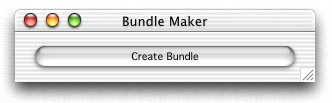
The interface this week is simple to create. Launch REALbasic and open Window1. To this window, add a PushButton.
That's it for the interface!
Source Code
You only have to add code to one location for this week's tutorial. Double-click PushButton1 to open the Code Editor.
To its Action event, add the following code:
Dim dlgApp as OpenDialog
Dim f,ff as FolderItem
dim contents,destApp,destMacOS as folderItem
dim infoplist, pkgInfo as textoutputStream
dim r as resourcefork
dim s,stringToFind,appLocation as string
//select or create a new folder
//to use as the base for our bundle
f=selectfolder
If f <> Nil and f.exists then
//select a Carbon application
//that we will add to the bundle
dlgApp=New OpenDialog
dlgApp.InitialDirectory=DesktopFolder
dlgApp.Title="Select a REALbasic-made Carbon application."
dlgApp.Filter="application"
ff=dlgApp.ShowModal()
if ff<>nil and ff.exists then
// Create folder named "Contents" in it.
contents = f.child("Contents")
if contents<>nil then
contents.createAsFolder
// Create PkgInfo file (which contains type and creator)
pkgInfo = contents.child("PkgInfo").createtextFile
if pkginfo<>nil then
pkgInfo.write ff.MacType+ff.MacCreator
pkgInfo.close
end if
// Create Info.plist file using 'plist' resource from the built application.
r=ff.openresourceFork
infoplist = contents.child("Info.plist").createtextFile
if infoplist<>nil then
s = r.getResource("plst",0)
//add an entry to the plist file, before we create it
//this points to the Carbon executable in the MacOS folder
stringToFind = "</dict>"+chr(13)+"</plist>"
appLocation = appLocation+"<key>CFBundleExecutable</key>"+chr(13)
appLocation = appLocation+"<string>"+ff.name+"</string>"
appLocation = appLocation+stringToFind
s=replace(s,stringToFind,appLocation)
//create the .plist file
infoplist.write s
infoplist.close
end if
//create a folder to store the carbon app
destMacOS = contents.child("MacOS")
if destMacOS<>nil then
destMacOS.createAsFolder
// Copy the application into the app folder (MacOS)
ff.copyFileTo destMacOS.child(ff.name)
end if
// Set folder name + ".app" extension
// (works in place of setting the bundle bit)
f.name = f.name+".app"
MsgBox "Bundle is complete!"
end if
else
MsgBox "No application chosen. Unable to create bundle."
end if
Else
MsgBox "No folder chosen. Unable to create bundle."
End if
To complete the project, create a new file type. Select Edit-File Type and add a new file type called "application":
- Mac Creator: ????
- Mac Type: APPL
Conclusion
To test the project, select the Debug-Run menu. Click the button to select or create a folder. Then, you will be prompted
for an application. Make sure that it's a Carbon application. When you're finished, the project displays a Msgbox and the new bundle
will be in the location of the folder you chose/created. This demo doesn't account for Classic applications in the bundle, nor does it help
you pull the resources from the resource fork and stick them in their own files. We'll cover these topics next week.
You can download the completed version if you prefer not to type all of the above code. See you next week!
8-20-02
REALbasic News
by Erick Tejkowsi
REALbasic FAQ
Chris Cummer has posted the latest REALbasic FAQ.
This version is Issue 016. The FAQ answers many common questions that REALbasic users have, so don't miss it!
Virtual Volume Manager
If you're using the new Virtual Volume feature of REALbasic, you'll surely want to check out the
Virtual Volume Manager from Eric Williams. This time he's added
a few new features and fixed some bugs.
vCard Reader Class
If you use the Address Book in Mac OS X 10.2, you'll find that the addresses are stored in the so-called "vCard" format.
Sam Rowlands has released a class to help you retrieve this information from vCards.
Download it here.
uDevGame 2002
iDevGames has announced the
official opening of uDevGame 2002, the second annual Macintosh game creation
competition. Simply write a game that runs natively on an Apple Macintosh
computer and you could win prizes from a prize pool that retails at over
9,000 dollars!
Any game genre is welcomed and entries are permissible from anywhere in the
world. The competition closes on November 17, 2002 and winners will be
announced on December 2, 2002. "The best part about participating in
uDevGame is not the prizes, but the possibility that your entry might end up
on the cover CD of a book or a magazine. Having some sort of publishing
history is vital if you want to enter the Game development business", said
Sacha Saxer, third place winner of last year's contest.
Cubies Winners Announced
REAL Software announced the
winners of the annual Cubies contest.
They are:
- Business: Barcode Producer by Intelli Innovations, Inc.
- Cross-platform: Quick Pallet Maker 2 by SCA Mecanica
- REALbasic development aid: UniHelp by Electric Butterfly
- Education: A-OK! The Wings of Mercury by You Are Go!
- Enterprise: Visual 3270 by Trizen Systems
- Internet: AthenaIRC by ChiperSoft Systems
- Mac OS X: MediaEdit by Mien Software
- Multimedia: Baytex Party! by Baytex
- Utility: PrefsOverload 4.1.2 by Zik's Software and Passenger by MacinMind Software
- Advocate of the Year: Erick Tejkowski - Hey, wait a second! That's me! :-)
|


 Boot Panels