|
6-6-02
Generate Kaleidoscope Desktop Images with REALbasic by
Erick Tejkowsi
 Just because "Dan the Desktop Man" is out of town doesn't mean we can't see some new desktop images.
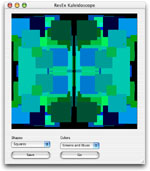
This week we'll build a project that generates random kaleidoscope-style images. This project lets you set colors, shapes, and image size to produce a wide variety of desktop images.
Just because "Dan the Desktop Man" is out of town doesn't mean we can't see some new desktop images.
This week we'll build a project that generates random kaleidoscope-style images. This project lets you set colors, shapes, and image size to produce a wide variety of desktop images.
Build the Interface
Before you get started on this project, download the Flicker Free Canvas we used in earlier projects.
Then, launch REALbasic and open Window1. Unstuff the flickerFreeCanvas and drag it in your REALbasic project.
Next, add the following controls:
| Control Type | Control Name | Other Properties |
| Canvas | Canvas1 | Super=flickerFreeCanvas |
| PushButton | PushButton1 | Caption=Go |
| PushButton | PushButton2 | Caption=Save |
| PopupMenu | PopupMenu1 | InitialValue:Squares
Circles |
| PopupMenu | PopupMenu2 | InitialValue:Random
Reds
Greens
Blues
Reds and Greens
Greens and Blues
Reds and Greens |
| Timer | Timer1 | Mode=0; Period=20 |
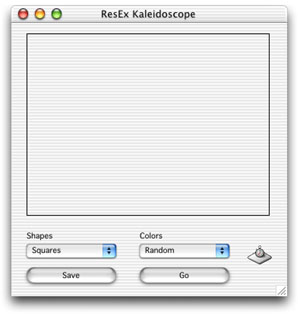
Arrange the interface however you desire. A sample might look like this:
Source Code
Before adding code, we need to do two things: define a property and add a file type. Double click any part of the Window1 interface
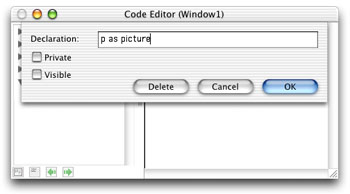
to open its Code Editor. Then, select Edit-New Property. Create a Picture property like this:
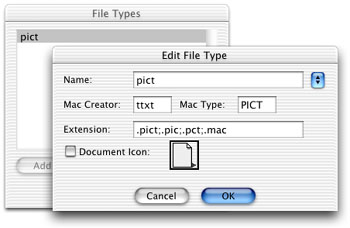
To add the file type, select Edit-File Types and add "pict" to the fray:
OK, now we're ready for some code. Navigate to the Action event of PushButton1 and add this code:
if me.caption = "Go" then
me.caption = "Stop"
p=newpicture(canvas1.width,canvas1.height,32)
if p<>nil then
p.graphics.foreColor=rgb(0,0,0)
p.graphics.fillrect 0,0,p.width,p.height
end if
Timer1.mode = 2
else
Timer1.mode = 0
me.caption = "Go"
end if
This code create a new image, toggles Timer1, and changes the caption on PushButton1.
Next, navigate to the Action event of Timer1 and enter this code
dim rx,ry,rs as double
dim square as boolean
if popupMenu1.listindex=0 then
square=TRUE
else
square=FALSE
end if
if p<>nil then
//split the canvas(and picture) into four quadrants
// 1 | 2
//------------
// 3 | 4
// find a random "size" value
rs = rnd * ((p.height/4)+1)
//get a random point in the top left quadrant
//to begin drawing
// find a random x value
rx = rnd * ((p.width/2)-rs+1)
// find a random y value
ry = rnd * ((p.height/2)+1)
select case popupMenu2.listindex
'Random
'Reds
'Greens
'Blues
'Reds and Greens
'Greens and Blues
'Reds and Greens
case 0
p.graphics.foreColor=rgb(rnd*255,rnd*255,rnd*255)
case 1
p.graphics.foreColor=rgb(rnd*255,0,0)
case 2
p.graphics.foreColor=rgb(0,rnd*255,0)
case 3
p.graphics.foreColor=rgb(0,0,rnd*255)
case 4
p.graphics.foreColor=rgb(rnd*255,rnd*255,0)
case 5
p.graphics.foreColor=rgb(0,rnd*255,rnd*255)
case 6
p.graphics.foreColor=rgb(rnd*255,0,rnd*255)
end select
if square then
//SQUARES
//draw a shape in quadrant 1
p.graphics.fillrect rx,ry,rs,rs
//draw a shape in quadrant 2
p.graphics.fillrect p.width-rx-rs,ry,rs,rs
//draw a shape in quadrant 3
p.graphics.fillrect rx,p.height-ry-rs,rs,rs
//draw a shape in quadrant 4
p.graphics.fillrect p.width-rx-rs,p.height-ry-rs,rs,rs
else
//CIRCLES
//draw a shape in quadrant 1
p.graphics.filloval rx,ry,rs,rs
//draw a shape in quadrant 2
p.graphics.filloval p.width-rx-rs,ry,rs,rs
//draw a shape in quadrant 3
p.graphics.filloval rx,p.height-ry-rs,rs,rs
//draw a shape in quadrant 4
p.graphics.filloval p.width-rx-rs,p.height-ry-rs,rs,rs
end if
canvas1.mPicture = p
canvas1.redraw
end if
This code does the actual drawing. It splits the image up into four sections. A random size and position is then selected and a shape is drawn
in each quadrant of the image according to these random numbers.
Finally, navigate to the Action event of PushButton2 and add this code:
dim f as folderItem
if timer1.mode<>0 then
PushButton1.push
end if
f=GetSaveFolderItem("pict","ResEx Kaleidoscope Desktop.pct")
if f<>nil then
f.saveaspicture canvas1.mPicture
end if
This code lets you save the image as a PICT file when you're finished.
Conclusion
That's all for this week. You can download the project or
the built applications (for OS 9 or OS X)
to try things out.
So, get to work creating some fun desktop images and send them to Dan. See you next week!
6-4-02
REALbasic News
by Erick Tejkowsi
Aqua Checklist
If you develop software for Mac OS X, you may be feeling overwhelmed by the Aqua interface guidelines.
Doug Grinbergs posted a handy Aqua cheat sheet
which simplifies matters. Don't miss it!
ZegsRuler 1.05
FracturedSoftware recently announced the release of ZegsRuler 1.05.
ZegsRuler is a set of classes that enable you to easily add all sorts of
rulers and scales to your REALBasic project. ZegsRuler supports the common
requirements of scaling (zooming), scrolling and changing of the origin as
well as lots of control over line length, width and color, background color,
text etc. It comes with 5 easily modified built in styles to get you started
as well as extensive documentation and example projects.
This new version has improved Windows compatibility, protection against
low memory situations, updated examples and some small internal changes to
make it easier to draw the ruler into any graphics object.
A fully functional demo of ZegsRuler is available at
www.fracturedsoftware.com.
New REAL Software Employee
John Balestrieri has joined the REAL Software team as a Testing Engineer.
He will be designing unit
tests for REAL's automated testing system, verifying bugs, providing
workarounds, etc. John holds the distinction of being the first person
to purchase a copy of REALbasic, so he's been a REALbasic nut since the early days.
You can check out some of his REALbasic work at his personal web site.
Welcome John!
Sort Library
Charles Yeomans has uploaded version 1.8 of SortLibrary.
The major change in version 1.8 is a substantial rewrite of quicksort
which implements the three-way partitioning method of Bentley and
McIlroy. This yields substantial improvements in performance in the
presence of equal keys. In addition, quicksort is now implemented using
recursion. SortLibrary is a free, open-source REALbasic library providing robust,
optimized implementations of several standard sorting algorithms for use
by REALbasic developers.
KuConta v1.5
KuConta, an accounting application (made with REALbasic) for homes and
small business has been updated. At its easy way of managing multiple
cashes and bank accounts, capability of handling any currency, and report
personalization, has been added important improvements to make easier the
process. More information and example movies are available at:
http://homepage.mac.com/kualo/kuconta_en.html.
666 Killer
No demons here... just a virus. If you've ever been bitten by the 666 virus (or one of its variants),
Toon Van Acker has some relief for you.
After discovering that the virus had left a copy of itself in any
app in use, he coded a fix for it in REALbasic.
Check out 666 Killer here.
|


 Boot Panels