|
11-16-01
REALbasic Image Table by
Erick Tejkowsi
Q: When is an image not an image?
A: When it's a table!
This week we'll look at how to create a "virtual" image in HTML without using a single JPEG or GIF. It's a fun little toy
to play with and may even have some creative uses.
Background
This week's project idea was submitted by ResEx reader, Steven Canfield. If you'd like to download his project, you can
get it here. Otherwise, follow along with this tutorial
to see how he accomplishes the "voodoo that he do".
Build the Interface
Launch REALbasic and open the default window: Window1. Add the following controls to the window:
- One PushButton
- One Slider - Min = 1; Max = 36;
Add the Code
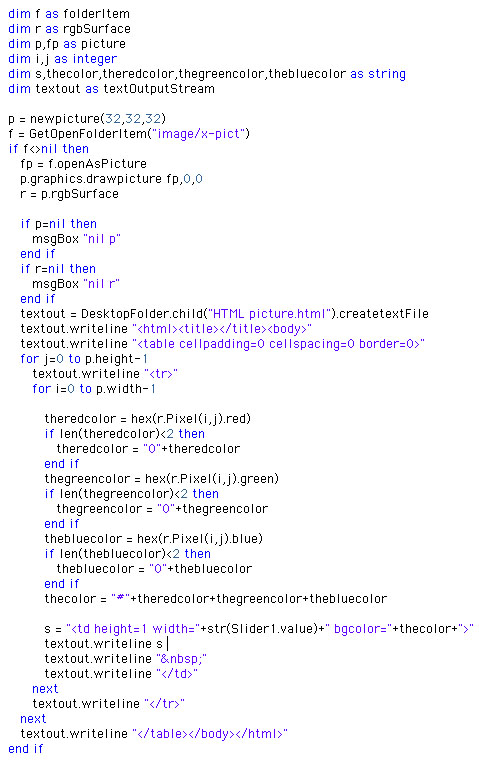
With our interface built, double click the PushButton1 to open the Code Editor. In the Action event
of the PushButton, add this code:
Yep, that's it! Now, to explain what this code does. The main idea behind this code is to open an image, scan through each pixel in that image, and
finally recreate it as an HTML table.
To simplify matters, we'll name the file "HTML picture.html" and place it on the desktop. Next, we create two loops. One loop scans through the image one row at a time.
The other loop (which is embedded within the first loop) scans through all columns of the image. As we loop through each pixel of the image, we extract
the red, green, and blue color information from the pixel. Using this color information, we then construct the individuals cells of an HTML document.
By now, I bet you're wondering what that RGBSurface stuff is about. An RGBSurface is a useful tool for scanning through the pixels of an image
at high speed. The speed increase over the Pixel property of a Graphics class is amazing, so be certain to use it whenever possible.
Another thing you should know about this code involves the slider. The slider is included for two reasons.
First, it allows you to stretch the image
to different widths. This gives you the opportunity to play with variations of the same image. It also serves a second important role.
Despite using HTML as a standard, not all browsers are created equal. The slider permits you to tweak the HTML to suit your particular browser.
If you plan on publishing this HTML, you may simply have to find a happy medium for the slider value that agrees with the output of popular browsers.
One final note... use small images (32x32 images work well) or you may be waiting awhile for your browser to attempt to render the image.
Browsers don't render tables particularly fast and it is easy to imagine how much a table of 100 rows and columns could slow down any browser.
The best advice is to experiment with various image sizes until you find something that works for you.
Conclusion
When you're done, select Debug-Run to load your favorite image and convert it into HTML. If you'd like to download this week's example instead of typing it in,
you can download the completed project.
See you next week!
11-13-01
REALbasic News
by Erick Tejkowsi
REALbasic 3.5.2
REALbasic 3.5.2 is a free update to version 3.5. It fixes some outstanding bugs from RB 3.5.1.
Download it here...
Carbon Events Plugin
Will Cosgrove has updated his new Carbon Events plugin:
- Added SheetChangedOrigin() event when live resizing is installed;
very useful when a sheet is shown and you don't want the window to
jump back to it's old location. However, it can quickly cause a
stack over flow exception you must handle it accordingly.
- Added IndentDockMenuItem() to allow indenting dock menu items.
- RemoveDockMenu() now removes the dock menu event handler when
called, this will allow you to use the method whenever you want, not
just at Close.
- Changed the commandIDs for the Dock menu to better avoid responding
to other menu events.
The plugin can be downloaded here.
QT File Transfer
There's a new version of Alfred's plugin that
transfers remote files to your local machine. The plugin supports classic
68K & PPC, Carbon/OSX and WIN32, but QuickTime-5 is required.
As of version 1.1 the windows version works like the MacOS version and using
QTFileTransferPoll is only to enhance polling, but not required.
Get it here.
Pop a Wheelie!
WheelScroll is a wrapper class for WIll Cosgrove's excellent
CarbonEvents plugin, which adds, among other things, MouseWheel
support to RB OSX applications. WheelScroll makes adding
MouseWheel support to your projects a breeze, offering built in
support for several scrollable controls.
WheelScroll 1.0 is freely available and can be downloaded here.
|


 Boot Panels