|
10-11-01
REALbasic Magnifying Lens by
Erick Tejkowski
One fun trick that many programmers use is the magnifying lens. You've probably seen it. Move the cursor around the
screen and watch a magnified version of the area around the cursor appear onscreen. This is helpful for calculating
HTML colors as well as viewing icons up close.
Add Some Code
The first step in this week's project is to create a custom class. Select File->New Class to create a new class. Name the class
"flickerFreeCanvas" and change its Super property to "Canvas".
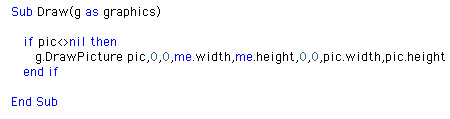
Next, create a new Method by choosing Edit->New Method. Name the Method Draw with a parameter of g as graphics. Enter the following code:
Then, create a Method named Redraw by selecting Edit->New Method.
To this new method, add the following code:
Finally, add a property by choosing Edit->New Property (pic as Picture)
Create an Interface
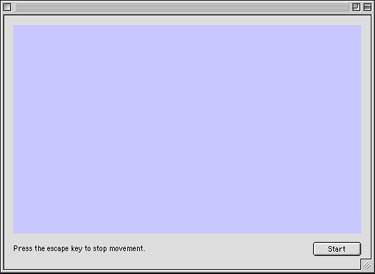
This week's interface is simple to create. Add a Canvas control (with default settings and "flickerFreeCanvas" as the Super property) and a Timer (with Period set to 10).
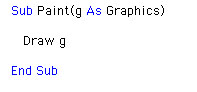
Double click Canvas1 and enter the following code into its Paint event:
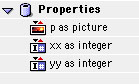
Next, create two integer properties by selecting Edit->New Properties. Name the two properties xx and yy.
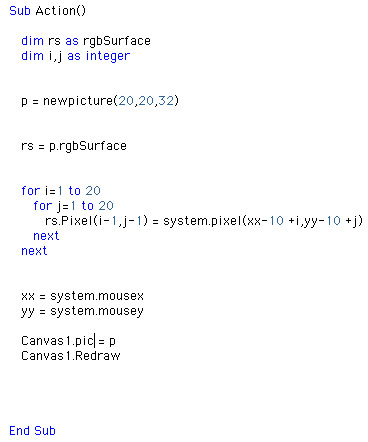
Finally, add the following code to the Action event of Timer1.
Conclusion
If you'd like to download this week's example instead of typing it in, you can get it here. See you next week!
10-9-01
REALbasic News
by
Erick Tejkowski
REALbasic 4 Alpha
REAL Software has released REALbasic 4a2.
Lots of new goodies in this one, so don't miss it!
- New Listbox - Now it can do graphics and lots of other cool stuff
- EditField Improvements
- Databases - blob comparisions now work
- New features in the Oval, RoundRect, Rectangle, Rb3DSpace, ProgressBar, and more.
- Tons of bug fixes
Carbonized TBFinder
If you're into Declare statements in REALbasic, be sure to check this out.
TBFinder has been Carbonized. If you're new
to TBFinder, it helps you weed through the Mac API to create ready-made Decalre statements.
Style Grid 3
Einhugur always puts out some quality controls, and this week is no different. Einhugur has posted SytleGrid 3
- Added SelectRange method.
- Added a Image property to Extended Cells.
- Added a new class called "StyleGridPicture"
- Headers now have same attributes as non-extended cells.
- Replaced "Label(Col as Integer) as String" with
- Header(Col as Integer) as StyleGridCell.
- Cell BackColor Getter is now implemented for Win32
- Cell ForeColor Getter is now implemented for Win32
- Cell BorderColor Getter is now implemented for Win32
- Added OutOfBoundsGridLineColor property.
- Fixed a range selection update bug.
- ExtendedCells are no longer exceptions in the Grid renderer, making rendering faster.
- Improved speed in floating engine text handling.
Mac OS X Code Tip.
Ben Schneider passes along this helpful code tip. To set that little
red dot in the close box of OS X windows, use a function like this:
Dim osErr As Integer
Dim v As Variant
#if TargetMacOS then
#if TargetCarbon then
Declare Function SetWindowModified Lib "CarbonLib" (window As Integer,
modified As Integer) As Integer
#else
Declare Function SetWindowModified Lib "WindowsLib" (window As
Integer, modified As Integer) As Integer
#endif
#endif
v=TRUE //FALSE to remove the dot
osErr=SetWindowModified(Self.MacWindowPtr,v)
if osErr<>0 then
MsgBox "Err: "+Format(osErr,"-#")
end if
iScreenSaver
iScreensaver Designer is the world's first and only cross-platform
screensaver editor. It will convert any QuickTime-compatible movie
(including MPEG, MooV, AVI, and Macromedia Flash files) into a
self-contained screensaver. The software runs on either Windows or
Macintosh, and either version builds screensaver for both platforms.
iScreensaver Designer includes features not found in other
screensavers. Oh, and it's Made with REALbasic.
|


 Boot Panels