|
05-09-02
REALbasic Audio Player with Reverb by
Erick Tejkowsi
The REALbasic 4.5 development cycle is really starting to heat up!
Among various improvements, REALbasic 4.5a9 adds significant
new QuickTime functionality to the mix.
This week we'll take a look at some of these new REALbasic 4.5 QuickTime features, focusing
primarily on sound. We'll build a simple audio player, add real time reverb effects, and
give users the option of saving the result. Try to do that with iTunes!
Introduction
Before you get started, you will need to
download a copy of REALbasic 4.5a9 or higher.
Keep in mind that REALbasic alpha releases are works in progress. You shouldn't rely on them
for professional development. The features and appearance of pre release versions can change at any time.
Always back up your projects when using REALbasic alpha releases. Since we will be working with
existing media files this time (e.g. mp3, aif, wav, mov, etc...), it would be a good idea
to make back up copies of these files as well. You don't want an errant REALbasic to
wreak havoc on your only copy of that Kajagoogoo tune you snagged from LimeWire.
In other words, take the usual ResEdit precautions: always keep a back up!
Build the Interface
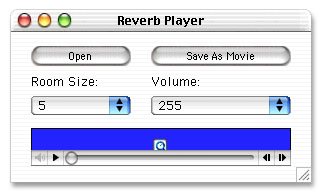
Launch REALbasic and open Window1. To this window, add the following controls:
| Control Type | Control Name | Control Properties |
| PushButton | OpenButton | Caption="Open" |
| PushButton | SaveButton | Caption="Save as Movie" |
| PopupMenu | RoomSizePopup | ListIndex=4; InitialValue=1,2,3,4,5,10,20,30,50,etc... |
| PopupMenu | VolumePopup | ListIndex=3; 0,64,128,255,512 |
| MoviePlayer | MoviePlayer1 | |
Arrange the interface however you wish. It might look something like this:
Source Code
Before we get started with the code, we need to do a few preliminary tasks.
First, select the Edit-File Types menu. In the File Types dialog, add these
two file types:
| Name | Mac Creator | Mac Type |
| any | ???? | ???? |
| video/quicktime | TVOD | MooV |
Next, double click Window1 to open the Code Editor. Select the Edit-New Property menu
to create the following 3 properties:
- e as editableMovie
- reverb as QT3DAudio
- sndTrack as QTSoundTrack
Okay, now we're ready for some code. Add the following code to the Action event of OpenButton:
dim i as integer
dim f as folderItem
dim trackCount,sndTrackIndex as integer
dim foundOne as boolean
f=GetOpenFolderItem("any")
if f<>nil then
e = f.openEditableMovie
e.SaveOnClose=FALSE
//load the player
//with this movie
MoviePlayer1.movie = e
//find a soundtrack
//trackCount = e.TrackCount
trackCount = e.TrackCount
foundOne = FALSE
if trackCount>0 then
for i=1 to trackCount
if e.track(i).MediaType="soun" then
foundOne=TRUE
sndTrackIndex=i
//force ourselves out of the loop next time
i=trackCount
end if
next
end if
if foundOne then
sndTrack=e.SoundTrack(sndTrackIndex)
reverb = nil
reverb = sndTrack.Get3D
if reverb=nil then
//no 3D settings in this track
//so we'll add them
reverb = new QT3DAudio
end if
reverb.SourceMode=1
reverb.RoomSize = val(RoomSizePopup.text)
//attach the 3D info to the soundTrack
sndTrack.set3D reverb
//set the sndTrack's volume
sndTrack.volume = val(VolumePopup.text)
else
MsgBox "No SoundTrack in this file"
return
end if
end if
Next, navigate to the Action event of the SaveButton and add this code:
dim exportMovie as editableMovie
dim destTrack as QTSoundTrack
dim f as folderItem
f=GetSaveFolderItem("video/quicktime","WithReverb.mov")
if f<>nil then
//create a new movie to hold the reverb track
exportMovie=f.CreateMovie
//add a new soundtrack to the movie
destTrack = exportMovie.NewSoundTrack
//copy the soundtrack from the source soundTrack
//to the new soundTrack
destTrack.InsertSoundTrackSegment sndTrack,0,sndTrack.duration,0,TRUE,TRUE
//add a QT3DAudio object to the SoundTrack
destTrack.set3D reverb
end if
The final step is to add some functionality to the two PopupMenu controls. To the Change event of RoomSizePopup, add the following code snippet:
reverb.roomsize=val(me.text)
sndTrack.set3D reverb
Then, add this snippet to the Change event of VolumePopup:
if sndTrack<>nil then
sndTrack.volume = val(me.text)
end
Conclusion
That's it! To test, select Debug-Run. Press "Open" to load your favorite audio file. Since we left it open-ended (i.e. file type="any"),
you can load many common audio formats (mp3, aif, wav, mov). Once the audio is loaded, adjust the room size (in meters) to your
liking and press "Save" to save the result as a movie. You can download the finished project here.
Have fun and see you next week!
5-7-02
REALbasic News
by Erick Tejkowsi
New REALbasic Alpha!
REAL Software has posted a
new development release: REALbasic 4.5a9. This version sports several important fixes
and loads of new features. The QuickTime features alone make this alpha a must-see.
Now you can create and edit QuickTime movies in all sorts ways!
We will cover some of these new features in forthcoming ResExcellence tutorials.
New QuickTime Plug-ins
Seth Willits has unleashed
two new QuickTime-related plug-ins.
FSPlayQTMovie can be used to play a QT compatible movie file
without using a MoviePlayer control. FSMovieExtension v1.0 extends the Movie class in REALbasic by adding four
methods:
- Rate() as integer - This will tell you the rate of the movie.
- SetRate(rate as integer) - Allows you slow or speed up the movie, and even let you play it backwards.
- Duration() as integer - How long the movie is. This value is not necessarily in seconds.
- TimeScale() as integer - This is the scale the movie uses for playback.
Cubies Extended!
REAL Software has been receiving so many nice submissions for the
annual Cubies contest that
they decided to extend the deadline to 20 May, 2002. Winners will be
announced in early June. To submit a nomination, send an email to
nominations.
If relevant, please include a url.
Only Premier partners are eligible for software categories.
UniHelp Helps
Electric Butterfly has updated
their handy UniHelp 1.2 Module for REALbasic.
UniHelp is a cross-platform HELP Engine for your REALbasic applications.
NEW IN VERSION 1.2:Win32 support for the IMG tag, linked images, video and audio.
New Sort Library
Charles Yeomans has released SortLibrary 1.7.
SortLibrary is a REALbasic library providing robust, optimized
implementations of several standard sorting algorithms for use by
REALbasic developers. Version 1.7 includes substantial performance improvements to mergesort,
a bug fix or two, and some corrections to the documentation.
|


 Boot Panels