|
1-10-02
REALbasic Merlin Simulator - Part 2 by
Erick Tejkowsi
Back in the late 1970's, Parker Brothers introduced a great handheld electronic game machine called Merlin.
This week we continue with Part 2 of our Merlin Simulator project and begin
adding functionality to the simulator.
Interface
If you'd like to start where we left off last week, download the project. Then, launch REALbasic
and open Window1. Drag a NotePlayer control from the toolbar and add it to you Window1 interface.
It doesn't matter where you drag it to in the interface, since it will be invisible when the application executes.
Feel free to adjust the Instrument property. If you leave it set to its default value (1) it will play back as
a piano. The remaining instrument numbers are displayed in the Online Reference for the NotePlayer control (press Cmd-1).
Add the Code
Before you get started writing any code, open the Code Editor for Window1 and add the following properties (by selecting Edit-New Property):
| Property Declaration |
| CurrentNote as Integer |
| GameNumber as Integer |
| NewGame as Boolean |
| NoteArray(0) as Integer |
Close Window1 for now. We will return to it in a second. But, first we need to make some alterations to our
custom Canvas classes. Open the NumButtonClass and create two new events, by selecting Edit-New Event.
| Event name | Parameters: | Return Type: |
| MouseDown | x as integer, y as integer | |
| MouseUp | | |
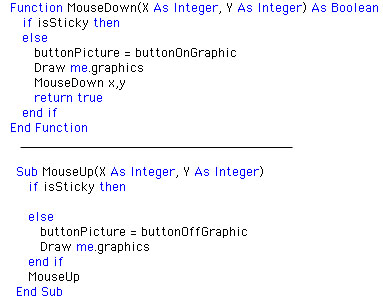
Navigate to the MouseDown and MouseUp events of the NumButtonClass
and change the code for each to look like the following:
Now that you have the hang of this, open up the UtilButtonClass and do the same, creating two new events,
MouseDown and MouseUp like before.
Then, navigate to the MouseDown and MouseUp events of the UtilButtonClass
and change the code for each to look like the following:
What we have done here is to give our Window1 controls NumButton and UtilButton the
chance to override the default functionality of the class. We will use these new events to respond to
actions taken during the game, all from the code of Window1.
Before we jump back to coding the games in Window1, create two new methods in the NumButtonClass by
selecting Edit-New Method. Name them as follows:
| Add these Methods to NumButton |
| ButtonOn |
| ButtonOff |
Add the appropriate code to each method:
The custom classes are now complete, so return to the Code Editor of Window1. Create two new methods, by selecting Edit-New Method.
| Method Name | Parameters: |
| MusicMachinePlayNote | merlinnote as integer, lightson as boolean |
| MusicMachinePlaySong | |
The code for the MusicMachinePlaySong method is:
Since the code for the MusicMachinePlayNote method is so lengthy, I present it to you here in a text box.:
As you may have guessed, these two methods play either a note or a song (which we are storing in the NoteArray). The final step for
this week is to add some code to the MouseUp events of the NumButton and UtilButton controls. Open the MouseUp for each and
add the appropriate code:
These two methods tie in all the other parts we have worked on so far. The utilButton.MouseUp event
sits and waits for you to start a new game. When you do, it sets a flag (newgame = TRUE). Since
newgame = TRUE, the number keys respond to a new game inquiry. By pressing the "2" key, a new game called
"Music Machine" begins play.
In this game, you are allowed to enter musical notes by pressing the number keys. As
you play them, the notes will sound and be remembered by the Merlin Simulator. When you have completed the song,
press "COMP TURN" to play the song back. For orientation purposes, the number button all the way at the top of the machine is "0", while
the bottom number button is "10". The actual Merlin machine has numbers molded into the plastic
adjacent to each button. Our interface is more simplistic. If you have any problems, be sure to review the
Merlin manual.
Conclusion
Well, that's it for this week. Select Debug-Run to test your work. If you encounter any
difficulties with the code or don't feel like entering it all, you can
download the completed project and applications.
See you next week!
1-15-02
REALbasic News
by Erick Tejkowsi
String Stuff 3.0
Theo Smith has updated his popular (and speedy) plugin for string manipulations:
String Stuff 3.0.
Main additions are full UTF support, and a multi search replace object,
designed for very fast replacements. MSR is optimised for cases where
there is only 1 initial character to search for, and also uses a binary
search to look through it's array of matching items. FastString has been updated to handle UTF32 transparently.
Back to School
School might be back in session after the holidays, but at least you can have some fun over at the
REALbasic University, where Marc shows you how to add a Help System to your games.
Valentina Before Valentine's Day
Valentina, the popular replacement for the REALbasic database,
has been upgraded to version 1.8.10 b13. This version fixes a couple bugs and adds a feature or two.
Align your Eyecons!
Temponautics has announced the release of Eyecon 1.0.1.
Eyecon produces those fun icon patterns you find on so many commercial CDs.
Monkey See, Monkey Do
Check out the latest plugin from Monkeybread.
This big plugin enhances Realbasic with over one hundred new functions,
methods and properties. Some highlights:
- Details about IDE drives (like serial number)
- Calculation of checksums
- Filemapping class
- Icons of files
- Filestreams for files bigger than 2 GB
- Bitwise functions
- NameRegistry class (Hardware details)
- Functions to access special folders (z.B. Picturefolder)
- Create pictures from strings
- Details about battery in Powerbooks
- Fast search on drives (CatSearch)
- Details about the CPU
- Encryption class
- Alias class
- Folderitem of your running app
- Simulating a keydown (Presskey class)
- extended Graphics class for Arcs
- extended Folderitem class. (e.g. isPicturefile)
- extended Memoryblock class.
- extended System class. (e.g. MACAddress)
- extended Window class.
|


 Boot Panels