|
8-16-01
Build an AIM Mate by
Erick Tejkowski
If you're an avid user of AOL Instant Messenger, you may often find yourself retyping some
of the same messages and phrases daily. Poor typing skills don't improve the situation.
What's an AIM geek to do?
This week we'll create a simple REALbasic application, named AIM Mate, that can help
alleviate some of the more mundane typing tasks of working with Instant Messenger. Our AIM Mate
project will display a list of commonly used phrases and sentences as well as a list of buddies.
With the click of a button, you will be able to send any text to whomever you wish. You'll never have to
type "LOL" or "BRB" again!
Build the Interface
Create a new REALbasic project and open Window1.
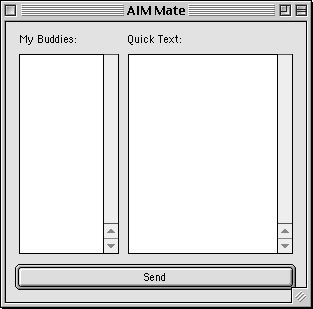
Add two Listboxes and a PushButton to the window:
| Control |
Name |
| Listbox |
BuddyList |
| Listbox |
QuickTextList |
| PushButton |
SendButton |
You can arrange the interface however you wish, but to give you an idea of where we are going with this,
here's a sample:
For the sake of convenience, it would also be good to change the Frame property of Window1 to
Global Floating Window. This makes the window float above all other applications, giving you easy acces while
using AIM.
Create Two Text Files
When AIM Mate starts up, we will load two text files into the interface:
- Buddies - A list of AIM Buddies
- QuickText - A list of common phrases and
Create these two text files (SimpleText works fine for this) and place them in the same folder as your
REALbasic project. Make sure you name them exactly as shown above. If you decide to change the file names, you
will also need to do so in the code that follows.
Add the Code
Ok, enough of the preparations, let's get to the code! First, add the
following code to the Open event of Window1:
dim f as folderItem
dim textin as textinputStream
f=GetFolderItem("Buddies")
if f<>nil and f.exists then
textin = f.openastextFile
while NOT(textin.EOF)
BuddyList.addrow textin.readline
wend
textin.close
end if
f=GetFolderItem("QuickText")
if f<>nil and f.exists then
textin = f.openastextFile
while NOT(textin.EOF)
QuickTextList.addrow textin.readline
wend
textin.close
end if
This code loads the two text files you created earlier and places the contents of each in the correspdonding Listbox.
Next, place the following code in the Action event of SendButton:
if BuddyList.Listindex>=0 and QuickTextList.ListIndex>=0 then
SendAIM BuddyList.text,QuickTextList.text
end if
This code sends the currently selected text to the currently selected Buddy. But wait! What's that
SendAIM command you see there? Easy, it's the name of an AppleScript that will take care of communicating with
Instant Messenger for us.
Create the AppleScript
Launch Script Editor and create a new AppleScript:
on run {x, y}
tell application "AOL Instant Messenger (SM)"
activate
SendIM screenName x message y
end tell
end run
Save the script as a "Compiled Script" and give it the name: SendAIM. Finally, drag the new script into your
REALbasic project.
Conclusion
That's it! Test the project and when you're happy with the results, build the final application. Of course,
you can download the application and completed project instead. Until next week!
8-14-01
REALbasic News
by
Erick Tejkowski
REALbasic - Final Candidate
REALbasic 3.5 has reached the "final candidate" phase.
This means that the final version should be released very shortly. From their press release:
REALbasic 3.5fc3 is a build that we believe to be the final version
of REALbasic 3.5. At this point, we will only be fixing new bugs, and
only those that are of a profoundly serious nature.
Back to School
This week's REALbasic University (REALbasic Basics IV)
discusses the NotePlayer
control and gives some tips on writing code that's
pleasing to the eye.
Build a Web Browser.
A trio of REALbasic plug-ins
permitting you to build a web browser.
- HTMLrendering 2.0
- URLAccess 1.0
- cIconButtons 2.0
HTMLrenderer is a plugin capable to render HTML files you can provide
through navigation services, and through an internal URL-parser.
URLAccess is a plugin capable to upload and download files from anywhere.
cIconButtons is a plugin capable to connect URL strings (through ResEdit)
with action events.
Handy Database Tool.
REALdb Tools
gives you the ability to manipulate REAL database files
in ways that the built in engine does not provide at this time. With
REALdb Tools you can:
- Compact a database to make it smaller after records have been deleted.
- Drop any table or column from a REAL database.
- Change table names.
- Change column names and data types.
- Add new tables and columns.
Stylin' !
The latest StyleGrid control from Einhugur
is useful for displaying styled spreadsheet data.
- Added support for smart scrolling under PPC (System 8.5 and later).
- More than 32k of Rows now supported under Carbon.
- More than 32k of Rows now supported under PPC (System 8.5 and later).
- More than 32k of Rows now supported under Windows x86.
- Removed all dependencies to the depreciated REALGetControlHWND
(depreciated in the new REALbasic plugin SDK)
- Fixed a DoubleClick bug when SelectEntireRow was true.
- Fixed a glitch with smart scrolling under Carbon.
- Fixed a rare refresh bug.
- Did more optimizations in the Grid Renderer.
|