|
6-07-01
REALbasic Color Picker Tutorial by Erick Tejkowsi
Have you ever noticed that computer people like to describe colors in a variety of ways?
Web developers use one format, REALbasic programmers another,
and Mac OS X resource hackers use yet a third.
This week's tutorial will show you how to build a color converter. Beginners should enjoy the project, because it is easy to
complete. Pros can benefit too, because the tool is very useful. (I use mine daily.)
Programmers have several different schemes for
describing color. The web folks like to talk in hex,
REALbasic programmers in integers, and the
'plist' files of Mac OS X use decimals.
Below is a chart showing the color schemes and their numeric ranges.
| Web |
$00 - $FF |
| REALbasic |
0 - 255 |
| 'plist' files |
0 - 1 |
Build the Interface
This week's interface is very simple to build. Open Window1 and drag the following controls into your interface:
- 1 PushButton, named PushButton1.
- 3 EditFields, named HexField, RBField, and plistField respectively.
- 1 Rectangle, named Rectangle1. Change its FillColor to whatever you wish.
You may arrange your interface in any fashion you desire. The idea of the application is that a user will push PushButton1
and choose a color from the color picker. Once a color has been selected, our project will convert the color into 3 color formats:
- Hex - Useful for web pages
- REALbasic format - Handy for coding REALbasic graphics
- 'plist' format - Great for editing 'plist' files in Mac OS X
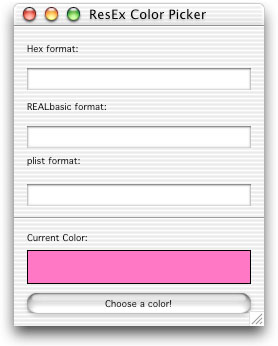
Pictured below is a sample interface. (Note how the extra StaticText and Line controls spruce up the interface.)
Add the Code
Like the interface, the code portion of this week's tutorial is very easy to recreate. Open the Action event of PushButton1 and
add the following code:
Dim r,g,b as String
Dim dr,dg,db as Double
Dim c as Color
Dim colorSelected as Boolean
//set the default color for the color picker dialog
c = Rectangle1.FillColor
//let the user select a new color
colorSelected = SelectColor(c,"Select a Color")
if colorSelected = TRUE then
//update the color in the interface
Rectangle1.FillColor=c
//*******************************
//
// Calculate Hex color values ($00-$FF)
//
//*******************************
r = hex(c.red)
//make sure the red hex string is two digits long
if len(r)=1 then
r = "0" + r
end if
g = hex(c.green)
//make sure the green hex string is two digits long
if len(g)=1 then
g = "0" + g
end if
b = hex(c.blue)
//make sure the blue hex string is two digits long
if len(b)=1 then
b = "0" + b
end if
//display color info
HexField.text = r + ", " + g + ", " + b
//*******************************
//
// Calculate REALbasic color values (0-255)
//
//*******************************
//convert integer color values to strings
r = str(c.red)
g = str(c.green)
b = str(c.blue)
//display color info
RBField.text = r + ", " + g + ", " + b
//*******************************
//
// Calculate plist color values (0.0 - 1.0)
//
//*******************************
//change values to decimal percentages
// and convert color values to doubles
dr = c.red/255
dg = c.green/255
db = c.blue/255
//convert doubles to formatted strings (i.e. with decimal points)
r = format(dr,"#.00##")
g = format(dg,"#.00##")
b = format(db,"#.00##")
//display color info
plistField.text = r + ", " + g + ", " + b
end if
First, we allow the user to select a color using the standard color picker. On Mac OS X, it looks like
this:
If the user selects a color, we convert the red, green, and blue values of the Color object into the three color formats: Hex, RB, and 'plist'.
There is a bit more involved in the Hex conversion than the others. This is due to the fact that all numbers below 16 will return only one digit
in hex. However, HTML requires double digits. The extra code tacks on a leading "0" (zero) if the string is only one character long.
The REALbasic color format has a range of 0 to 255. No conversion is necessary.
Finally, the 'plist' format is somewhat unique, because we must use Double type variables in this conversion. 'plist' colors fall in the range between
0 and 1. Since decimal points are involved, Double variables are required. The Format command cleans up the decimal points and puts them into a string
which we then display.
Test and Build
That's it! To test, select Debug->Run. Once you have it down pat, select File->Build Application. This week's example is compatible with
Mac OS Classic, Mac OS Carbon, and Microsoft Windows.
As usual, you may:
And, for the first time in this column... Microsoft Windows!
6-05-01
REALbasic News
by Erick Tejkowsi
Can they ship by kangaroo? REAL Software announced the availability of REALbasic for the Australian market.
Streetwise Software will be taking care of sales,distribution, and support for RB users down under.
Welcome Streetwise Software!
MacTech extends deadline. If you are interested in competing in the
June MacTech REALbasic Challenge, the deadline for submission
has been extended to June 8. Get those entries in!
Cool Eye Candy!. Do your REALbasic interfaces need some improvement?
Everyday Software has updated the popular MS Style Buttons 2.8 and
Mac OS X Toolbar Buttons 1.0 (pictured below). They look great and they're a cinch to use!
Object Binding Tutorial. Quantum Meruit has a new and
improved Object Binding tutorial available.
This is one of the better explanations on the topic I have seen.
Who's got the fastest finger?. REALbasic University has a nifty REALbasic tutorial
for creating a fast-action finger game, 'ala Who Wants to be a Millionaire. They also
show you how to build an email utility app. If that weren't enough, they
even answer reader's RB-related mail. Whew!
Super Duper!. Essence Software has updated the REALbasic must-have
Super Socket 2.0.2. If you are working with networks in your RB apps, there's no better
tool around.
Hurry, get the plunger.... VanHoek and crew have done it again.
Plugin Plunger has reached version 2.3 and is available for download. If you are unfamiliar with this tool, it
let's you peer inside plugins to learn what classes, methods, and other goodies are located within. Oh yes, it's free too!
More GUI Goodies. While you're busy downloading cool RB tools, be sure to pick
up HierPop 1.6. It gives you the ability to
create contextual menus with icons among other useful tricks.
|


 Boot Panels