|
9-19-02
Lissajous Figures by
Erick Tejkowski
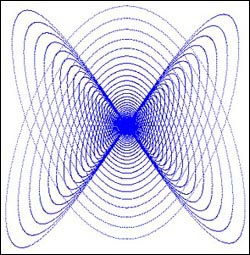 This week we'll play around with some fun graphics patterns called Lissajous Figures.
Besides being fun to watch, this project is also really easy to create. Most people can
complete it in about 10 minutes. So, let's get started!
This week we'll play around with some fun graphics patterns called Lissajous Figures.
Besides being fun to watch, this project is also really easy to create. Most people can
complete it in about 10 minutes. So, let's get started!
Build the Interface
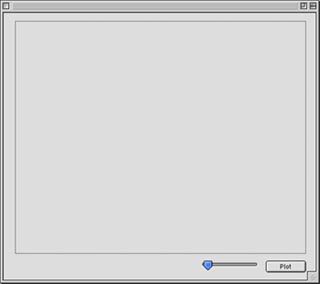
This week's interface is really simple to create: one PushButton, one Canvas, and one Slider. When you add them to a window,
leave their default names as is. (i.e. PushButton1, Canvas1, and Slider1).
- PushButton1 - Caption = "Plot"
- Canvas1 - width=500; height=400
- Slider1 - minimum=1; maximum=10
Arrange the interface any way you want. An example might look like this:
Source Code
Before you get started with the code for this project, you'll need to make a number of properties. Open the Code Editor
for Window1 and add the following properties using Edit-New Property:
- f as double
- r as double
- rad as double
- t as double
- x as integer
- y as integer
The code this week is adapted from an existing Chipmunk BASIC project
available here.
Double-click PushButton1 and add the following code to its Action event:
rad = 3.14159271180
r = 180
t = 90
f = 0
canvas1.graphics.foreColor=rgb(0,0,0)
canvas1.graphics.fillrect 0,0,500,400
while r > 1
x = sin(t*rad*2)*r
y = cos(t*rad*3)*r
plot
t = t+slider1.value110
r = r*0.99991
wend
Next, create a new method named Plot by choosing Edit-New Method. To this method, add the following code:
x=x+250
y=y+200
if f=0 then
canvas1.graphics.pixel(x,y)=rgb(255,255,0)
else
canvas1.graphics.foreColor=rgb(255,255,0)
canvas1.graphics.DrawLine x,y,x-250,y-200
end if
Conclusion
That's it for this week. Select Debug->Run to test your work. Try playing around with the various numbers in the source code
to see what results you can produce. With a few more lines of code, you could save this picture for
use as a nifty desktop image or for some other task. If you don't feel like creating the project by hand,
you can download
the finished project. See you next week!
9-17-02
REALbasic News
by
Erick Tejkowski
The Garage is Open
The new REALbasic Garage Search Engine is now
available to the RB community!
A fully functional search engine, but specifically targeted to RB resources.
Are you searching for a module, a class or plugin for your project?
Do you need a developer on a specific country in the world?
Are you searching for a Tutorial on some RB techniques?
Try RB garage!
Blobber
James Baxter just released Blobber, a utility to replace the wait cursor in Jaguar.
Made with REALbasic, you can find it here.
SortLibrary
Charles Yeomans has updated SortLibrary.
Version 1.91 is now
available here.
This version of SortLibrary fixes a bug in ShellSort which caused it to
fail to sort arrays of two or three elements correctly.
Lyrictracker Client
Das-L Technologies has released Lyrictracker Client 4.
New features in this version include:
- Enhanced iPod support for registered users
- Supports the 'NewGen' lyrictracker database
- full-text searching in lyric-text
- Tool-tips
- Print lyrics directly from client
As you might expect, it's Made with REALbasic.
KuConta
Kualo Software announced the availability of
KuConta 2.1.0,
a new update of its account application.
It is available for Mac OS 9 or earlier and Mac OS X.
KuConta is developed using REALbasic.
|


 Boot Panels