Add the Code
The code for this project is also very easy to complete. In fact, you don't have to type one
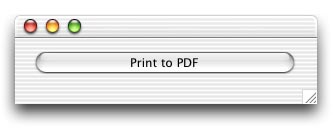
bit of code if that's your preference. Double click the PushButton in Window1. Then,
press Cmd-1 (one) to open the Language Reference. Navigate to the Printersetup class. Once you find it,
scroll down to the bottom of its documentation. The third snippet of code in the Exmamples section is what you need.
As you can see, the code is outlined with a square.
Drag that square to the Action event of the PushButton in the Code Editor.
That's all there is! To test your code, select the Debug-Run menu. Click the PushButton. You'll immediately
see a Page Setup dialog. Adjust it to you liking and click OK.
Next, you'll see the standard Print dialog. Notice the "Save as PDF" button at the bottom of this window.
That's the one you want to click.
When you click the "Save as PDF" button, you'll see the standard Save dialog. The new document that you "print"
can be opened with your favorite PDF viewer like Preview or Adobe Acrobat.
Conclusion
If you don't feel like recreating this project, you can download it here. See you next week!
10-29-02
REALbasic News
by Erick Tejkowsi
Palette 1.0
The La Jolla Underground has announced the availability of
Palette 1.0.
Palette is a simple painting program that even children should find
easy to use. Palette runs on both Windows and Mac OS. Palette-created
pictures are saved in a cross-platform format that can be opened with
either the Windows or Mac versions of Palette. Palette can also save
pictures as platform-specific files (PICTs on the Mac and BMPs on
Windows). Palette has a few simple tools such as pencil, eraser,
rectangle and oval, as well as a selection tool.
Palette is free and made with REALbasic.
Kunvert and KuConta
Kualo Software has updated two applications:
- Kunvert: a freeware Utility for Macos X that converts PDF to JPG, and more...
- KuConta: an accounting application.
Both programs are made with REALBasic.
GrandUnifiedWindowExtension Plugin v.1.1.0
Winning the "weirdest plug-in name" award, GrandUnifiedWindowExtension Plugin adds extra functionality to the
REALbasic Window class.
The focus of GrandUnifiedWindowExtension (GUWE) is to add commonly-used
user interface elements to Window, in a quick and simple way. Elements
such as:
- Mac OS X toolbar button support
- Mac OS X dock icon update
- Proxy icons (Mac OS)
- Window collapse/minimize (Mac and Win32)
- Outside dimensions and locations of windows, and window frame
thickness on all sides (Mac and Win32)
GUWE will work with all Macs supported by REALbasic new and old,
including 68k. Win32 support for most functions.
New in v.1.1.0: Added proxy icon support. Properties/functions not
prefixed with 'Mac-' work under Win32. 'Mac-' properties/functions have
Win32 stub support (properties return useful defaults, functions have no
effect).
MongoToDCon 2.6
MongoToDCon is the original debugging plug-in
for REALbasic. This plugin is free, and has
been improved for MacOSX.
MongoToDCon : A REALbasic Plugin that adds debugging facilities. You would
like to use a remote console? Use this plugin. You want to quickly debug
your WIN32-compatible code? Use this plugin. This plugin will send debug
strings to either the DCon console or to DebugView Console, or to the
Console that comes with MacOS X.
10-22-02
REALbasic News
by Erick Tejkowsi
REALbasic 4.5.2
REAL Software recently released REALbasic 4.5.2.
This version is a maintenance release that fixes various issues. Go get it today!
Monkeybread Plug-in
Moneybread Software has continued to update their giant REALbasic plug-in. Sporting
hundreds and hundreds of classes and methods, it's definitely worth checking out.
You can learn about it here or
download it here.
REALbasic Garage meet Sherlock 3!
The new Sherlock 3 module for REALbasic Garage is now available.
REALbasic Garage meet Sherlock 3 and relase the search module for all Mac OS X 10.2 (Jaguar) users.
The last 10.2 update of Apple Mac OS X (formerly known as Jaguar) include
the new version 3 of Sherlock, a powerful application for searching sites on
internet. This new version use a completely new engine with more powerful
and better support to building access interfaces.
Searching on REALbasic Garage is now more simple than ever.
If you are a Jaguar user, just go to REALbasic Garage and activate the Sherlock 3 module.
Go to this page to see how to subscribe to it.
In few seconds you can enable searching REALbasic Garage at lightspeed!
StyleGrid
StyleGrid 5.0, Einhugur, is out. StyleGrid is a specialized Spreadsheet plug-in control for REALbasic.
StyleGrid Offers more properties per cell than Grid, such as font style, cell borders and pictures.
Check it out!
VideoOut Plugin
An important update of VideoOut Plugin for REALbasic is available for
downloading. VideoOut also supports the WIN32 platform, and moreover, when
you visit Alfred's web site, you also notice the addition of online help.
VideoOut Plugin, based on QuickTime Video Output Components enables
REALbasic programmers to output DV and DVCPRO video streams via the FireWire
port (also known as iLink or IEEE-1394) of your Macintosh and Windows computers.
10-08-02
REALbasic News
by Erick Tejkowsi
VV Browser
The La Jolla Underground has announced the
availability of VV Browser 1.0.
VV Browser is a utility that lets you browse virtual volumes created by
REALbasic. A volume is displayed as a hierarchical list. File sizes and
last modification dates are also displayed.
VV Browser is free!
UniHelp 1.3
Cross-Platform HELP Module for Your REALbasic Applications!
Apple Help Viewer, Microsoft HTML Help, WinHelp.... Why waste your precious
development time designing and compiling a different Help system for each
platform when you can easily use UniHelp
for all of them?
NO additional plugins or classes needed. Just drag the UniHelp module and
its graphics folder into your REALbasic project, add a few lines of code,
create your external help pages, and that's it -- instant online help for
your compiled REALbasic applications that looks and functions the same on
Classic Mac, Mac OS X, and Microsoft Windows 98/NT/ME/2000/XP.
REALbasic University
Marc Zeedar concludes his look at REALbasic 4.5 this week
by examining Virtual Volumes, the PagePanel
control, and other new features.
Muscle!
Muscle! 1.5.5 has been released and is currently available for download or
purchase. Muscle! is a simple fitness journal application for
Mac OS X and was Made with REALbasic. The software is geared toward weight
lifting and general cardio exercises and allows you to:
- plan and keep track of workouts,
- keep track of diet and supplement data,
- set goals,
- and monitor progress.
New to version 1.5.5 is auto-calculation of Diet Equivalents for some
popular diet plans. The unregistered version is fully functional except
for printing.
The Do's and Don'ts of Shareware
O'Reilly has an interesting article about starting a shareware business.
O'Reilly often has informative online articles and this one is no different. It also looks like it's going to be a multi-part series, so stay tuned.


 Boot Panels