|
9-06-01
Create a Stock Ticker with REALbasic (Part 2) by
Erick Tejkowski
Last week, we started building a stock ticker application. In that tutorial
we looked at one way to retrieve stock information from the Internet with REALbasic. This week, we'll discuss how to
display and animate the stock information. The animation will mimic a "Times Square style" stock sign.
Preparation
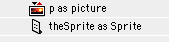
If you are following along from last week, open the Stock Ticker project and create two new Window1 properties: a Sprite and a Picture.
To create these properties, open the Window1 Code Editor and select Edit->New Property.
Build the Interface
Since this is Part 2 of the tutorial, much of the interface is already built. This week, we'll continue using the interface from
last week, adding the following three controls:
| Control |
Settings |
| SpriteSurface |
Name : SpriteSurface1
Height=40 |
| Timer |
Name : AnimationTimer
Period = 100
Mode = 0 |
| PushButton |
Name : StopButton |
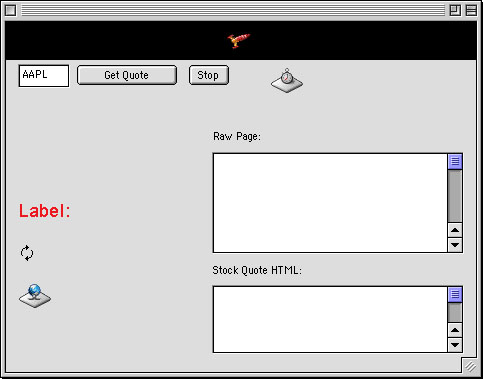
Arrange the interface however you wish. To give you some ideas, here's how the demo interface is arranged:
Add the Code
Before adding any code to the new controls, we will begin by appending some code to a control from last week. Scroll to the end of the
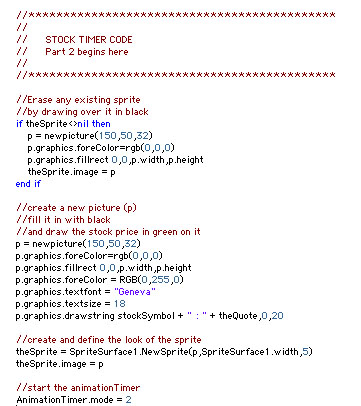
DLfinished event of httpSocket1 (after all existing code) and add the following code:
To help you understand what's going on here, we'll look at this code in reverse order. The AnimationTimer periodically
refreshes the stock animation. So, we simple turn it on here.
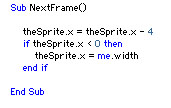
The heart of our animation is the SpriteSurface control. It takes care of running our animation and we have to do
amazingly little work to make it do so. To animate with a SpriteSurface, you must first create a Sprite object, passing it a
picture (named "p"). Thus, before creating a Sprite, we create a Picture object and draw the stock quote on it.
Since we want this code to execute anytime we request a new stock quote and a stock animation may already be running, we start this code off
by clearing out any existing Sprite graphic with a black square. So, to recap in the forward order, we erase any existing sprites, create a new picture,
draw the stock information on that picture, and create a sprite using the picture. Finally, we start the animation timer.
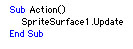
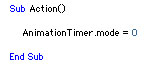
Navigate to the Action event of AnimationTimer and enter this code:
This lonely line of code forces SpriteSurface1 to redraw its sprites. When you call the Update method of a SpriteSurface, it
causes the NextFrame event of the SpriteSurface to execute. That's where we move the Sprite.
Of course, if it falls off the edge, we want to bring it back to the
opposite side to start the crawl all over again.
Once the animation is running for awhile, you may want to turn it off. Open the Action event of StopButton and add some code to stop
the animation process.
Conclusion
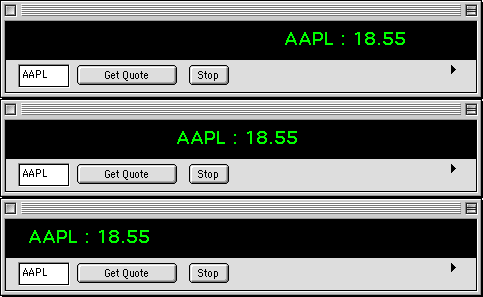
To give you a taste for how the finished product should look, here's a screenshot. Following last week's recommendation,
this graphic shows the interface shrunken to conceal the editfields where all the parsing takes place.
Test the project and when you're happy with the results, build the final application.
You can download the application and completed project
if you don't feel like working through the tutorial. See you next week!
9-04-01
REALbasic News
by
Erick Tejkowski
Slow RB Week.
With Labor Day celebrations demanding the attention of U.S. developers, it's been a fairly quiet week for RB news. We still have a few goodies for you, though.
New REALbasic Beta.
Get over to the REALbasic Prerelease section to download the latest prerelease of
REALbasic: Version 3.5.1b2
DB Reports.
Aaron L Bratcher has posted a bug fixe update of db Reports.
OSAXen Fixer.
OSAXen Fixer makes it possible for REALbasic applications to invoke
AppleScript Scripting Additions directly (i.e. without using
AppleScript) on Mac OS X systems.
On classic Mac OS systems it is possible to invoke a Scripting
Addition by simply sending the addition's AppleEvent to yourself. It
is also possible to invoke Scripting Additions in other applications
by sending the addition's AppleEvent to any other process.
Download version 1.0
Back to School
The REALbasic University has posted Part II of last week's tutorial.
This week Marc Zeedar shows you how to build an EditField that automatically supports
unlimited undo capabilities.
|