|
5-31-01
Picture Extractor 2 by Erick Tejkowsi
Based on suggestions from ResExcellence readers, this week's tutorial will continue with the project started in the
previous tutorial - Picture Extractor. Last week, we looked at how to open any application's resource fork and
view the enclosed 'PICT' resources. We also added the ability to export any of the 'PICT' resources to a PICT file.
Several readers wrote saying that it would be nice to give users the chance to change any of the 'PICT' resources located within the
application's resource fork. This week, we'll do just that. The result is a handy little application that will let you hack away at your
favorite startup screens, about boxes, and assorted resource tom-foolery without the usual resource shuffle.
Expand the Interface
If you are following along from last time, you can simply open last week's project. If you didn't catch the last article, you can:
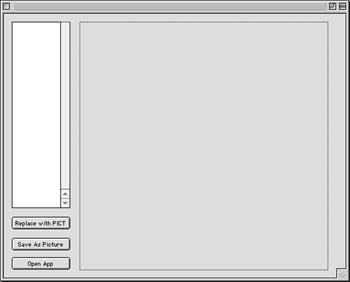
Once you have the project opened, open Window1 with a double-click. Resize Listbox1 so that it is 300 pixels high and add
a PushButton (named PushButton3 by default) directly below Listbox1. Change the Caption property of PushButton3 to reflect its
functionality. For example, I changed it to "Replace with PICT" (without quotes). By now, your interface might look like this:
Suppose that you want a user to click this button only when there is a selection in Listbox1.
You could accomplish this with a bunch of code, but REALbasic makes it a no-brainer.
To make PushButton3 automatically enabled
when Listbox1 has a selection (and conversely disabled when the Listbox has no selection), you must "bind" the PushButton to the Listbox.
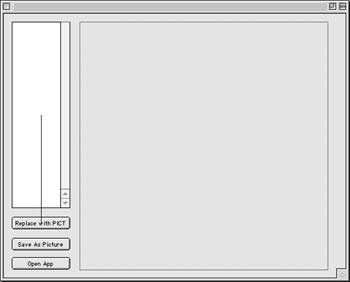
To bind two controls together, press Command-Shift and drag from PushButton3 to Listbox1. As you do, a small line will appear
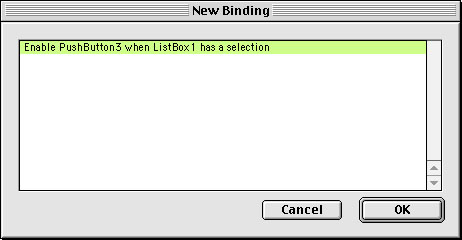
and show the connection of the two controls. When you let go of the mouse, REALbasic displays a dialog asking you which kind of binding you'd like
to attach between these two controls:
For this example, there is only one choice. Click OK, and Window1 shows the bound controls in your interface. Don't worry, this line is
invisible when the application runs. If you mess something up, you can select the line and press Delete to
remove the binding. By now, your interface should look like this:
The great part about this binding is that REALbasic takes care of enabling and disabling the PushButton for us. We don't need to write any other code.
Now, whenever a user selects an item in the list, the PushButton will spring to life. Deselection disables the PushButton. Lots of function; little work.
These great little touches might help explain REALbasic's popularity.
Add the Code
Double-click PushButton3 to open its Action Event in the Code Editor. Add the following code:
dim sourcefile as FolderItem
dim rsrcnumber as integer
dim rf as ResourceFork
sourcefile = GetOpenFolderItem("image/x-pict")
//Do we have a source file to work with?
if sourcefile<>nil then
//the resource number currently selected in listBox1
rsrcnumber = val (Listbox1.text)
//Do we have an folderitem representing the
//target application to work with?
if f<>nil then
//open the resource fork
//of the target application
rf = f.openResourceFork
//open the source 'PICT' file
//which we want to transfer to the
//application
p = sourcefile.openasPicture
//copy the picture to the resource fork of the target application
//passing the picture, the resource number,
//and the name of the target resource
rf.AddPicture(p, rsrcnumber,"")
//close the resourcefork of the application
rf.close
//redraw the new picture in the Canvas
Canvas1.width = p.width
Canvas1.height = p.height
Canvas1.Refresh
end if
end if
This code begins by presenting an Open File dialog box and permitting a user to open a 'PICT' file type. This is the picture that will
go into the application's resource fork. If the user chooses a picture file, we then create a resource number based on the currently
selected item in Listbox1. We will transfer the graphic from the picture file to the 'PICT' resource using this resource number. This will replace
the previous 'PICT' resource, so make sure to work only on backup copies of applications.
With a resource number readied, we
- open the resource fork of the application
- open the PICT file (assigning it to the Picture object p)
Next, we do the dirty deed - copying the picture from p to the resource fork of the application. The magic here occurs courtesy of the
AddPicture method of the ResourceFork class. AddPicture has three parameters:
- A picture object (in this case p)
- A destination resource number (rsrcnumber)
- A destination resource name (an empty string ; i.e. no name)
The code concludes by closing the resource fork of the application and refreshing the display of Canvas1.
Test and Build
Select Debug->Run to test your handiwork. When you are convinced that everything works smoothly, select File->Build Application to
create the executable application. Now, get changing those splash screens!
As is customary, you can:
5-29-01
REALbasic News
by Erick Tejkowsi
REAL Software wins award! It was a very big week at the WWDC for REAL Software.
REAL walked away with an Apple Design Awards
runner up award for best Mac OS X technology adoption in REALbasic. This is the third year in a row that REAL has been
recognized by Apple. Congratulations REAL Software!
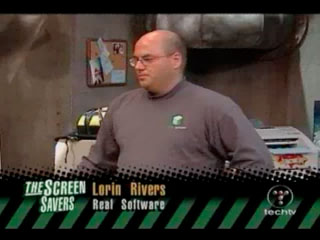
REAL TV Segment. On Friday, May 25, REALbasic was featured during a segment on
The Screen Savers show on Tech TV.
Lorin Rivers, from REAL Software, gave a quick demo of REALbasic on Mac OS X and
also compiled a version of the demo for Windows.
Below are a few screenshots from the show:
New MacScripter Magazine. Since AppleScript makes such a nice addition to your REALbasic toolbox, it's never a bad idea to brush up on your AppleScript skills. Head over to
MacScripter and check out the latest MacScripter Magazine. It has lots of
AppleScript goodies and MacScripter deserves an A+ for presentation. Well done!
Plugin Developer Tip. Are you a REALbasic plugin programmer? If so, you may run into a problem knowing which library to add to your project to get
certain functions to work properly. The solution? Look in the folder Code Warrior:Other Metrowerks Tools:Find Library. There you'll find a complete listing
of the libraries and their included functions. Special thanks to Patrick Wynne for this tip.
RB Binding Interfaces Documentation. RB developers who are interested in Bindings should be certain to see the
RB Binding Interfaces Documentation at
Quantum Meruit. They also have a lot of nice REALbasic code examples.
Collection plugin update. Patrick Wynne has updated his MacCollection plugin.
MacCollection is a plugin that provides a wrapper class to the Macintosh Collection
Manager. This allows you to store variable-length data and retrieve it
by specifying a key and ID value. Similar to the REALbasic Collection
object, but much more powerful. Among the features are:
- write to/read from file
- lock/unlock items
- 16-bits of user-specified attribute data for each item
- purge items by key or by specifying item attributes
- clone/copy
- multiple methods of accessing the items
|


 Boot Panels