|
6-20-02
HTML IMG Tag Machine by
Erick Tejkowsi
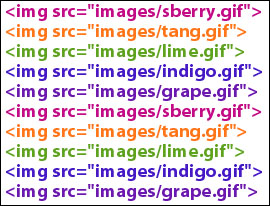 If you still code your HTML by hand like I sometimes do, then this week's tutorial is for you!
This time we'll build a simple little utility for generating HTML IMG tags. Just drag
your images into the window and our project takes care of the rest.
If you still code your HTML by hand like I sometimes do, then this week's tutorial is for you!
This time we'll build a simple little utility for generating HTML IMG tags. Just drag
your images into the window and our project takes care of the rest.
Build the Interface
Launch REALbasic. Open Window1 and add two Editfields to it. You can also label the interface with StaticText controls or something else
appropriate. An example interface might look like this:
EditField1 is the one on top. Change its MultiLine property to TRUE in the Properties Window. That's it! Now, on to some code...
Source Code
To begin coding, navigate to the Open event of Window1 and add this code:
me.acceptFileDrop "image/jpeg"
me.acceptFileDrop "image/gif"
me.acceptFileDrop "image/png"
Then, navigate to the DropObject event of Window1 and add the following code
dim p as picture
dim s,q,w,h,relativePath as string
q=chr(34)//quotation mark
relativePath=EditField2.text
if obj.FolderItemAvailable then
//Loop thru all images
//dropped on the window
do
//open the image
p=obj.folderItem.openasPicture
//learn its size
w=str(p.width)
h=str(p.height)
//Build HTML string
s="<img src="+q+relativePath+obj.folderItem.name+q
s=s+" width="+w+" height="+h+" >"+chr(13)
//display string in interface
editfield1.text=editfield1.text+s
//bottom of the loop
loop until not obj.NextItem
end if
//select all of the text in EditField1
//so it's easy for the user
//to copy to the clipboard
editfield1.selstart=0
editfield1.selLength=len(editfield1.text)
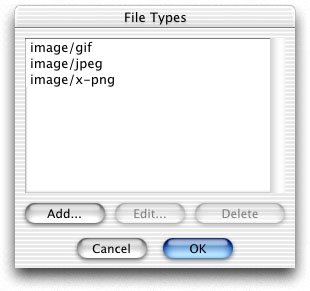
Finally, add some file types to your project. Since web pages most often use GIF, JPG, and PNG files, these are the types we chose to add.
Select the Edit-File Types menu and create each of the following file types:
Conclusion
That's all for this week. You can download the completed project here; or you can grab the
compiled applications for OS 9 or OS X.
Have fun and see you next week!
6-17-02
REALbasic News
by Erick Tejkowsi
Three New Plug-ins
Francis Lessard has announced three new plug-ins for REALbasic.
- Icon Util 2.5 - Change the state of cicn and icl icons. You can set state to: disabled, selected, offline, open and more.
- Custom Icon 1.5 - Use the OS X system icons: alert, note, stop and others.
- DrawControl 1.5 - For OS X: small check box, small radio button, Arrow Button, Round bevel button, and icon support.
You can find them here.
Relevance, QuickTime, and the Weasel that Made Them
Seth Willits (aka "Weasel" Willits) has posted a Relevance Bar control plug-in. Introduced in Mac OS X,
the relevance bar is used to display the relevance of such things as search response.
Download it here.
Seth also updated his
FSPlayQTMovie package.
Now it contains an example project that demonstrates how to implement
looping for a movie without using a movie player control.
PaletteCanvas
Boris Segerstahl has created a new class named PaletteCanvas.
It is a canvas subclass for the creation of palettes. Typical examples are tool palettes in paint programs and format palettes in.
It is free and open source. Download the class here.
Electric Butterfly
 Electric Butterfly has released the latest version of Stimulus.
Enjoy your personal collection of photos, digital music and video clips with
one integrated viewer/player! Features Audio CD and iPod Audio playback,
enhanced support for 18 popular file formats, a redesigned interface,
improved navigation, Slideshow, Scale-to-Fit, Zoom, built-in Help, and more!
Version 2.1 is a maintenance release, adding performance refinements and several
minor bug fixes. It is a recommended update for all Stimulus users. Made with REALbasic!
Electric Butterfly has released the latest version of Stimulus.
Enjoy your personal collection of photos, digital music and video clips with
one integrated viewer/player! Features Audio CD and iPod Audio playback,
enhanced support for 18 popular file formats, a redesigned interface,
improved navigation, Slideshow, Scale-to-Fit, Zoom, built-in Help, and more!
Version 2.1 is a maintenance release, adding performance refinements and several
minor bug fixes. It is a recommended update for all Stimulus users. Made with REALbasic!
Need a Project Idea?
Lorin Rivers from REAL Software posted this interesting info on the RB-NUG mailing lists.
These are the top 20 categories for downloads in the last month at Download.com. If you are
looking for an area to focus on for your next project, you might consider these categories as a start.
- MP3 Search Tools
- Chat
- Video
- System Utilities
- File Compression
- Download Managers
- Browsing Companions
- Security Encryption
- Players
- Rippers Encoders
- Action
- Arcade
- Offline Browsers
- Miscellaneous
- Online Privacy
- Plug-ins
- Antivirus
- File Disk Management
- FTP
- Image Editing
Of course, programming "outside-the-lines" can work great too! :-)
KRAM it!
James Baxter has announced KRAM,
a benchmark utility Made 100% with REALbasic.
Check Your Links
Link Checker is a tool for checking the links on your website.
You can filter certain links so they don't get
checked and specify how many connections you would
like to have open for your website. Link Checker can
check all your websites if they are online or stored
locally on your hard drive. Link Checker is also
smart. If your website has a sub directory it will
decide if the link belongs to the subdirectory or the
main site. Link Check
your website today! Made with REALbasic.
High Precision Plugin
Bob Delaney has posted Precision Plugin 1.7 for PPC, Carbon, and x86.
Precision Plugin 1.7 adds a pseudo-random number generator, with the ability for the user to reseed.
Further, Precision Plugin provides almost all the math functions built into REALbasic at precisions up to 30,000 digits.
Download Page:http://homepage.mac.com/delaneyrm/PrecisionPlugin.html
|


 Boot Panels