|
7-26-01
Build an iTunes Skinner by
Erick Tejkowski
A popular new addition to the ResExcellence site is the iTunes Skins section.
To install any of these skins within iTunes, you must:
- Open the skin and the iTunes application using ResEdit
- Copy the resources from the skin to the iTunes application.
Although this is pretty much a no-brainer, we can make it even easier using REALbasic.
This week we'll whip up a quick hack that makes this process a little more streamlined. It's not the flashiest project, but
maybe it will give you some ideas for other useful hacks you can create with REALbasic.
Building the Interface
Launch REALbasic and open the default window, entitled Window1. Add a Listbox to the window. We will display
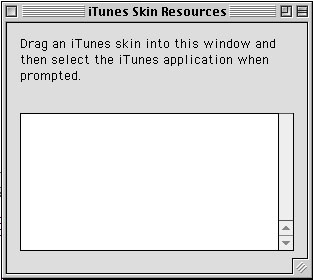
the resources types from the skin file here. Feel free to spruce up the interface any other way you see fit. A sample interface might look like this:
Define the File Types
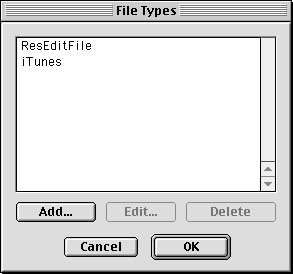
Since we want to work with two kinds of files (the skin file and the iTunes application itself), we need to describe
them to REALbasic. Select Edit->File Types... and define two types of files:
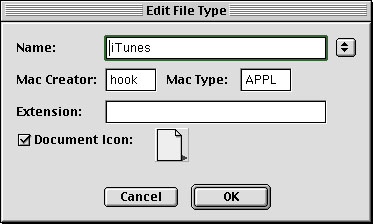
For the ResEditFile file type, enter the following infortmation:
For the iTunes file type, enter this data:
Add the Code
Now that we have built the interface and defined the file types our project will use, it's time to add the code. The
main idea behind this project is to copy all of the resources from the resource fork of a ResEdit skin file to the resource fork of iTunes.
Right now would be a good time to make a backup copy of iTunes, since you will be modifying the iTunes application.
To simplify matters, we will permit a user to drag a skin file into thw interface window. To make the window drag and drop aware, add this code
to the Open event of Window1:
me.acceptfileDrop("ResEditFile")
Finally, add this code to the DropObject event of Window1:
dim i, j, rcount, thisresourcenumber as integer
dim fSkin, fiTunes as folderItem
dim rfiTunes, rfSkin as resourceFork
dim rtype, junk, s, thisresourcetype as string
//is "obj" a FolderItem?
if obj.folderItemavailable then
//the folderitem of the skin file
fSkin = obj.FolderItem
junk = chr(0)+chr(0)+chr(0)+chr(0)
fiTunes = GetOpenFolderItem("iTunes")
//first loop through all resource types in the
if fiTunes<>nil and fiTunes.exists then
if fSkin.exists then
//open the skin's resource fork
rfSkin = fSkin.openresourcefork
//open the iTunes resourcefork
rfiTunes = fiTunes.openresourcefork
//clear listbox
listBox1.deleteAllRows
//we don't know how many types
//of resources there are
//we will assume that there are no more
//than 10,000 resource types
for i=1 to 10000
rtype = rfSkin.ResourceType(i-1)
if rfSkin.ResourceType(i-1)<>junk then
//we found a resource type,
//so add it to the list
listBox1.addrow rfSkin.ResourceType(i-1)
end if
next
end if
if listBox1.listcount>0 then
//loop through all resource types
for i=1 to listBox1.listcount
thisresourcetype = listBox1.list(i-1)
rcount = rfSkin.resourcecount(thisresourcetype)
//loop through all resources of this type
for j=1 to rcount
//find resource number for this resource
thisresourcenumber = rfSkin.resourceid(thisresourcetype,j-1)
//retrieve the resource
//from the skin source file
s = rfSkin.getresource(thisresourcetype, thisresourcenumber)
//copy the resource to iTunes
rfiTunes.AddResource(s, thisresourcetype, thisresourcenumber, "")
next//j
next//i
end if
//close the resource fork of the skin and iTunes
rfiTunes.close
rfSkin.close
end if//fiTunes<>nil and fiTunes.exists
end if//obj.folderItemavailable then
Conclusion
As usual, you can download the project and completed application. If you are an astute
ResExer, you may realize that this project could be easily modified to work with a number of ResExcellence hacks and improvements.
This project lends itself
well to any instance where you need to copy resources from one file to another. Happy experimenting!
7-24-01
REALbasic News
by
Erick Tejkowski
Back to normal.
Having returned from MWNY 2001, the REALbasic section of ResExcellence returns to normal operation.
What's new Sagoo?
First up, Amar Sagoo has posted a helpful addition to anyone's REALbasic Carbon Toolbox:
Round Buttons for OS X. Now you can add those
nifty orbs to your project just like the Cocoa people do
(see the Login Panel in Mac OS X for an example).
New version of REALbasic!
REALSoftware has announced the immediately availability of
REALbasic 3.5b1. This version squashes
numerous bugs and updates some of the newer features.
RB3D Tutorial
Joseph Nastasi has written an interesting article entitled
Introduction to Rb3D
available at iDevGames.com. With the inclusion of 3D features in REALbasic 3.5, this
tutorial is a must-see.
Does this guy ever stop?
Michio Ono has been hard at work lately, updating and posting many new REALbasic plugins. He has some very
cool stuff on his site, so
make sure not to miss it. Among the highlights:
- RbStringUtil plugin - Strings, strings, and more strings...
- RGBSurface plugin - High speed graphics maniuplations.
- Equalizer plugin - Display an equalizer in your project.
- iTunes plugin - Use iTunes visuals in your own RB apps!
Yes, you read right.... iTunes visuals in your own REALbasic projects!
3D Panoramas.
Joe Strout of REALSoftware has posted a nice
3D Cubic Panorama Demo
example. The example is now included with
REALbasic 3.5b1 download.
WASTE much, want not...
Doug Holton has updated his WASTEfield plugin to version 2.0.5.
This is a really fine addition to your programming arsenal and he's been working on it for a long time. Nice job, Doug!
Explore Klondike this Summer.
A few months back, MacTech magazine ran a REALbasic programming contest to see who could come up with the best version
of Klondike (a game akin to Solitaire).
Thomas Reed has made his code available for download. I'm not a
card game buff, but Thomas did a very nice job on this project. I especially like the card flip animation.
|


 Boot Panels