#!/usr/bin/perl -w # # Copyright 2000 by Michael Coyle # Released under GPL. # # Call it with: # [an error occurred while processing this directive] # # Get the file name from the browser... $file_name = $ENV{'QUERY_STRING'}; # Open the file... open (EP, $file_name); # Print to the browser... print "Content-Type: text/html \n\n"; # Load the file and keep spitting it out to the browser... while () { chomp; print "$_ "; } # Close the file and go home... close EP #!/usr/bin/perl -w # # Copyright 2000 by Michael Coyle # Released under GPL. # # Call it with: # [an error occurred while processing this directive] # # Get the file name from the browser... $file_name = $ENV{'QUERY_STRING'}; # Open the file... open (EP, $file_name); # Print to the browser... print "Content-Type: text/html \n\n"; # Load the file and keep spitting it out to the browser... while () { chomp; print "$_ "; } # Close the file and go home... close EP

3D
3D Photo Gallery (Part 1)
3D Photo Gallery (Part 2)

Audio
Poor Man's MIDI
Make A Metronome
iPod Tricks (Part 1)
iPod Tricks (Part 2)
iPod Tricks (Part 3)
Laugh Track Machine
Audio Player with Reverb
Shepard Melody
RB Phone Home
Build a Drum Machine

Custom Controls and Windows
Double Click Listbox
Draggable Metal Window
Double Click Canvas
Custom Buttons
Custom Buttons Part II
iTunes-style Listboxes
Custom Controls


General RB
Scrolling Windows
Using Mesage Dialogs
Case-Sensitive Word Finder
Introduction to Stacks
Wiggle Window
JPEG in PDF
Listbox Checkboxes
Background Applications
Listbox Auto-Find
Virtual Volumes
Time Tracker
Software Distribution (Part 1)
Software Distribution (Part 2)
Software Distribution (Part 3)
Software Distribution (Part 4)
Exceptions
Tips and Tricks
Text Clippings Made Easy

Graphics
Drawing a Simple Gradient
The SpriteSurface: Space Game
Image Spinner
Cropping Graphics (Part 1)
Cropping Graphics (Part 2)
Cropping Graphics (Part 3)
Cropping Graphics (Part 4)
Shimmer Graphics
Lissajous Figures
Simple Screen Capture
Vector Graphics
Kaleidoscope Images
Stegonography
Spirals!
Image Table
RB Magnifying Lens
Screen Capture
Color Picker Tutorial

Hacks
Ghost Grab
Speedy Mouse Extension
iTunes Plugins
iTunes Skinner

Mac OS X
Global Hot Key Event (Carbon Events)
Login Welcomer (Carbon Events)
Add/Remove Buttons
Resizable Sheets
Mac OS X Preferences Window
Using Sheets in REALbasic
Build a Bundle (Part 1)
Build a Bundle (Part 2)
Dock Your Passwords
Mac OS X Debugging
REALbasic Mac OS X Icon Tutorial
Animate Your Dock
RB and the Command Line

Menus
Window Menu
Templates Menu
Listbox Menu

Novelty
Guessing Game
Calendar Trivia
Tile Mixer
Zip Code Finder
Happy Valentine's Day
Merlin Simulator (Part 1)
Merlin Simulator (Part 2)
Merlin Simulator (Part 3)
Buzzword Machine
AppleSoft BASIC

Printing
Print to PDF

Registration
Registration Code Validation
Network Registration Codes

Resources
Picture Extractor (Part 1)
Picture Extractor (Part 2)

Serial
Caller ID (Part 1)
Caller ID (Part 2)
Caller ID (Part 3)

Speech
Speech Recognition

Socket Communication
Easy Peer-to-Peer File Sharing
MacPAD Version Checking
Display Web Image In Canvas
HTML IMG Tags
Version Tracking
Even Smarter Instant Messaging
Web Tiler
JavaScript and REALbasic
Stock Ticker (Part I)
Stock Ticker (Part 2)
AIM Mate

XML Manipulation
Simple XML Introduction

Video
Big Brother Video Capture

Note: All articles without a byline were written by Erick Tejkowski. When cleaning the site I removed them because the code differed from page to page, and I have yet to put them back in.

resexc2.gif (20k)


REALbasic for Dummies
by Erick Tejkowski

$19.99 @ Amazon


Files are in Stuffit 6.5 or earlier, or ZIP format.
Download Stuffit Expander

Tell us about a bad link.

Double Click Canvas by Seth Willits
01-17-04


Double Clicks
Well, I don't suppose I need to tell you what double clicks are, so I guess I'll just tell that we're going to make a canvas subclass which accepts double clicks on every platform, using the actual system double click time!

Design
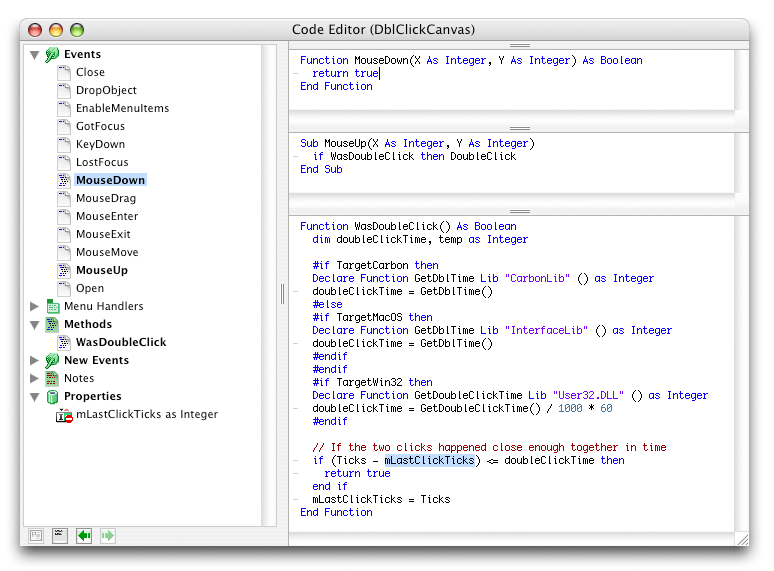
Okay, it's really simple. Create a new class named "DblClickCanvas" with a super of Canvas. Create one new event named "DoubleClick", a property "mLastClickTicks as Integer", and a new protected method "WasDoubleClick() as Boolean". (Note that the image below doesn't show that it's protected. I'm too lazy to make a new image!) In the MouseDown event of our canvas we'll return true so that the MouseUp event is called. In the MouseUp event we'll simply ask: "if WasDoubleClick then DoubleClick" which will call the DoubleClick event when appropriate.

The WasDoubleClick Method
On the Mac, the toolbox command GetDblTime() returns the maximum number of ticks that can pass between clicks. On Windows, the function GetDoubleClickTime() returns the maximum number of milliseconds. What we'll do is convert the milliseconds value on windows into ticks by dividing by 1000 and multiplying by 60 (a tick is 1/60th of a second) to make the very very core of the code the same for each platform.

The code to get the double click time in ticks for every platform is:

dim doubleClickTime as Integer

#if TargetCarbon then
   Declare Function GetDblTime Lib "CarbonLib" () as Integer
   doubleClickTime = GetDblTime()
#else
   #if TargetMacOS then
      Declare Function GetDblTime Lib "InterfaceLib" () as Integer
      doubleClickTime = GetDblTime()
   #endif
#endif
#if TargetWin32 then
   Declare Function GetDoubleClickTime Lib "User32.DLL" () as Integer
   doubleClickTime = GetDoubleClickTime() / 1000 * 60
#endif

Once you have the doubleClickTime, all you need to do is check that the difference of the current time and the time of the last click (mLastClickTicks) is less than or equal to it! If it is, we return true. Regardless of whether it is or isn't, we always need to set mLastClickTicks to the current Ticks value since we need to record the time of each click.

// If the two clicks happened close enough together in time
if (Ticks - mLastClickTicks) <= doubleClickTime then
   return true
end if
mLastClickTicks = Ticks

The Finished Product
That's all there is to it. Drag an instance of the DblClickCanvas class to a window and put some code in the DoubleClick event. Pretty simple! You can download the project here.

(Click on the image for a full view of the class)

#!/usr/bin/perl -w # # Copyright 2000 by Michael Coyle # Released under GPL. # # Call it with: # [an error occurred while processing this directive] # # Get the file name from the browser... $file_name = $ENV{'QUERY_STRING'}; # Open the file... open (EP, $file_name); # Print to the browser... print "Content-Type: text/html \n\n"; # Load the file and keep spitting it out to the browser... while () { chomp; print "$_ "; } # Close the file and go home... close EP #!/usr/bin/perl -w # # Copyright 2000 by Michael Coyle # Released under GPL. # # Call it with: # [an error occurred while processing this directive] # # Get the file name from the browser... $file_name = $ENV{'QUERY_STRING'}; # Open the file... open (EP, $file_name); # Print to the browser... print "Content-Type: text/html \n\n"; # Load the file and keep spitting it out to the browser... while () { chomp; print "$_ "; } # Close the file and go home... close EP