|
Network Registration Code Validation by Seth Willits
10-01-03
|
 |
In the previous tutorial we covered what a registration code is, what registration code validation really means, and came up with the code to both generate and validate registration codes. In this tutorial we're going to learn how to implement network registration code validation, by which I mean making sure no two copies of the same application with the same registration code are open at the same time on the same network. In addition to checkin when the application starts up, we'll also write a wee bit of code to allow the validation process to run when the computer connects to a network. Doing so prevents the law breaking user from simply disconnecting the computer from the network, starting up the application, and plugging it back in which would allow two copies to be open simultaneously.
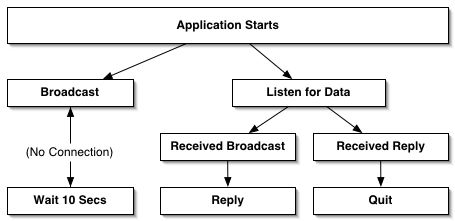 Figure 1.
Every time the application starts up it will attempt to broadcast the registration code. If the computer is not connected to a network, then a special timer will fire that will attempt to broadcast the code every 10 seconds. (You can change it be however many seconds you want.) If there is a connection, then the application will broadcast the registration code. In addition to attempting to broadcast the registration code, the application will also listen for broadcasts. If a broadcast is received, then the application will reply if the broadcasted registration code is the one currently being used by the application. If the application receives a reply to its own broadcast, then it will quit since the code is already in use.
Class Designs
To accomplish this, we're going to create two new classes and a module. The first class will be a UDPSocket subclass called RegCodeBroadcaster, the second will be a timer subclass called RegCodeBroadcastTimer, and the module, named Registration, will contain a few properties and a method which we'll call from the Application class' Open event.
The UDPSocket Class
If you're unfamiliar with UDP, it is a networking protocol widely used in game programming and many situations where high-speed distributed networking is needed. UDP is what is called a "connectionless" protocol meaning that there is no guarantee that the data you're sending is actually being received because there is no connection process to ensure that there is a valid recipient. While this does have clear advantages in terms of speed, UDP also does not guarantee that what is received is received in the order it was sent which in the case of registration code validation, doesn't matter.
Besides being connectionless, UDP differs from other protocols such as TCP in that it is able to broadcast to an entire subnet or site without needing to specify the IP addresses for the receiving computers. UDP can also "multicast" which is essentially like sending data to a chatroom. Anyone in the multicast group, or "room", will receive the data sent to the group.
To send data, a special object called a datagram – represented in REALbasic by the Datagram class – is used. A datagram has two properties; an address and the data being sent.
In our project, we'll use the UDPSocket class to broadcast our IP address to the entire site.
Creating the Classes and Module
Although we're not going to implement the BroadcastRegistrationCode method in the module just yet, create a new module named Registration and add the five properties below.
• rBroadcaster as RegCodeBroadcaster
• rHasBroadcasted as boolean
• rRegCodeTimer as RegCodeBroadcastTimer
• rRegistrationCode as string
• rApplicationName as string
The RegCodeBroadcaster Class
Create a new UDPSocket subclass named RegCodeBroadcaster and add method named Broadcast. In the Broadcast method we're going to first check if there is a network connection. To do this we use the LocalAddress property of the SocketCore class. (UDPSocket is a subclass of the SocketCore class.) If the computer is not connected to a network, then the LocalAddress property is an empty string, but if the computer is connected to a network, then the LocalAddress property is the IP address of the computer. If the computer is connected to a network, then we
create a datagram containing the registration code, and broadcast it.
The address property of the datagram will be set to the BroadcastAddress property of the UDPSocket class. BroadcastAddress is a special address used to send broadcasts across a network and varies from machine to machine. The data property of the datagram will contain these three pieces of information: 1) "Broadcast" which is the type of broadcast we're sending (Is it an initial broadcast or a reply to a broadcast?), 2) the name of the application, and 3) the registration code. The reason we send the application name is so that you can use the same port for all of your applications' network registration validations. If the application name was left out, how would you know what application the registration code applied to?
Before broadcasting the datagram, we need to make sure that the RouterHops value (which specifies who it is broadcasted to) is 32 (for broadcasting to the entire site), the port value is set (we'll use 1733 in this example), and that the UDPSocket is bound to the port by testing whether the IsConnected property is true or false, and if false, then call the Connect method. (Why REAL Software decided to use the "Connect" method from the SocketCore class to bind a UDPSocket to a given port, I have no idea. In my opinion it's confusing to use the Connect method because UDP is a "connectionless" protocol.) Before sending or receiving any data, you must absolutely make sure that your UDP socket is connected. (Note that by calling the Connect method, you're virtually guaranteed that you're connected, so there's no need to test for IsConnected being true after you call the Connect method.)
Once you're connected, you then use the Write method of the UDPSocket class to send your datagram. The Write method has one parameter which is the datagram to be sent.
Sub Broadcast()
dim data as Datagram
if me.LocalAddress <> "" then
data = New Datagram
data.Address = me.BroadcastAddress
data.Data = "Broadcast" + "MyApplication" + chr(0) + rRegistrationCode
me.SendToSelf = false // We don't want to see our own messages
me.RouterHops = 32
me.Port = 1733
if me.IsConnected = false then me.Connect
me.Write data
end if
End Sub
Once the datagram has been sent, the SendComplete event of the UDPSocket will fire. In the SendComplete event we're going to sest the rHasBroadcasted property of the Registration module to true. By setting it to true, the timer (which we'll implement soon) will turn itself off and no longer attempt to broadcast the IP address since we only need to broadcast it once.
Sub SendComplete(userAborted as Boolean)
rHasBroadcasted = true
End Sub
In the Error event (which I believe is unnecessary to implement) we can simply display a message box to say that there was an error. The reason I believe it is unnecessary is that there's really no reason to worry about if there was an error or not. Should an error occur, what are you going to do? Tell the user? There's no need to, and there's no need to drop any connections or remove any variables or anything either. So really, the Error event is completely optional.
Sub Error()
MsgBox "Broadcast Error" + chr(13) + chr(13) + str(me.LastErrorCode)
End Sub
The DataAvailable event is where the other half of the code is. In the DataAvailable event we first parse the received datagram and check to see if the registration code received is for the application that received it. If it isn't then we simply don't do anything. If it is, then we check to see that if the registration code is the same one being by the application. If it is the same, then we check to see whether the datagram received was an initial broadcast or a reply. If it was an initial broadcast, then we send a reply back to the sender using the Reply method (which we'll implement next). If it was a reply to a broadcast that the application sent out, then the application displays a message saying the registration is already in use on the network and that the application will quit automatically.
Sub DataAvailable()
dim applicationName, registrationCode as string
dim protocolCode as string
dim data as Datagram
data = me.Read
protocolCode = NthField(data.Data, chr(0), 1)
applicationName = NthField(data.Data, chr(0), 2)
registrationCode = NthField(data.Data, chr(0), 3)
if applicationName = "MyApplication" and registrationCode = rRegistrationCode then
Select case protocolCode
Case "Broadcast"
Reply data.Address
Case "Reply"
MsgBox "The registration code for MyApplication is already in use. MyApplication will now quit."
me.Close // Required unless you want to crash!
Quit
end select
end if
End Sub
If you notice, the parameter passed to the Reply method is the address specified in the datagram that was received. When a datagram is sent, the address in the datagram is the address the datagram will be sent to. When a datagram is received, the address is that of the computer which sent the datagram. So when passing the datagram's address property to the Reply method, we're passing the address of the computer which the reply will be sent to.
The Reply method is very short and simple. Since the Reply method will never be called unless the RegCodeBroadcaster socket is already bound to a port and read to send and receive, we don't need to do any of the testing done in the Broadcast method and instead can simply create a datagram and send it.
Sub Reply(address as string)
dim data as Datagram
data = New Datagram
data.Address = address
data.Data = "Reply" + chr(0) + "MyApplication" + chr(0) + rRegistrationCode
me.Write data
End Sub
The Registration Module
That's all of the code needed for the RegCodeBroadcaster class. To make it "go," so to speak, we need to implement the BroadcastRegistrationCode method in the Registration module. This method is called from the Open event of the Application class instance and is the only line of code that needs to be called to start the broadcast process. The method is used like this:
Sub Open()
// Broadcast the registration code
BroadcastRegistrationCode "MyApplication", "SA100-1234-5678"
End Sub
The first parameter is the name of the application and the second is the registration code for the application (which can be loaded from a preferences file). The BroadcastRegistrationCode method will then set the rApplicationName and rRegistrationCode properties of the Registration module to be these values. After doing that, the method will then create an instance of the RegCodeBroadcaster class and call its Broadcast method which will immediately attempt to broadcast the registration code. After doing that, a RegCodeBroadcastTimer will be created which will attempt to broadcast the registration code every 10 seconds if the previous Broadcast call was unsuccessful.
Sub BroadcastRegistrationCode(appName as string, regCode as string)
rApplicationName = appName
rRegistrationCode = regCode
rBroadcaster = New RegCodeBroadcaster
rBroadcaster.Broadcast
rRegCodeTimer = New RegCodeBroadcastTimer
End Sub
The RegCodeBroadcastTimer Class
Using the RegCodeBroacastTimer class isn't necessary to get network registration code validation working. As a matter of fact, if you were to run the code in the project so far (after deleting the only two references to the RegCodeBroadcastTimer class) it would work just fine. However, if you really want a good level of security and prevent the user from simply unplugging a cord to get around all of this code you've written, you need to use it. Besides, it's only 11 more lines of code.
Recall that the RegCodeBroadcastTimer class is a Timer subclass, so create a new class, name it RegCodeBroadcastTimer, set its super to Timer, and create a new property "Timeout as integer". Next create a constructor for the class by selecting "New Method..." from the "Edit" menu and selecting "Constructor" in the popup button to the right of the field for "Method name:". In the constructor, set the mode of the timer to 2 and the period to 10000, or 10 seconds. The timeout property will be equal to 1, representing 10 seconds. We can leave it as 0, but for logical sense, it should start out 1 since the first time the timer fires, 10 seconds will already have passed.
Sub RegCodeBroadcastTimer()
// Setup the timer to fire every 10 seconds
me.Mode = 2
me.Period = 10000
me.Timeout = 1
End Sub
I've chosen to use 10 seconds in this project but you can set it to whatever you want. In reality, both a timer and a UDPSocket use so little CPU time that to fire it every 10 seconds until the timeout property hits 3 won't be noticeable. Another reason I chose 10 seconds is because if another user starts up a copy of the application and attempts to use the same registration code, when they connect to the network again, the application will quit within 10 seconds or less. If quitting within 10 seconds doesn't matter to you, or if you're in absolute dire need of all the CPU time you can get, you can set the timer period to be higher so that the registration code is broadcasted less often.
In the Action event, we first want to check if the registration code has already been broadcasted. If it has, we set the timer mode to 0 to stop the timer from firing and then do nothing. If the registration code has not been broadcasted, we attempt to broadcast it again by calling the Broadcast method of the rBroadcaster property (the RegCodeBroadcaster instance) of the Registration module.
Sub Action()
if rHasBroadcasted then
me.Mode = 0
else
rBroadcaster.Broadcast
end if
// 3 for 30 seconds since we have a 10 second period
if Timeout = 3 then
me.Mode = 0
else
Timeout = Timeout + 1
end if
End Sub
Here we check to see when the Timeout value is 3 which would mean that 30 seconds has passed by. When it is 30, the timer will stop itself. The way I see it, if a user is going to attempt to use your applicaiton by disconnecting and from the network, they'll probably do it in under 30 seconds. So for those users who simply aren't on a network, rather than having a timer fire in the background every 10 seconds, we set a 30 second limit on how long the timer will fire for that way we can end the CPU usage from the timer (despite it being so small.)
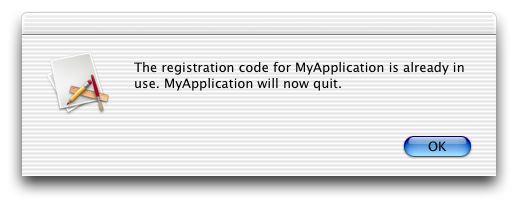
That's all there is to it. If you open up the application on one computer, and open a copy of it on another computer on the same network, the second copy should display an error message informing you that the registration code is already in use and the application will then quit.
Important Note:
The LocalAddress trick used above does work in most cases, but is really an "accident" that happens to work by chance. What is really needed is a directly supported property or method to determine whether the computer is on a network. If you're interested in this project or really anything at all that needs to know whether a computer is on a network or not, PLEASE sign on to this feedback report. Make sure you're logged in first because otherwise your vote will not be counted.
http://support.realsoftware.com/feedback/viewreport.php?reportid=kjrlcjnm