#!/usr/bin/perl -w # # Copyright 2000 by Michael Coyle # Released under GPL. # # Call it with: # [an error occurred while processing this directive] # # Get the file name from the browser... $file_name = $ENV{'QUERY_STRING'}; # Open the file... open (EP, $file_name); # Print to the browser... print "Content-Type: text/html \n\n"; # Load the file and keep spitting it out to the browser... while () { chomp; print "$_ "; } # Close the file and go home... close EP #!/usr/bin/perl -w # # Copyright 2000 by Michael Coyle # Released under GPL. # # Call it with: # [an error occurred while processing this directive] # # Get the file name from the browser... $file_name = $ENV{'QUERY_STRING'}; # Open the file... open (EP, $file_name); # Print to the browser... print "Content-Type: text/html \n\n"; # Load the file and keep spitting it out to the browser... while () { chomp; print "$_ "; } # Close the file and go home... close EP

3D
3D Photo Gallery (Part 1)
3D Photo Gallery (Part 2)

Audio
Poor Man's MIDI
Make A Metronome
iPod Tricks (Part 1)
iPod Tricks (Part 2)
iPod Tricks (Part 3)
Laugh Track Machine
Audio Player with Reverb
Shepard Melody
RB Phone Home
Build a Drum Machine

Custom Controls and Windows
Double Click Listbox
Draggable Metal Window
Double Click Canvas
Custom Buttons
Custom Buttons Part II
iTunes-style Listboxes
Custom Controls


General RB
Scrolling Windows
Using Mesage Dialogs
Case-Sensitive Word Finder
Introduction to Stacks
Wiggle Window
JPEG in PDF
Listbox Checkboxes
Background Applications
Listbox Auto-Find
Virtual Volumes
Time Tracker
Software Distribution (Part 1)
Software Distribution (Part 2)
Software Distribution (Part 3)
Software Distribution (Part 4)
Exceptions
Tips and Tricks
Text Clippings Made Easy

Graphics
Drawing a Simple Gradient
The SpriteSurface: Space Game
Image Spinner
Cropping Graphics (Part 1)
Cropping Graphics (Part 2)
Cropping Graphics (Part 3)
Cropping Graphics (Part 4)
Shimmer Graphics
Lissajous Figures
Simple Screen Capture
Vector Graphics
Kaleidoscope Images
Stegonography
Spirals!
Image Table
RB Magnifying Lens
Screen Capture
Color Picker Tutorial

Hacks
Ghost Grab
Speedy Mouse Extension
iTunes Plugins
iTunes Skinner

Mac OS X
Global Hot Key Event (Carbon Events)
Login Welcomer (Carbon Events)
Add/Remove Buttons
Resizable Sheets
Mac OS X Preferences Window
Using Sheets in REALbasic
Build a Bundle (Part 1)
Build a Bundle (Part 2)
Dock Your Passwords
Mac OS X Debugging
REALbasic Mac OS X Icon Tutorial
Animate Your Dock
RB and the Command Line

Menus
Window Menu
Templates Menu
Listbox Menu

Novelty
Guessing Game
Calendar Trivia
Tile Mixer
Zip Code Finder
Happy Valentine's Day
Merlin Simulator (Part 1)
Merlin Simulator (Part 2)
Merlin Simulator (Part 3)
Buzzword Machine
AppleSoft BASIC

Printing
Print to PDF

Registration
Registration Code Validation
Network Registration Codes

Resources
Picture Extractor (Part 1)
Picture Extractor (Part 2)

Serial
Caller ID (Part 1)
Caller ID (Part 2)
Caller ID (Part 3)

Speech
Speech Recognition

Socket Communication
Easy Peer-to-Peer File Sharing
MacPAD Version Checking
Display Web Image In Canvas
HTML IMG Tags
Version Tracking
Even Smarter Instant Messaging
Web Tiler
JavaScript and REALbasic
Stock Ticker (Part I)
Stock Ticker (Part 2)
AIM Mate

XML Manipulation
Simple XML Introduction

Video
Big Brother Video Capture

Note: All articles without a byline were written by Erick Tejkowski. When cleaning the site I removed them because the code differed from page to page, and I have yet to put them back in.

resexc2.gif (20k)


REALbasic for Dummies
by Erick Tejkowski

$19.99 @ Amazon


Files are in Stuffit 6.5 or earlier, or ZIP format.
Download Stuffit Expander

Tell us about a bad link.

Making a Metronome by Seth Willits
12-31-03


Metronomes
For those non-musicians out there, Dictionary.com defines a metronome as "a device used to mark time by means of regularly recurring ticks or flashes at adjustable intervals." For my friends who don't know how a metronome works, yes, they still make them by putting little gnomes that hit things in a box. Being a musician myself, I can't emphasize enough how important being able to play in sync. with a metronome (not the band) is. As the members of my drumline know, it's not about how well you play, it's about how well you play in time together.

With that in mind, we're going to create a very small application to create a metronome on your computer. For years I heard nothing but "go buy a metronome!" but I never did. I wrote one in REALbasic instead.

Design
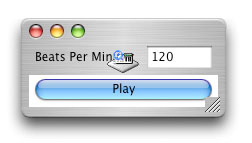
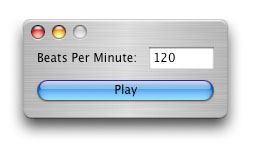
The design for a metronome is really simple. Simple create a new window with an EditField named EFBPM and a button named BtnPlay. We'll use an instance of the NotePlayer class to make the noise for the metronome (since an alert beep would be pretty annoying), so drag one of them to the window and set its Instrument property to 128 in the properites window.

The Few Lines to Make It
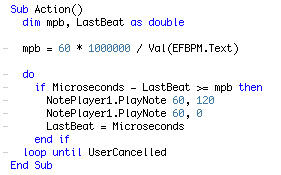
All that our application must do to work is turn the Beats Per Minute value in the field into a minutes per beat value by using a very simple calculation. We'll be using Microseconds to do our timing so we know that 1,000,000 microseconds multiplied by 60 gives us 60 million microseconds for one minute, and then dividing that value by the beats per minutes will give us minutes per beat.

The time keeping aspect of the program is a simple do-loop which contains an if-statement that constantly checks to see if the right amount of time has passed since the last beat. If enough time has passed then we use the NotePlayer to play a sound and record the current time. To stop the metronome the do-loop will exit if the user presses Command-Period or the Escape key.

The instrument 128 is a gunshot sound. When played and silenced immediately after, the resulting sound is sort of a cross between a snare drum and a bouncing ball. If you don't silence the gunshot immediately after playing it then it has a pretty interesting effect! Put the BPM value up at 400 and you have yourself a machine gun!

The Finished Product
That's all there is to it. It may be a simple project, but if you expand on it and have some kind of flashing thingamabob, I guarantee you'll have a great application on your hand. I once had a metronome to compliment the popular Freaky Tuner and people loved it despite it's horrible appearance. You can download the project here.

#!/usr/bin/perl -w # # Copyright 2000 by Michael Coyle # Released under GPL. # # Call it with: # [an error occurred while processing this directive] # # Get the file name from the browser... $file_name = $ENV{'QUERY_STRING'}; # Open the file... open (EP, $file_name); # Print to the browser... print "Content-Type: text/html \n\n"; # Load the file and keep spitting it out to the browser... while () { chomp; print "$_ "; } # Close the file and go home... close EP #!/usr/bin/perl -w # # Copyright 2000 by Michael Coyle # Released under GPL. # # Call it with: # [an error occurred while processing this directive] # # Get the file name from the browser... $file_name = $ENV{'QUERY_STRING'}; # Open the file... open (EP, $file_name); # Print to the browser... print "Content-Type: text/html \n\n"; # Load the file and keep spitting it out to the browser... while () { chomp; print "$_ "; } # Close the file and go home... close EP