






 |
 |
 |
|
 |
||
 |

Articles 3D Audio Custom Controls General RB Graphics Hacks Mac OS X Menus Novelty Printing REALbasic 2005 REALbasic 2006 Registration Resources Reviews Serial Speech Sockets XML Video Resource Links News Current News February 2006 January 2006 December 2005 November 2005 October 2005 September 2005 August 2005 July 2005 June 2005 May 2005 April 2005 March 2005  REALbasic for Dummies by Erick Tejkowski  Learning REALbasic through Applications REALbasic for Macintosh REALbasic Cross-Platform Application Development 
Older files are in Stuffit 5 or greater format. Newer files are ".Zip". Download StuffIt Expander |

|
 
Window Groups
The Design
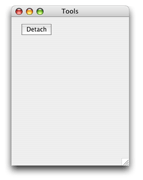
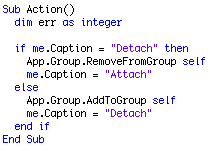
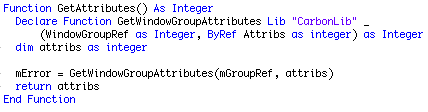
Notice that there is a new RemoveFromGroup method, and notice that the group is now part of the App instance rather than the main window. In fact, there are a couple sublte changes to the implementation so rather than work from the old project, just download the new one and look at it. Anyway, that code simply uses the caption of the button to determine which action should take place. If the button label is "Detach" it'll remove it from the group, otherwise it will add it. Another necessary step to be able to remove a window from the group is getting the attributes before releasing the group reference so that when the new group is created, we can set its attributes to match those of the old group.
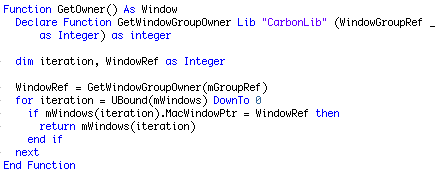
One of those not-so-subtle changes to the WindowGroup class is moving from setting the first window in the group to be the group's owner, to allowing the developer to set it explicitly. This I should have done in the first place, but that's what I (well, you, really) get when I write an article after 1 AM. Anyway, here is the pair of methods to Get and Set the owner of the group:
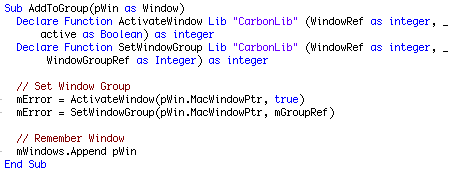
Notice that there is a new property of the WindowGroup class, mWindows(-1) as Window. This array contains all of the windows in the group. To do this, we also need to add a line to the AddToGroup method:
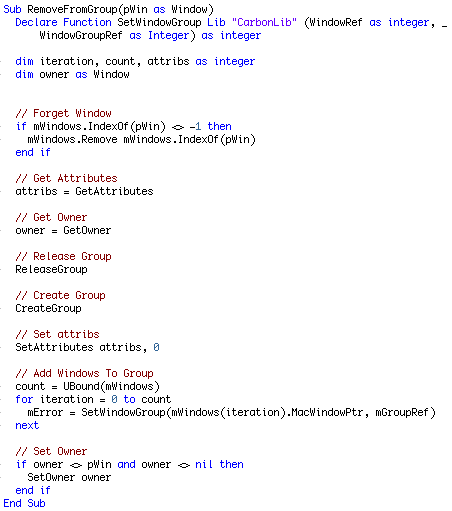
So that's the all the code we need before we can implement the remove method which is below.
As you can see, we first remove the window from the mWindows array so we don't re-add it, we remember the attributes and owner of the group, release the group, create a new group, set the attributes, add the windows to the group, and if the owner is not nil and not the window we just removed from the array, then we set the owner again. Finished |
 |
||
 |
 |
 |
|
 |





 |
 |
 |
||||||||||||||||||||||||||||||
 |
|
 |
||||||||||||||||||||||||||||||
 |
 |
 |
Maintained by the Staff of ResExcellence. This entire site ©1997-2006 ResExcellence
Privacy Statement? Sure we gotta Privacy Statement.
[an error occurred while processing this directive]