
Window Groups
In the last tutorial we covered how to setup a window group and get the group of windows to move together. In this tutorial, I planned to cover removing a window from a group and implementing sticky windows, but I was sort of hit by two major setbacks. The first being there isn't any way to remove a window from a group like I thought! (But as you can tell by the name of this article, I'll show you how.) The second was totally my fault in forgetting something else, but I'll cover that in another article. Anyway, so you as you've guessed by now by the name of the article, we're going to cover how to remove a window from a group.
The Design
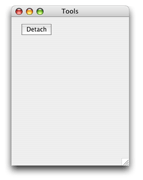
Well, since there isn't a native call to remove a window from a group what we're going to do is fake it, and create a new group with one less window. Genius, right? For starters, we're going to add a button to the floating window which will "detach" it from the group. The code for the button is below:
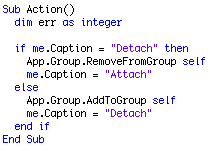
Notice that there is a new RemoveFromGroup method, and notice that the group is now part of the App instance rather than the main window. In fact, there are a couple sublte changes to the implementation so rather than work from the old project, just download the new one and look at it.
Anyway, that code simply uses the caption of the button to determine which action should take place. If the button label is "Detach" it'll remove it from the group, otherwise it will add it.
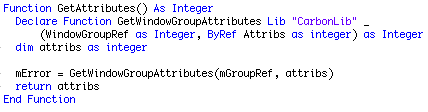
Another necessary step to be able to remove a window from the group is getting the attributes before releasing the group reference so that when the new group is created, we can set its attributes to match those of the old group.
One of those not-so-subtle changes to the WindowGroup class is moving from setting the first window in the group to be the group's owner, to allowing the developer to set it explicitly. This I should have done in the first place, but that's what I (well, you, really) get when I write an article after 1 AM. Anyway, here is the pair of methods to Get and Set the owner of the group:

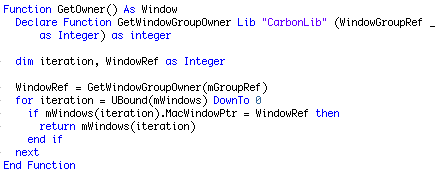
Notice that there is a new property of the WindowGroup class, mWindows(-1) as Window. This array contains all of the windows in the group. To do this, we also need to add a line to the AddToGroup method:
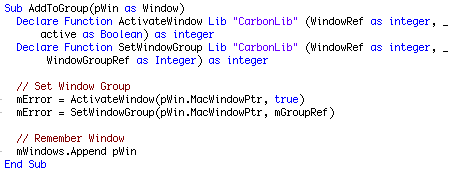
So that's the all the code we need before we can implement the remove method which is below.
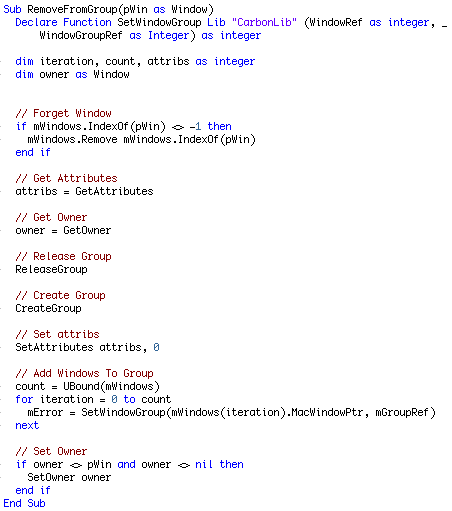
As you can see, we first remove the window from the mWindows array so we don't re-add it, we remember the attributes and owner of the group, release the group, create a new group, set the attributes, add the windows to the group, and if the owner is not nil and not the window we just removed from the array, then we set the owner again.
Finished
So there you have it. Removing a window from a group. Check out the project and see how it runs. This is a big step to being able to make sticky windows. To make them we'll have to get into Carbon events again so you might want to refresh yourself on them. As always, you can download the project here.