






 |
 |
 |
|
 |
||
 |

Articles 3D Audio Custom Controls General RB Graphics Hacks Mac OS X Menus Novelty Printing REALbasic 2005 REALbasic 2006 Registration Resources Reviews Serial Speech Sockets XML Video Resource Links News Current News February 2006 January 2006 December 2005 November 2005 October 2005 September 2005 August 2005 July 2005 June 2005 May 2005 April 2005 March 2005  REALbasic for Dummies by Erick Tejkowski  Learning REALbasic through Applications REALbasic for Macintosh REALbasic Cross-Platform Application Development 
Older files are in Stuffit 5 or greater format. Newer files are ".Zip". Download StuffIt Expander |

|
 
Window Groups
The Design For right now, lets just look at the two most important parts of the project, the constructor which creates the window group, and the AddToWindow method which adds a window to the group.
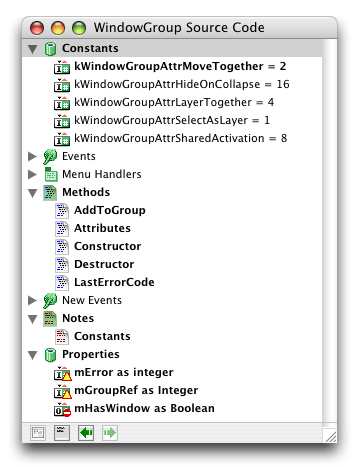
The AddToGroup method accepts a window as a parameter, activates that window, adds it to the group, and using the mHasWindow private property of the group class, sets the window to be the window group's owner if it does not already have one. mHasWindow is true if the group has an owner.
Then lastly there is the Attributes method which accepts two integers, the first is the attributes to set, the second those to clear.
The attributes for the class can be seen in the class image at the top of this article.
So that's the core of the the code, now the example we'll be using here is simply getting to windows to move with each other. That is, while one window is being moved, the other will move with it, in its exact relative position to the other windows in the group.
In the open event of Window1, we'll open and position Window2, add both windows to the group with the attributes put into setThese. The windows will move together, layer together (if both are in the background and one is selected they'll both come to the front), they share activation (both are active at the same time), they not only activate together but layer behind and in front of other windows together, and they collapse together. Finished |
 |
||
 |
 |
 |
|
 |






 |
 |
 |
||||||||||||||||||||||||||||||
 |
|
 |
||||||||||||||||||||||||||||||
 |
 |
 |
Maintained by the Staff of ResExcellence. This entire site ©1997-2006 ResExcellence
Privacy Statement? Sure we gotta Privacy Statement.
[an error occurred while processing this directive]