
Window Groups
In Mac OS X, the concept of Window Groups was introduced. A window group is simply a collection of windows where the group is given certain attributes which then apply to all of the windows in that group. These attributes can be hiding together when one window is collapsed, layering together (like all Mac OS 9 windows did), moving together, selecting the entire group as one, and shared activation. Window groups can be used for some interesting things although some of them can't be done in REALbasic very easily at all. In this example, we're going to get two windows to move together.
The Design
A window group in our project will be represented by a WindowGroup class which contains all of the Declare code needed to manipulate the window group, and keeps references to its Carbon pointer counterpart. The class you'll download today isn't a full implementation because we'll add on to it in later tutorials.
For right now, lets just look at the two most important parts of the project, the constructor which creates the window group, and the AddToWindow method which adds a window to the group.
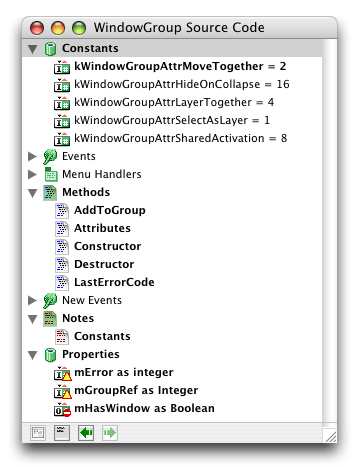
The constructor uses a declare to CreateWindowGroup to create the group, stores the pointer to that group in the mGroupRef private property of the WindowGroup class, and remembers the error value returned from the function. The error can be recalled with the class's LastErrorCode method.

The AddToGroup method accepts a window as a parameter, activates that window, adds it to the group, and using the mHasWindow private property of the group class, sets the window to be the window group's owner if it does not already have one. mHasWindow is true if the group has an owner.

Then lastly there is the Attributes method which accepts two integers, the first is the attributes to set, the second those to clear.

The attributes for the class can be seen in the class image at the top of this article.
So that's the core of the the code, now the example we'll be using here is simply getting to windows to move with each other. That is, while one window is being moved, the other will move with it, in its exact relative position to the other windows in the group.

In the open event of Window1, we'll open and position Window2, add both windows to the group with the attributes put into setThese. The windows will move together, layer together (if both are in the background and one is selected they'll both come to the front), they share activation (both are active at the same time), they not only activate together but layer behind and in front of other windows together, and they collapse together.
Finished
Window groups are pretty handy. One place they can be used (although not easily in REALbasic) is to draw between windows like Interface Builder does with the connector lines. In the next tutorial we'll cover how to remove windows from the group and make the windows "sticky," which although it might sound like they're sticky now, refers to one window always moving relative to the other, but can be moved independently. It's a pretty neat effect. As always, you can download the project here.