Software Update by Scott Chitwood
Matrix Rebooted Icons and Pixelpalooza People's Choice Voting at The Iconfactory
Dave Brasgalla's talent for designing icons never ceases to amaze me - his Matrix Rebooted set is jaw dropping good, eliciting several "Wows!" from me as I scrolled through them. Dial into The Iconfactory to score a set for yourself!
And as long as you're already dialed in, make sure you swing by to cast your vote in the Pixelpalooza People's Choice Voting. It's easy, quick, fun to do and is totally free from any "hanging chad" issues.
DragThing 5.1 Released!
Yeah baby! DragThing rules :)
TLA Systems is pleased to announce the immediate availability of DragThing 5.1, the thirty-first release of their popular dock application for Mac OS. This is a major new release, with dozens of new features including...
- New dock window styles like metal and translucent black.
- Completely rewritten preferences and dock storage code, with docks now saved as separate files, and support for XML exporting and importing.
- Much improved Desktop Trash, with many new options including displaying the number of items in the trash.
- Full control over how Exposé affects your docks and the Desktop Trash.
- You can display the version number of docked applications as part of the name or icon.
- Improved contextual menu previews, including support for Adobe InDesign and plain text documents.
- Another cool thing about DragThing 5.1 is some of the graphics have been moved out to separate files inside the Resources folder in the app so you can now hack things like the "dock poof" and the different badges to show things like running apps and mounted disks a lot easier than before.
A full list of all changes can be found here plus you can grab a copy DragThing directly from the ResEx download mirror.
Custom Splash Installer (CSI) Updated to version 2.2
Custom Splash Installer 2.2 makes it easier than ever to customize splash screens to match your personality. This new update provides support for PNGf applications which include Photoshop, as well as continued support for your other favorites like Camino and OmniWeb.
Déjà Vu 2.6.2
Propaganda Productions has updated their handy back-up utility Déjà Vu to version 2.6.2.
Extensive review of Photoshop CS on IT-Enquirer
Whenever Adobe releases a new version of Photoshop, a shiver goes through the graphics design and photographers’ community. What will Adobe have cooked up this time to make life even simpler or to create even more stunning looking photos?...
Read more at IT-Enquirer.
ADHOC Keynote Speaker Announced
The organizers of ADHOC (the conference formerly known as MacHack) have announced that after an exhaustive search, respected Mac columnist David Pogue will be the keynote speaker for this year's Macintosh developer's conference.
Send us your press releases!

REALbasic: News by Seth Willits
 | HexSame v1.0 - Semi-clone of the old game Tusami.
Front End Digital Media Player - Easily create play lists of up to 99 files.
BugManager - Manage your local bug database.
StandardAlertSheet - Standard alert sheets for Mac OS X.
PrettyXML - Ouputs readable RB XML creation code!
pgSQL4RB v 1.0.1 - PostgreSQL database classes for REALbasic.
Frequency 2.0 - Manage your Weblog from The Desktop!
VidiSuite Television Tools - Organize and produce a telecast!
Simple AutoComplete - AutComplete in EditFields (similar to REALbasic's)
On-Target Report 4.0 Beta Program Opens - Easy to use reporting tool for popular databases.
RBUnit 1.0 - The first public Unit Testing Framework for REALbasic.
Titlelistconverter 1.7 - Postproduction subtitle exporter.
Data & Time Controls 3.0 - Date and Time fields for Windows & Macintosh. |

Internet Cleanup
Tools of the Trade by Scott Chitwood
X11: Sodipodi (and Much More) Revisited
Back on March 23rd we featured an article by Mark Evans on "How To Install Sodipodi Under X11 Using Fink". I became intrigued enough by Mark's efforts to install and run Sodipodi that I wanted to try it myself. After downloading and installing Fink Commander (the version that didn't need to be compiled) I set the prefs per Mark's instructions and downloaded Sodipodi from this page. Things didn't go well at all for me so I backed off from the "hurry up and try it" mode, deciding to come back to it at a later date.
This week offered me some good time to try it again from a different angle, so in Tuesday's report I decided to start with a fresh install of Fink Commander, which I really didn't need, but at the same time I wanted to try compiling the app in XCode since that was something I had never done before. That part was quick and easy, although I missed a couple of points in the article that a couple of our friendly readers were able to educate me on.
One item I missed, that was rather important, was making sure that X11 SDK from Panther's install Disk 3 was installed. While that didn't interfere with downloading and compiling Fink Commander it made a huge difference when downloading and installing Sodipodi through Fink Commander's interface. Even though X11 was already installed on my system, Fink Commander wanted to overwrite it the files with xfree86-shlibs. From what I have learned so far, this was because I didn't have X11 SDK installed prior to using Fink Commander, here's the error message in full..
You have an existing X11 installation in /usr/X11R6/lib.
This package refuses to overwrite these. Remove them, then tell Fink to
install xfree86-shlibs again.
I didn't think cooperating with the request would cause any issues but boy was I wrong, X11 kept crashing on lauch even after tossing it's prefs file. While installing a new copy of X11 along with X11 SDK I decided to dig around in the apps folder and discovered that Fink Commander's overwrite had installed XDarwin which looks fairly similar to X11 but does have some subtle differences. Hmmmm, two Unix based enviroments to explore - excuse me while my head exploads :)
In the midst of all that excess activity Sodipodi was downloaded and installed. Woohoo! There are two ways to launch Sodipodi once X11 is open.
- Using X11's terminal type the following command as previously noted by Mark;
/sw/bin/sodipod
or
- Add Sodipodi to X11's Application menu by pasting /sw/bin/init.sh; sodipodi into the customize function, you can even add in a keyboard shortcut if you like.


Sodipodi screenshoot, hit preview to view large image
Sodipodi is easy enough to play around with and even offers a CMYK color space mode. If you're expecting to jump in and use it as easy as Illustrator or your other favorite vector app be prepared to spend some adjusting to and learning how to use it's tools.
So, to sum it all up...
- Do make sure you have X11, X11 SDK and Fink installed before you download and install/compile Fink Commander. While you don't need X11 or X11 SDK to install Fink Commander you will need them before you start downloading and installing apps through Fink Commander.
- Download Sodipodi through Fink Commander. You'll need to change the prefs to read "Use unstable packages" so Fink Commander can locate the package for downloading.
- Run the command /sw/bin/sodipod in X11's terminal to launch Sodipodi.
One final distinction to make to the above statement regarding X11 and X11 SDK: You don't need X11 or the X11 software development kit to download and/or install **non-X11** applications using Fink Commander. Big thanks to Mike Harris! Knowledge is good.
| |
AQUASlate 1.1 guiKit
Dewey99's AQUASlate 1.1 lays a nice textured charcoal grey over the white elements of Apple Aqua. | |
XiAP Updates XiMX7 and XiTibook2 guiKits
Both of these updates by XiAP are wonderfully crafted themes with an abundance of original elements that look absolutely stunning. XiTibook2 v1.1 and XiMX7 v1.1 have integrated Safari Skins and desktops as part of their download packages. |  XiMX7 v1.1 guiKit by XiAP
Hit preview to view large image
|
AJ v3.0.0 guiKit
Cyber-Thief's very blue theme AJ v3.0.0 has a few good ideas lurking in it but unfortunately that's where it stops, overall it's just a little too mismatched and too busy for my taste. |  AJ v3.0.0 guiKit by Cyber-Thief
Hit preview to view large image
|
Auckwa 1.0 guiKit
As far as Aqua mods go Auckwa 1.0 is okay but not overly exciting. I do like the look of the menubar and the theme could be so much stronger by adopting some it's design elements into it's window and interface elements. |  Auckwa 1.0 guiKit by DeXtop
Hit preview to view large image
|
Demetallifizer 1.0 guiKit
This Aqua mod simply removes the brushed metal from Finder windows. | |
User Contributions by Scott Chitwood
It's easier than ever to contribute using our Browser Based Upload Page! If you contribute a file to any section of ResExcellence, you could win a PowerMax gift certificate worth FIFTY DOLLARS! It's easy and fun to win, look here to see how it's done!
Jason Martin's Purple Crocus Boot Panel has thoughts of warm days and sunshine floating through my head.
Hey! Here's our second Mac OS Classic MOSS contribution of the week, Frustrated Mac by Meesh B Mash.
An unusual and interesting iTunes Skin called DAYAN from Japanese artist o/d/e is worth taking a look at.

StuffIt - The Complete Compression Solution
Icon & Desktop News: by Dan
 Icons - Desktops: Yeah! We've got another selection of great icons and desktops to satisfy your hunger for desktop decoration. Starting off with [6] New Desktops, [2] New Icon Sets, and of course, updated "News From Around the Web". Take your time going, and hurry back!
Editors Note: I've had it with getting hundreds of virus laden emails every week through my ResExcellence email account. I'm removing it from this page, and directing everyone with news items to our submission page till this monster calms down. Thanks for your patience, as I have lost mine.
We love promoting your work! So, grab those pixel pencils, and send us your best creations!
In an ongoing effort to make it easier for you to send us your Icons and Desktops, we've designed a new Browser Based Upload Page for the task. Just follow the easy to use instructions, and you'll find submitting your artwork is a piece of cake. In case your haven't done so already, don't forget to read our submission guidelines before you start!
- Thunderstorm Icons by Treetog is an awesome set of ninety six low impact blue-grey system level icons designed for the GUI Olympics 2004.
- Daniel Goffin wants to know if you are you still following the crowd? Using the newest gooey goofy melted plastic aqualicious iconset? This is the definite end and answer to your lost soul! Seek and you will find. He made DeathZManYFaceZ icons because he was not able to find any decent grunge hardcore icons on the net. Daniel made them using traditional brush, pen and paper to oppose the mostly boring vector or rendered aqua sets. Bring Death to your desktop!
- Blue Sign by FR4NK is a great looking piece with that modern techno look. Comes in 1600x resolution
- Daddy likes! Mojo Desktops by Mark Evans is a fun and funky set of three colorful backdrops, available in 1280x resolution each.
- Cute! Wallflower Desktops (part of the Wallflower Project) by Katy Camille is a stylish three picture set available in 1024x resolution each. Visit the website for more info on this work.
- Organized desktop by an anonymous reader combines the popular default Aqua desktop with a simple yet elegant solution to desktop clutter. This one comes in 1600x resolution.
- Thundercat by Rottenapples brings that brushed metal look to your Panther Desktop. Comes in 1600x resolution.
- Fasten your seat belt! X-34-A by Nasa Man captures Nasa's experimental rocket plane streaking skyward in 1024x resolution.
News From Around the Web:
Marmalade Moon releases Sakura (cherry blossom) icons and Hanami Desktop Picture and Calendar. Glad to announce a new desktop collection inspired by the Japanese holiday Hanami “enjoying seeing the flowers in April”. This artwork was inspired by a piece of e-mail from a Japanese visitor who fondly described the anticipation of a Japanese spring holiday named Hanami. This is when Japan turns into clouds of cherry
Timeoutofmind.com updates with one Desktop Background, "Observations in three resolutions.
Another new update of Aqua Developer Icon Kit Vol. 1 is now available at Iconkits.com. This update gives back the true aqua look to the icons. The icons are also a bit bigger now. This update is free for anybody with an Aqua Developer Icon Kit Vol. 1 license."
Public voting for the Iconfactory's People's Choice Award for Pixelpalooza 2004 has officially begun.
Mandolux has issued a new Mesopotamian desktop titled Wing Detail with Snake. As the name Apkallu found at my favorite museum in all Southern California - Los Angeles County Museum of Art.
To celebrate the North American DVD release of Matrix Revolutions, resident artist Dave Brasgalla, has pulled out all the stops for this weeks' freeware icon release. Matrix Rebooted is a grand tribute to the movie trilogy from the Wachowski brothers and contains over 90 individual icons that can be used as a complete system replacement set for Mac desktops.
MacMonkies fries up 5 New Desktops for this week's Wednesday Desktop Edition! Stoking the coals of the GUI barbecue are some hot numbers from FR4NK, Pictures and Adicons, William D. Thompson, Bob Wiley, and Jameson Sasser. Also on the menu is a taste of News and Bananas too. Get your Recommended Daily Allowance of Mac munchies from MacMonkies.com!
Two new icons sets added to mbstuart.com: "CPR(Crosby, Pevar, and Raymond) icons" he made for the band. James Raymond(Keyboards) had a PowerBook G4 on stage with him and he told him I'd make an icon set to go with it. The other set is his 2004 PixelPalooza entry - "EYEcons."
Spring Jam Vol. 1 icons are now available at Yellowlane.
So what's up WWW? Icons? Desktop Pictures? News? Inform us! We'll post it!
*The desktop and icon archive is updated three times a week. The work is actually done on Tuesday, Thursday and Sunday evenings for publishing the following day. If you want a news item posted the same day, try and get it to me before 6 pm on any one of those evenings. THANKS!
REALbasic: Easy Peer-To-Peer Fiel Sharing by Seth Willits
| | Peer-to-Peer File Sharing
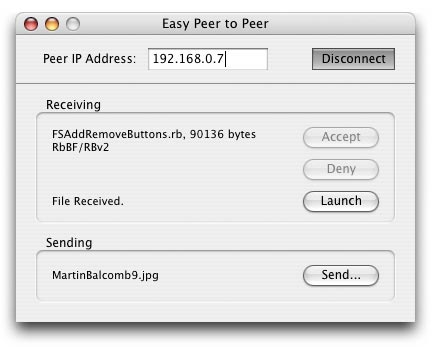
Have you ever wanted to implement a peer-to-peer file sharing application but never knew how? Believe it or not, you can accomplish this in REALbasic in less than 130 lines of code! In this tutorial we’ll create a small application that can connect to another copy of it on a different computer (over the internet or a LAN) and send and/or receive a file. Also, if you’ve ever just wanted to get your feet wet in networking code, this tutorial would be a good read. |

Tools of the Trade by Scott Chitwood
X11: Download and Compile Fink Commander
If you're ready to try an app or two from the Open Source Unix community on your Mac you can use Fink Commander as an alternative to using Fink in the Terminal to search for, download and compile the applications. You'll need the following items installed on your system before you can get started with Fink Commander; X11 and X11 SDK from Disk 3 of Panther's install CDs, Xcode/Apple Developer Tools and Fink.
 Fink Commander is a gui for Fink that provides an intuitive front-end to the Fink command-line tools for downloading and installing Unix software. Downloading and then compiling the source code for Fink Commander with XCode is simple to do. Once the package is unstuffed use the File > Open command in XCode and navigate to "FinkCommander.pbproj" in the Fink Commander folder. Then hit the Build and Run button in the XCode toolbar. After compiling, Fink Commander will lauch and ask you for your admin password so it can do a self-repair; read more detailed info on getting started with Fink Commander on this page. Now you're ready to download and compile Unix apps!
Additional Notes: 04-06 @ 8:40 p.m.
Craig Domingue reminded me "...that you need to install the X11 SDK in order to compile programs with Fink or Fink Commander, or Fink will not recognize you have X11 installed." Thanks Craig! Now I understand the error message I got when installing sodipodi;
You have an existing X11 installation in /usr/X11R6/lib.
This package refuses to overwrite these. Remove them, then tell Fink to
install xfree86-shlibs again.
Mike Harris says "You do not need to compile Fink Commander. It now comes with a Fink download, and/or can be downloaded separately at: http://finkcommander.sourceforge.net/#download." I was aware of that option and should have given it a mention even though compiling Fink Commander with Xcode was the main point of this article.

Compile Fink Commander with XCode.
Reader Help Desk: Custom Voices In Speakable Items
Jose Arroyo writes...
I was wondering if your staff or maybe any other of your readers can help me with this project. What format and application is needed to create your own choice of the voices that come with OS for use under speakable items? I don't particularly care about the ones that part of the OS system bundle and thought it would be great to be able to customize or create a voice of your own.
Mac OS X Class Action Lawsuit Settled
Even though I qualify for a refund of Mac OS X 10.0 that was purchased for use on our Rev. B Bondi Blue iMac I'm still not sure how I feel about actually claiming a share of the settlement. On one hand OS X's performance on old iBondiMac was terrible and I did remove it and downgrade back to OS 9 ages ago, so I should take the cash. But I'd also be giving up a little bit of Mac history by returning the install CD, sentimental perhaps, but still not easy to part with. I'll spare you the other arguements floating around in my head...
I know one of our readers (who was also a contributing artist) was so disappointed with this situation that he opted to buy a PC rather than support Apple when it came time to purchase a new computer.
Change The Clock Face In Panther
Updated 04-06-2004
by Gene Poncelet
The Panther Analog Clock face is in two places. The one that shows on the desktop and the one that shows in the Date & Time System Preferences Pane.
The paths to these two resources are:
The Panther 10.3.3 Analog Window clock face is in;
Macintosh HD
System
Library
Core Services
Menu Extras
Clock.menu (show package contents)
Contents
Resources
WindowClock (show package contents)
Contents
Resources
Clock02.tif
And the clock face that shows in the Date & Time System Preferences Pane is in;
Macintosh HD
System
Library
PreferencePanes
DateAndTime.prefPane (show package contents)
Contents
Resources
DateTime.prefPane (show package contents)
Contents
Resources
ClockFace.tiff
| |
Aqua Matrix 1.1, Lights Out 1.0.1 and BeOS Geek 1.1 guiKits
Peter McWhinnie has been busy updating his Aqua Matrix and BeOS themes. Aqua Matrix has a new variation called Lights Out that is fairly solid other than its grey Aqua style widgets being a bit on the pale side. Matrix Menu is an optional download that does exactly what its name implies. |  Lights Outs guiKit by Peter McWhinnie
Hit preview to view large image
|
Metallika v1 guiKit
The wire mesh texture in Metallika v1 is really quite wonderful in and of itself but it goes a step further by helping define and lift the other elements off its surface. The window widgets are a bit small although they do light up nicely on mouse overs. |  Metallika v1 guiKit by Dewey99
Hit preview to view large image
|
User Contributions by Scott Chitwood
It's easier than ever to contribute using our Browser Based Upload Page! If you contribute a file to any section of ResExcellence, you could win a PowerMax gift certificate worth FIFTY DOLLARS! It's easy and fun to win, look here to see how it's done!
Swen tosses us a Madonna World Tour Boot Panel featuring the famed performer decked out as an alluring Marie Antoinette.
Netscape 7 users with a passion for anime should check out Tiamat's Lumscape 7 Splash Screen.
Bram van Gerwen designed his most excellent BlueSteel Mighty Mouse Cursor Set using Cinema 4D 8.
Will Ernst answered our call for Mac OS Classic contributions quite admirably with his Classic Moss and ATM creations - very nice!

Support ResExcellence By Visiting Our Sponsors!
Software Update by Scott Chitwood
What a beautiful weekend we had here, too bad I got stuck doing yardwork. Maybe next year I can convince Dan to drive half a continent to help me spread all that mulch :)
Guitar Shed 2 by Astoundit Software
Astoundit Software has released its next major update to the Guitar Shed audio software suite, Guitar Shed 2. This new version includes many enhancements including a microphone-sensitive chromatic tuner, gig manager, website manager, and many speed improvements.
"With the release of Guitar Shed 2, we've taken audio software, specifically guitar software to a new level of usability. Beginning users, as well as experts will enjoy the many new features we've built into this release."
Guitar Shed 2 features over 400 chords, with full audio samples for easy lookup and song creation, plus it includes just about every music tool you'll ever need; Adjustable Metronome, Jam Machine, Song Jammer, Low-Octave Bass Tuning, Gig Manager, Web Manager, and much more.
Playing With GarageBand
I finally had time Saturday night to play around with GarageBand and couldn't have been more pleased with how easy it is to work with. I was a little apprehensive about performance after reading a couple of different articles that said GB was less than spectacular on single processor G4s (like our 800 mhz system) but from what I've seen so far that really doesn't seem to be the case. Finding the right mix of synths, guitars and percussion from GB's built-in loops hardly took any time at all.
MacThemes.net Theme Mock Up Contest Winners Announced
Check 'em out here. The winning entries were all very well deserving as were many other concepts submitted to this contest. Hats off to the MacThemes.net gang for doing a great job it!
Send us your press releases!
Polling Place by Scott Chitwood
 The question was; Do you work in graphic design or pre-press?
Wow! We've got more readers in the graphic design and pre-press fields visiting ResExcellence than I would have thought. My graphics career started way back in April of 1981 as the darkroom "guy" for an ad specialties company where we had to deal with imprint areas as small as 5/8" diameter for a tire shaped keyring. On the other end of the size scale the company I'm with now did 48' x 4' Olympic Torch Run over-the-street banners for the Atlanta games in 1996.
Not that graphics are the only area of Mac creativity - many of you do cool stuff with a Mac in other industries too! I'd love to find out more about what it is you do and have a poll based on a broader scope of careers where you get to work on a Mac all day.
Some polls deserve to be recycled now and then. Due to the ever changing nature of Mac model lines, monitor resolution is one of those. Why is it important? For desktop submissions our current requested size reads "...send as many desktop resolutions as you like, but please make sure that at least one of them is 1024x768..." We need to know if that dimension is still current for the majority of users or if the demographic has changed, especially since many of the newest Macs have moved to a widescreen format.
The question is; What is your monitor resolution set at?
Do you have an idea for poll question that you'd like to see us ask? Send it my way!
Icon & Desktop News: by Dan
Icons - Desktops: Yeah! We've got another selection of great icons and desktops to satisfy your hunger for desktop decoration. Starting off with [6] New Desktops, [2] New Icon Sets, and of course, updated "News From Around the Web". Take your time going, and hurry back!
Editors Note: I've had it with getting hundreds of virus laden emails every week through my ResExcellence email account. I'm removing it from this page, and directing everyone with news items to our submission page till this monster calms down. Thanks for your patience, as I have lost mine.
We love promoting your work! So, grab those pixel pencils, and send us your best creations!
In an ongoing effort to make it easier for you to send us your Icons and Desktops, we've designed a new Browser Based Upload Page for the task. Just follow the easy to use instructions, and you'll find submitting your artwork is a piece of cake. In case your haven't done so already, don't forget to read our submission guidelines before you start!
- Mac users have certainly spread all around the globe. Spring Festival Icons by Yangge come all the way from Beijing, China, and feature sixty seven beautiful system level icons. Again, these appear to have been originally designed for Windows, but have been happily converted to the platform of choice.
- This man has talent! Smooth Metal -Apps Icons by Rokey is another excellent assortment of fifty one hand drawn application icons. Many of these appear to be Windows based, but there's more than enough selection to make any Mac user happy.
- The folks over at Digikitten keep on sending us loads of luscious desktops to share with ResExcellence readers. Housing some of the most fantastic digital artists on the globe, you are invited to come by and join them, play some Photoshop Tennis or many of the other digital pixel games they have. Floral Link by Yeokeh is the next awesome desktop from this long running display, and is available in 1024x resolution.
- Pink Floyd fans will appreciate Darkside of the Mac made by Ryan Stewart. Adapted from the "Darkside of the Moon" album cover, this one comes in 1440x resolution.
- Maurice Rojas likes the night and dark images as you will see with Nocturnum Sun and Eternity. Both of these are based on images he found on our site and then modified them to suit the theme. These come in 1440x resolution.
- Chanpon and MacV by Jim Pereira were found on the internet, colored and made into Anime Desktops. These come in 1024x and 1280x resolutions.
- Melvin Spivey has found it difficult to create an "old school" theme for his OSX desktop, and so decided to turn back the clock a bit with that familiar Smiley Mac Face, now available in six different colors. He's also included a Photoshop template (with the clipping paths for those of you with Photoshop) for cleaner variations you may want to make on your own.
- Is that an iMac in your lap, or are you just glad to see me? Apple CEO Steve Jobs appears in this oh so cuddly iMac desktop by Yannick von Arx. Comes in 1024x resolution.
News From Around the Web:
Two new icons sets added to mbstuart.com: "CPR(Crosby, Pevar, and Raymond) icons" he made for the band. James Raymond(Keyboards) had a PowerBook G4 on stage with him and he told him I'd make an icon set to go with it. The other set is his 2004 PixelPalooza entry - "EYEcons."
Bombia Design updates with Blocks (Green).
Mandolux has issued a new desktop in celebration of the new baseball season and his blue-and-white cap.
Spring Jam Vol. 1 icons are now available at Yellowlane.
The Iconfactory Releases "Radiant" Stock Icon Collection. Created specifically to work across the widest possible group of application environments, Radiant is both technical and approachable. Skillful use of color and shading, combined with professional detailing gives this collection the edge that will help web or software applications stand out from the rest. Radiant is available today as an electronic download for $349.00.
MacMonkies recoops from a Fool's Day Folly by ushering in a fantabulous Friday Icon Edition! Three New Icons Sets come your way courtesy of Steve Smith, Pictures and Adicons, and Black Widow. Stop by MacMonkies on Friday for a pixel pick-me-up and good News from all around the web!
The Iconfactory is happy to announce the release of this week’s freeware icon collection from icon artist Anthony Piraino – Take A Hike. This fun and colorful icon collection is a perfect companion for those who enjoy camping and hiking in the great outdoors.
At last the mighty burntcanvasdesign is back on the rails and rolling full steam. Alan is back with 12 new pieces site tweaks, and after popular demand a fixed icon set. The new work is available in desktop format and is in the galleries for you to check out.
The Creative Box has updated with "Blackout 2", a dark desktop with yellow outlines which symbolize the light.
Adam Dickson has updated his website at http://home.tiscali.nl/picturesandadicons/ with a new icon set 'Aim Men' and two macabinet themes.
So what's up WWW? Icons? Desktop Pictures? News? Inform us! We'll post it!
*The desktop and icon archive is updated three times a week. The work is actually done on Tuesday, Thursday and Sunday evenings for publishing the following day. If you want a news item posted the same day, try and get it to me before 6 pm on any one of those evenings. THANKS!

Support ResExcellence By Visiting Our Sponsors!