






 |
 |
 |
|
 |
||
 |

Articles 3D Audio Custom Controls General RB Graphics Hacks Mac OS X Menus Novelty Printing REALbasic 2005 REALbasic 2006 Registration Resources Reviews Serial Speech Sockets XML Video Resource Links News Current News February 2006 January 2006 December 2005 November 2005 October 2005 September 2005 August 2005 July 2005 June 2005 May 2005 April 2005 March 2005  REALbasic for Dummies by Erick Tejkowski  Learning REALbasic through Applications REALbasic for Macintosh REALbasic Cross-Platform Application Development 
Older files are in Stuffit 5 or greater format. Newer files are ".Zip". Download StuffIt Expander |

|
 
OpenGL in REALbasic First things first, (or rather second things second since I already did something first) we should all thank Asher Dunn from Fireye Software for writing the spectacularly awesome OpenGL Declare Library. I can't imagine how many hours it took him to do it, but I know the REALbasic community owes him many many thank you's. If you don't know OpenGL but want to learn it, see the NeHe tutorials. You should be able to do the first few tutorials without any problem using the project from this article. OpenGL Declare Library OpenGLView At the moment OpenGLView is a Canvas subclass. This is done for no other reason except for the fact that if I try to make it a pure class then I can easily cause a crash in the OpenGL driver for some odd totally unexplainable reason. I intend to figure out why it's happening and then turn the OpenGLView into a simple class rather than a control (because being a Canvas subclass has absolutely no benefit at all) but for now, who cares, it doesn't make a difference anyway. The important part is what the class does which we'll look at. Oh and also, the declare library is Windows compatible, and so was Asher's example, but this version of OpenGLView isn't because I deleted that code because I Don't Know Jack™ about Windows and didn't want to be responsible for it. Anyway, now on to the good stuff...
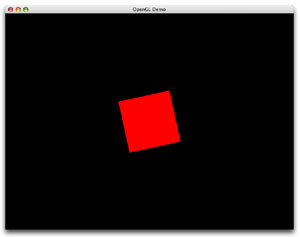
Yes, this is all the project does. It rotates a square.
Setting up the OpenGL Context
Above we see that the first thing done is creating a pixel format. Below you can see that we fill a memory block with flags describing the pixel format we want to create, then we select the pixel format using aglChoosePixelFormat. Normally these flags are sent as an array to aglChoosePixelFormat but we can't do that with REALbasic so we use a memory block on pass a pointer to it, which is all passing an array really does. If you're not familiar with how all of this setup is done, there are a couple places on the net that will explain it better than I am here. Namely, try the #idevgames IRC room and ask, visit the iDevGames website, possibly the mac-games-dev mailing list... there are numerous places to go. If the pixel format isn't selected properly, we bail out of the SetupContext method by returning false which prevents anything from being rendered later on. If it is, the context is created and then we attach it to a window by using aglSetDrawable. The MacGetWindowPort method takes a REALbasic Window and returns the window's port (it's a low level Window Manager thing). Passing it to aglSetDrawable tells the links the context to the window. aglSetCurrentContext selects the context so that any calls to OpenGL work with that context and not any other and then we do some stuff that you don't need to concern yourself with.
The Animation Sub Run()
And here, below, is the ultimate goal: The only small bit of code that we really need to write if we use the the OpenGLView. This draws a red square and rotates it. Pretty simple stuff.
Finished
|
 |
||
 |
 |
 |
|
 |




 |
 |
 |
||||||||||||||||||||||||||||||
 |
|
 |
||||||||||||||||||||||||||||||
 |
 |
 |
Maintained by the Staff of ResExcellence. This entire site ©1997-2006 ResExcellence
Privacy Statement? Sure we gotta Privacy Statement.
[an error occurred while processing this directive]