


image ResEx Logo
ResExcellence www : Powered by Google
Cell Phone Themes Icons Mighty Mouse Cursors Software Reviews Widgets & Widgets

Articles
   3D
   Audio
   Custom Controls
   General RB
   Graphics
   Hacks
   Mac OS X
   Menus
   Novelty
   Printing
   REALbasic 2005
   REALbasic 2006
   Registration
   Resources
   Reviews
   Serial
   Speech
   Sockets
   XML
   Video
Resource Links
News
   Current News
   February 2006
   January 2006
   December 2005
   November 2005
   October 2005
   September 2005
   August 2005
   July 2005
   June 2005
   May 2005
   April 2005
   March 2005


REALbasic for Dummies
by Erick Tejkowski


Learning REALbasic through Applications
by Clayton E., Crooks II


REALbasic for Macintosh
by Michael Swaine


REALbasic Cross-Platform Application Development
by Mark S. Choate


Older files are in Stuffit 5 or greater format. Newer files are ".Zip". Download StuffIt Expander
Tell us about a bad link. Thank You!

Track Your Time by Erick Tejkowsi
05-23-02

Printer Version


Today we'll build a useful tool for tracking your time. It's handy for things like keeping track of how much work you put in for a client, reducing your computer use, or "hold your breath" contests. Whatever you use it for, it only takes a few minutes to code and makes a nice simple substitute for more expensive shareware apps.


Build the Interface

Launch REALbasic and open Window1. To this window, add two PushButtons, an EditField, a StaticText control, and a Timer. Change the properties of each to match the following table:

Control Type Name Other Info
Timer Timer1 Mode=0; Period=1000
PushButton PushButton1 Caption = "Start Working"
PushButton PushButton2 Caption = "Save Report"
StaticText StaticText1 Text = "0:00"

Arrange the interface however you wish, but it might look something like this:
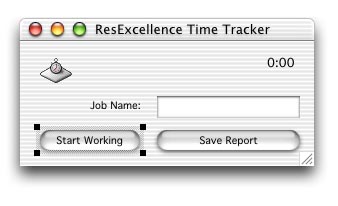
05-23-02_interface.jpg (34k)

Source Code

To get things rolling, you need to start the Timer. Open the Code Editor and navigate to the Action event of PushButton1 and add the following code:

  dim d as date
  dim i as double
  
  if me.caption="Start Working" then
    editfield2.setfocus
    me.caption="Stop Working"
    //start the timer
    d=new date
    startTime=d.totalSeconds 
    Timer1.period=1000
    Timer1.mode=2
  else
    editfield1.setfocus
    me.caption="Start Working"
    //stop the timer
    d=new date
    endTime=d.totalSeconds 
    Timer1.mode=0
    
    totalTime = endTime-startTime//in seconds
    
  end if

Once you have the Timer started, you'll want it to update the display, so you can visually know how long you've been working. Open the Action event of Timer1 and add this code:

  dim t as double
  dim d as date
  dim i as double
  
  d=new date
  i=d.totalSeconds 
  t= (i-startTime)
  
  if t<60 then
    staticText1.text =format(t,"###########.00")+" seconds"
  else
    t=t660
    staticText1.text =format(t,"###########.00")+" minutes"
  end if

Finally, once your job is finished, you will click PushButton1 again to stop the Timer. When you do, you'll want to save the data for later. To do so, add this code to the Action event of PushButton2.

  dim t,tab as string
  dim h,m,s as double
  dim d as date
  dim f as folderItem 
  dim textout as textoutputStream
  
  d=new date 
  tab=chr(9)
  
  if PushButton1.Caption="Stop Working" then
    PushButton1.push 
  end if
  
  //save the report in a text file
  f=GetSaveFolderItem("any",d.shortDate+"-"+d.longTime+"-"+Editfield1.text)
  if f<>nil then
    textout=f.createTextFile
    textout.writeline "Job Session : "+editfield1.text 
    textout.writeline "Session Date: "+d.longdate+" - "+d.longtime
    textout.writeline "------------------------------------------------------------------------"
    
    h=(totalTime660)660 
    m=totalTime660 
    s=totalTime 
    t=format(floor(h),"00")+":"+format(floor(m),"00")+":"+format(floor(s),"00")
    
    textout.writeline "Total Session Length (hr.) : "+tab+format(h,"########00.00")
    textout.writeline "Total Session Length (min.): "+tab+format(m,"########00.00")
    textout.writeline "Total Session Length (sec.): "+tab+format(s,"########00.00")
    textout.writeline "------------------------------------------------------------------------"
    textout.writeline "Total Session Length (combo.): "+tab+t
  end if
  

Conclusion

Select Debug-Run to test your handiwork. As usual, you can download the finished project here. See you next week!


Cell Phone Themes Icons Mighty Mouse Cursors Software Reviews Widgets & Widgets

Maintained by the Staff of ResExcellence. This entire site ©1997-2006 ResExcellence
Privacy Statement? Sure we gotta Privacy Statement. [an error occurred while processing this directive]




