






 |
 |
 |
|
 |
||
 |

Articles 3D Audio Custom Controls General RB Graphics Hacks Mac OS X Menus Novelty Printing REALbasic 2005 REALbasic 2006 Registration Resources Reviews Serial Speech Sockets XML Video Resource Links News Current News February 2006 January 2006 December 2005 November 2005 October 2005 September 2005 August 2005 July 2005 June 2005 May 2005 April 2005 March 2005  REALbasic for Dummies by Erick Tejkowski  Learning REALbasic through Applications REALbasic for Macintosh REALbasic Cross-Platform Application Development 
Older files are in Stuffit 5 or greater format. Newer files are ".Zip". Download StuffIt Expander |

|
 
Introduction As mentioned previously, AOL Instant Messenger users will be pleased to know that there are some interesting Bots available for the chat application. Simply add a user named "SmarterChild" (no quotes) to your buddy list. Then, send a message to SmarterChild. By typing "home" (again, no quotes), the SmarterChild gives you a menu of options. One of the menu items is "Utilities". We will build a simple floating toolbar that gives you one click access to the functions in the Utilties menu. Before you begin working with REALbasic, you first need to create a small AppleScript. Launch the ScriptEditor application and to it, add this code: 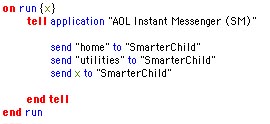 Save the script as a "Compiled Script" and name it "SmarterChildUtility". 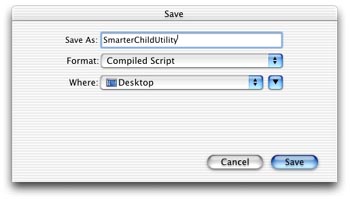 Build the Interface Launch REALbasic and drag the AppleScript you just created into the project window. Then, open Window1. Change the window's Frame property to "Global Floating Window".  Next, add six PushButtons to the window. Label them like this: 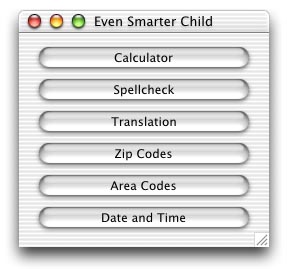 Give each PushButton the same name and a unique Index starting with 0 (zero): 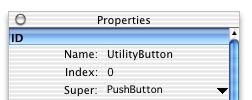 Source Code Double-click any one of the PushButtons to open the Code Editor and add this one line of code: Conclusion That's it! To test, select Debug-Run. As you might imagine, this project could be expanded to account for many more "SmarterChild" features. Hopefully this demo gets you started in the right direction. You can download the finished project here. Have fun and see you next week! |
 |
||
 |
 |
 |
|
 |




 Michael recently posted an AOL Instant messenger tip about AIM Bots. The little creature was so popular that I decided to include it in this week's REALbasic tutorial. This week we'll build a simple little hack that will improve your "SmarterChild" experience.
  |
 |
 |
||||||||||||||||||||||||||||||
 |
|
 |
||||||||||||||||||||||||||||||
 |
 |
 |
Maintained by the Staff of ResExcellence. This entire site ©1997-2006 ResExcellence
Privacy Statement? Sure we gotta Privacy Statement.
[an error occurred while processing this directive]