
 Michael recently posted an AOL Instant messenger tip about AIM Bots. The little creature was so popular that I decided to include it in this week's REALbasic tutorial. This week we'll build a simple little hack that will improve your "SmarterChild" experience.
Introduction
As mentioned previously, AOL Instant Messenger users will be pleased to know that there are some interesting Bots available for the chat application. Simply add a user named "SmarterChild" (no quotes) to your buddy list. Then, send a message to SmarterChild. By typing "home" (again, no quotes), the SmarterChild gives you a menu of options. One of the menu items is "Utilities". We will build a simple floating toolbar that gives you one click access to the functions in the Utilties menu.
Before you begin working with REALbasic, you first need to create a small AppleScript. Launch the ScriptEditor application and to it, add this code:
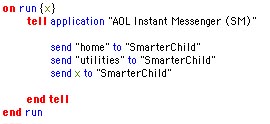
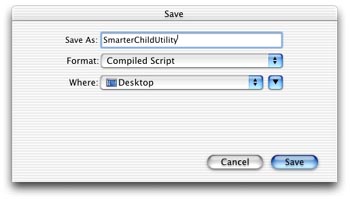
Save the script as a "Compiled Script" and name it "SmarterChildUtility".
Build the Interface
Launch REALbasic and drag the AppleScript you just created into the project window. Then, open Window1. Change the window's Frame property to "Global Floating Window".

Next, add six PushButtons to the window. Label them like this:
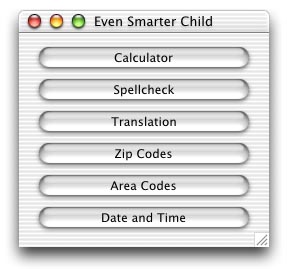
Give each PushButton the same name and a unique Index starting with 0 (zero):

Source Code
Double-click any one of the PushButtons to open the Code Editor and add this one line of code:
smarterChildUtility str(index+1)
Conclusion
That's it! To test, select Debug-Run. As you might imagine, this project could be expanded to account for many more "SmarterChild" features. Hopefully this demo gets you started in the right direction. You can download the finished project here. Have fun and see you next week!