






 |
 |
 |
|
 |
|||||||||||||||||||||||||||||
 |

Articles 3D Audio Custom Controls General RB Graphics Hacks Mac OS X Menus Novelty Printing REALbasic 2005 REALbasic 2006 Registration Resources Reviews Serial Speech Sockets XML Video Resource Links News Current News February 2006 January 2006 December 2005 November 2005 October 2005 September 2005 August 2005 July 2005 June 2005 May 2005 April 2005 March 2005  REALbasic for Dummies by Erick Tejkowski  Learning REALbasic through Applications REALbasic for Macintosh REALbasic Cross-Platform Application Development 
Older files are in Stuffit 5 or greater format. Newer files are ".Zip". Download StuffIt Expander |

|
 
Introduction Before you get started, you will need to download a copy of REALbasic 4.5a9 or higher. Keep in mind that REALbasic alpha releases are works in progress. You shouldn't rely on them for professional development. The features and appearance of pre release versions can change at any time. Always back up your projects when using REALbasic alpha releases. Since we will be working with existing media files this time (e.g. mp3, aif, wav, mov, etc...), it would be a good idea to make back up copies of these files as well. You don't want an errant REALbasic to wreak havoc on your only copy of that Kajagoogoo tune you snagged from LimeWire. In other words, take the usual ResEdit precautions: always keep a back up! Build the Interface Launch REALbasic and open Window1. To this window, add the following controls:
Arrange the interface however you wish. It might look something like this: 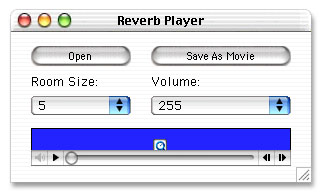
Source Code Before we get started with the code, we need to do a few preliminary tasks. First, select the Edit-File Types menu. In the File Types dialog, add these two file types:
Next, double click Window1 to open the Code Editor. Select the Edit-New Property menu to create the following 3 properties:
Okay, now we're ready for some code. Add the following code to the Action event of OpenButton: dim i as integer Next, navigate to the Action event of the SaveButton and add this code: The final step is to add some functionality to the two PopupMenu controls. To the Change event of RoomSizePopup, add the following code snippet: reverb.roomsize=val(me.text) Then, add this snippet to the Change event of VolumePopup: if sndTrack<>nil then Conclusion That's it! To test, select Debug-Run. Press "Open" to load your favorite audio file. Since we left it open-ended (i.e. file type="any"), you can load many common audio formats (mp3, aif, wav, mov). Once the audio is loaded, adjust the room size (in meters) to your liking and press "Save" to save the result as a movie. You can download the finished project here. Have fun and see you next week! |
 |
|||||||||||||||||||||||||||||
 |
 |
 |
|
 |




 |
 |
 |
||||||||||||||||||||||||||||||
 |
|
 |
||||||||||||||||||||||||||||||
 |
 |
 |
Maintained by the Staff of ResExcellence. This entire site ©1997-2006 ResExcellence
Privacy Statement? Sure we gotta Privacy Statement.
[an error occurred while processing this directive]