






 |
 |
 |
|
 |
|||||||||||||||||||||||||||||||||||||||||||||||||||||
 |

Articles 3D Audio Custom Controls General RB Graphics Hacks Mac OS X Menus Novelty Printing REALbasic 2005 REALbasic 2006 Registration Resources Reviews Serial Speech Sockets XML Video Resource Links News Current News February 2006 January 2006 December 2005 November 2005 October 2005 September 2005 August 2005 July 2005 June 2005 May 2005 April 2005 March 2005  REALbasic for Dummies by Erick Tejkowski  Learning REALbasic through Applications REALbasic for Macintosh REALbasic Cross-Platform Application Development 
Older files are in Stuffit 5 or greater format. Newer files are ".Zip". Download StuffIt Expander |

|
 
Today we'll build a simple tool to look up U.S. zip codes. Using only a zip code, we can learn the precise location of an address and calculate the distance from that location to any other place in the country. Intro This project is a clone of a Cocoa-based open source project. I thought the idea was fun and pretty useful, so I decided to convert it into a REALbasic project for ResExcellence readers. The zip code data that accompanies this project is a collection of numbered text files. These files comprise a complete (as of 1999) collection or "database" of all the zip codes in the United States. Accompanying each zip code is a city name, longitude, and latitude for location. In addition to these zip code data files, there are two files that contain the states and time zones of the various zip codes. Our project will simply accept a zip code and attempt to find it in the zip code files. Once a match is found, the various information is pulled from the database. An enterprising REALbasic user might consider moving all of this data into a REAL Database for additional database manipulation abilities. Build the Interface The interface is the most time-consuming aspect of today's project. It's not really difficult to build, but its a bit tedious. If you'd prefer not to build the interface, you can download the finished project at the end of this tutorial. Begin by launching REALbasic and open Window1 by double-clicking it in the Project Window. To this window add the following controls:
You can add labels and GroupBoxes to spruce things up as you see fit, but your completed interface might look like this: 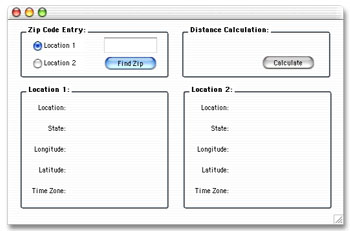
Add the Code The code segment of this tutorial is pretty easy to digest. You will need to place code in the Action events of PushButton1 and PushButton2. For starters, navigate to the Action event of PushButton1 and add this code: dim s,temp,remainingzip as string Finally, navigate to the Action event of PushButton2 and enter this code: dim distance,lat1,lat2,long1,long2 as double These two pieces of code scan through the various text files to track down the city, latitude, longitude, and time zone of the desired zip code. From this information, we calculate a distance. Accompanying the original open source project as well as the download for this tutorial is a short document that lists additional distance calculations. We used the simplest (but most error-prone) calculation for the distance. You might try your hand at the others to see how they differ. Conclusion That's it for this week. You can download the completed project here. See you next week! |
 |
|||||||||||||||||||||||||||||||||||||||||||||||||||||
 |
 |
 |
|
 |




 |
 |
 |
||||||||||||||||||||||||||||||
 |
|
 |
||||||||||||||||||||||||||||||
 |
 |
 |
Maintained by the Staff of ResExcellence. This entire site ©1997-2006 ResExcellence
Privacy Statement? Sure we gotta Privacy Statement.
[an error occurred while processing this directive]