11/7/00
Snapshot Gallery by Jeremy Hoesly
Tuesday’s snapshots are ready to fly:
- Akio, Danger Girl extrordinaire, is back with a submission featuring another custom Danger Girl desktop picture and the BIG Indigo K-Scheme, both of which were unreleased when I received this snapshot. Audion, overhauled with the BIG Indigo face, is dishing out tunes in the upper left.
- The custom “Zorak” desktop picture and Maury McCown’s Mangus OS K-Scheme debut in this screenshot from loyal contributor Alberto Chávez. iPObox, configured with the custom Apple Lime skin, is running in the lower left.
- Time for another trip into Mac history with this screenshot of a Mac SE from Michael V. An ancient version of Microsoft Word is running in the background with only a one megabyte memory partition! Now that’s something for the record books!
- Daniel Vera returns with an encore snapshot touting MacDesktops’ “Chrome” desktop picture coupled with the QT4 Modoki Theme. Audion, retro-fitted with the Quickie face, is taking music requests in the lower left-hand corner. The icons are provided by icons.cx and Icon Factory.
Have a masterpiece in your hot, little hands that you want to show off? Visit our submission guidelines page for more info.
Applescripts 11-7-00
Applescript/Scripting by Michael Today, instead of covering Applescript, we'll delve into the other scripting language supplied with MacOS X - Perl. Below is one of the simplest scripts used on ResExcellence. At the bottom of the left sidebar, it prints the amount of time the LinuxPPC server has been booted. This script runs equally well under MacOS X. There are only 7 required lines of code; lines beginning with # are comments.
| #!/usr/bin/perl
#
# The line above is needed to tell the script
# where to look for the perl program. It's required.
#
# After creating a script, you need to tell the computer it’s
# an executable program. Do this by typing in a terminal:
# chmod 755 /path_to_script/name_of_your_script
# 'uptime' is the name of a standard Unix application that prints
# the time the server has been running and the load on the cpu
# What I do below is take the output of 'uptime' and
# store it in a string variable
$result_of_run_command = `uptime`;
# Below is the result of an ‘uptime’ command.
# We are interested in the number between the words: up and mins.
# (13 in this example)
#
# 8:06AM up 13 mins, 2 users, load averages: 0.08, 0.16, 0.19
#
# To extract the number from the string use ‘split’ to break it into parts
# part1 equals everything before ‘up’. part2 is everything after ‘up’
($part1, $part2) = split(/up /,$result_of_run_command);
# we take part2 and say we want everything before ‘mins’
($the_number_of_mins) = split(/ mins/,$part2);
#the final result is the number of minutes culled from the string
# Enable the line below if you want plan to call the script from a browser.
# In your html, you need the line: <!--#exec cgi="scripts/up.cgi"-->
# print "Content-type: text/html\n\n";
# Otherwise, just print to the command line.
print "You’ve been booted for $the_number_of_mins minutes.";
# Add a line return to make look pretty.
print "\n" ;
#the end :) |
I'm the first to admit that as displayed, this script needs work. What happens after 60 minutes and the output of "uptime" reads one hour? What happens after 24 hours and "uptime" outputs 1 day? All of these can be handled with the addition of a conditional program loop. Drop me a line if perl interests you, and maybe we will cover this script in more detail on Thursday.
In the meantime, if you run Linux or MacOS X, download the text of the script and give it a run. Instructions to install:
Download up.tar.gz
Open a terminal and change into the directory where the download is located.
Type:
tar cvfz up.tar.gz
chmod 755 up.cgi
./up.cgi
If you have been booted less than an hour, you will see the number of minutes in the terminal output string. If you have been booted longer than an hour, nothing harmful will happen, but your text will not be formatted correctly.
REALSoftware announced the availability of REALbasic 3.0a12. Using this alpha release gives you the chance to learn about new features in REALbasic early, work with Carbon, and participate in setting the direction for the next release. It runs on and compiles for both Classic (7.6.1 to Mac OS 9) and Mac OS Public Beta. It uses Carbon and the Aqua User Interface for both the IDE and the compiled applications when running in Mac OS X, and Platinum in Classic.This release adds a complete revision of REALbasic's code encryption method. Modules may now be encrypted with a password.
There is an excellent discussion in our forum on how easy REALBasic is to use.
Today's News by Michael
Several readers, and even a phone call from a friend, alerted me to the fact that SteamTunnels mentioned ResExcellence. SteamTunnels in a college newspaper insert that reaches over 2 million students. Normally I wouldn't mention this, but since ResExcellence is a product of its readers hard work and contributions, all of you should share in the accolades!
Change the Finder Buttons in MacOS X
In the new Finder windows, there is a shortcut button bar with six icons. This edit allows you to change those icons! In case you haven't seen it yet, read the previous edit How to Change the New Icons in MacOS X. It will get you familiar with the tools and technique needed. (Continued...)

An Interview with Wade Cosgrove
A few weeks back, on the heels of the Mac OS X beta release ResExcellence Software Editor Cletus sat down with Wade Cosgrove, coauthor of clipEdit and Dock Manager, to have a little chat. Read along as he picks the brain of one of the cofounders of Everyday Software. (Continued...)
MacInstruct has posted their latest help guide, Dear Mac...
Topics covered this week...
- How to use liquid nitrogen to freeze a banana and hammer nails. (ok, I added that one.)
User Contributed Splash Screens:
- xochi created another Interarchy Wand! This one mimics the look of Apple's navigation bar on their webs site.
- I was fourteen when the Exorcist was released. Now twenty-five years later, Mr. Bitter created an Explorer splash with Linda Blair for the movie's re-release!
- Four times the Danger Girls in this Office replacement splash set by Nels Anderson.
You'll find a Toast skin to match your iMac in this set by Joakim Uhrwing.
- A MOSS for MacOS 9 claims to be for X! See this creation by Kevin Kelm.
Software News 11-03-00 Software News: by Cletus™
A new program called WindowFinder has been released. The homepage describes it as: "If you don't like the tedious, time-consuming, and repetitive task of having to juggle, windowshade, and close windows in order to find the files and windows you want to work with, then WindowFinder is the solution."
St. Clair Software has posted the next beta version of Default Folder, 3.0.8b2. Their dialog menu tool provides the following fixes:
• Fixed a bug that caused Navigation Services dialogs to crash when displayed by an Applescript script or applet.
• Updated text in the control panel to reflect the fact that Default Folder can now be purchased through both Kagi and DigiBuy.
• Added the SetFileDialogFolder scripting addition, which allows Applescript to set the folder shown by Standard File and Nav Services dialogs.
Last time I mentioned possibly adding LiteSwitch to the Software Archive if it met with readers approval. The response was overwhelmingly in favor. PeterMac, Ben Klocek, Michael Askew and Grey Tomorrow among others supported the addition. I have now added it to the SW Archive for all.
Panda Systems have offered up version 5.5.5 of PandoCalendar as their fix for a bug in 5.5.4 that could corrupt the PandoCalendar Notes file. PandoCalendar is a freeware calendar for on your desktop. Very useful and customizable.
Mac OS X Software:
 Gideon Greenspan has posted an update to his OS X menu enhancement, Classic Menu. Version 2.1 is now optimized for the Public Beta version of the OS. It provides both an Apple menu on the left of the menu bar and a Process menu on the right. Gideon writes:
Version 2.1 stops menus displaying when a Classic application is in the foreground, improves the disappearing menu shadow problem and detects screen resolution changes.
Sig Software is also pleased to announce a new licensing deal - Classic Menu and Drop Drawers X (our revolutionary user-interface enhancement, optimized for Mac OS X) can now be purchased together for just $20, a 20% saving.
Pocket Software has released Pocket Dock. Pocket Dock is an OS X utility to organize and launch applications, documents and web links. Version 2.1 beta1 provides the following changes:
• Tab based user interface.
• Drag and drop of links and tabs.
• Customizable links, tabs and windows.
• Multiple windows.
• Can launch documents, applications and web links.
Submit Software News Suggestions!

Calendar & Appointment Scheduler for Mac OS X
Snapshot Gallery by Jeremy Hoesly
Friday’s snapshot jewels are on display:
- This submission from Josh Kuesch sports a desktop picture from Artwiz. Audion is dishing out tunes in the lower left, and a plethora of icons amassed from all corners of the Mac universe converge on the desktop.
- A custom desktop picture and Toren Valimir’s I/OS X K-Scheme debut in this contribution from N. Lavertue. Audion, outfitted with the Cutting Edge face, is serving up the music in the upper left-hand corner. A custom screensaver created with Screentime for Flash is also featured in the upper left.
- Lars Mikkelsen sent in this screenshot touting a custom “Rebecca St. James” desktop picture. Audion, overhauled with Scott Aaleigh’s Oxygen face, is pumping out soundwaves at top center.
- Just when you thought Halloween was over, this last-minute submission from Kenneth Schneidman featuring a desktop picture from Blue Sky Heart along with Ben Mackin’s Liquid Theme slipped in. Audion, retooled with Paul Johnson’s Jack & Sally face, is situated in the center. Various icons, some of which are custom, are scattered throughout.
Have a drop-dead gorgeous desktop to strut about in the Snapshot Archive? Read up on the submission guidelines page for details.
Icon/Desktop News 11-1-00 Icon & Desktop News by Dan  WE WANT YOU! (yeah you), all those Digital VanGoghs, Pixelating Picassos, and Rasterizing Rembrandts. WE WANT YOUR ARTWORK! Why? cause it's you who make the ResExcellence Icon and Desktop Archives what they are; one of the best places on the web to view and download one of a kind, original and just all around awesome digital art and icons. Take a look at the Submissions page to get an idea of our guidelines, and get to it! Don't forget, we also have an ftp drop box for those large e-mail choking files bursting at the seams with your creativity. We also have to ask you kind folks who sent submissions to Jessica in the last few weeks to please re-submit them.
Icon and Desktop Archives: I'm starting to get that "warm and fuzzy" feeling from all those e-mails I've so far received welcoming me in as the new Icon and Desktop Archive editor. Thank you all for the kind thoughts and encouragement.......... and don't worry, I'll be around.
- Chris Kiss sends us a set of dueling deskpics starring himself in the National Ballet of Canada's production of Romeo and Juliet. Follow this link to more resolutions
- Noen Design sumits the fascinating "DesktopJewel", made in Artmatic and Photoshop
- Erik Veland of Wigwam Multimedia is at it again with his futuristic background titled "Warp Mode"
- A reader who wishes to remain anonymous makes "Mactoast", a hilarious parody on the new G4 cube.
- The "Rain Shower Suite" is an exploration of dreams in a set of original digital art, photography and poetry. (Eight 1024x768x32-bit images in JPEG format.) Please note that this is a large download, but well worth the trouble
- Günther Klebinger provides us with another in his series of Aqua Desktop pictures, "Waterdock 3".
News From Around the Web:
The Little Dark Room has received a facelift and she has released three desktop pictures. A new icon set should be coming soon.
Rosa Cortesão Pomar of Colheres lets us know that she's released a new icon set - cizento | grey (by Luísa)
Our favorite icon site, IliCon releases "Creatures", a new icon set full of cuteness from Cat to Dog and who knows what between them.
maCombine, a new icon site is about to open and reports on its latest set of icons,"Election2000". They have all the info on the pixelated candidates.
It's update time for RampantMac, seven new desktops and three new tiles have been posted. Always quality work found there.
So what's up WWW? Icons? Desktop pictures? Inform us! We'll post it!

Click here to learn more about Toast 6 Titanium
10/31/00
Snapshot Gallery by Jeremy Hoesly
Get to know your Keychain with my latest article.
Come satisfy your snapshot cravings with Tuesday’s batch:
- Danger Girl strikes again with this screenshot from faithful contributor Akio touting the “Danger X” desktop picture. Audion, retooled with the Elphin face, is tickling the eardrums in the lower right.
- Joaquin Jang submitted this snapshot touting a custom desktop picture in conjunction with the Aqua Theme. Audion, retro-fitted with the X-Fusion face, is kicking out soundwaves near the top.
- The downright awesome “Big Earth Map” desktop picture from Arstechnica is shown off in this submission from Ralph Lubin. Unsanity Echo X is dishing out tunes in the lower right. PCalc, an industrial strength calculator is running in the upper right.
- A desktop picture from Anime Fantasy Extreme along with Yoshihiro Kondo’s Another Sugar Plate III K-Scheme debut in this snapshot from Sara. Audion, overhauled with the F1 face, is serving up music in the lower left.
Have a drop-dead gorgeous desktop to strut about in the Snapshot Archive? Read up on the submission guidelines page for details.
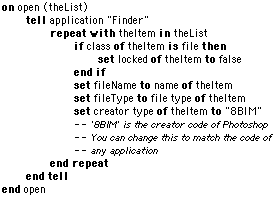
Applescripts 10-31-00 Applescripts by MichaelTimothy Hellum works at a major daily newspaper in Canada. He downloads lots of images from lots of different sites to his servers. Regardless of which application originally created them, Tim can select a bunch of the images and drop them onto the following applet to set the creator codes to PhotoShop, the preferred editor at his paper.
By changing the creator code, you can modify this script to work with any application. When saved as a MacOS X Applet, the script will work with two caveats: The application "Finder" changes to "Desktop", and while the creator code changes immediately, the icon won't switch until the next time you log in.
11/2/00
Snapshot Gallery by Jeremy Hoesly
Get your snapshots for Thursday:
- Darin contributed this sleek submission touting the Freon Mist desktop
pattern from Infinite Fish and Yoshihiro Kondo’s Sugar Plate IV
K-Scheme. Audion, equipped with the F1 face, is serving up music
in the upper right.
- A MacDesktops desktop picture debuts in this OS X Beta submission
from Don. Audion, retro-fitted with Akio’s Bioskin III face, is spitting
out selections in the lower left-hand corner. The Carbonized version
of DropDrawers is hugging the left edge.
- A desktop picture from DeskMod is featured in this OS X Beta snapshot
from Paul Sahner. A Carbonized version of SETI@Home is crunching numbers at center.
A QuickTime VR movie of the iMac is playing in the lower left.
- This Halloween submission from Steve– okay, I posted it slightly late– sports a custom desktop picture.
The Jack-O-Lantern program in the upper left keeps an eye on the
cursor. The Spooky icons displayed are from LivePencil.
Have a drop-dead gorgeous desktop to strut about in the Snapshot
Archive? Read up on the submission guidelines page for details.
Today's News by Michael
In the past, we've talked about how you should be careful and not log in as root unnecessarily A reader asks, "Why is it dangerous to do certain things on the Mac under OS X which involves logging in as root?"
For the most part, logging in as root is not more dangerous than using your computer under MacOS 9. When you boot MacOS 9, you have the ability to delete any file and render the computer incapable of booting. The same is true under MacOS X.
The added concerns with this new OS are two-fold. First, there isn't a large pool of trouble shooting info. Most System files are still a mystery, so you (or an application installer) may delete the wrong plist file, or set an incorrect file permission. It might take a full reinstall to get the computer to boot again!
But this is also possible under MacOS 9, so why all the doom and gloom in MacOS X? Unlike its predecessor, this new OS is a true multiuser environment that also has broad networks capabilities. With so many of our computers connected to 'always on' DSL and cable modems, the likelihood of our computers being cracked has increased. (Not by much in my opinion, but more likely just the same).
Because of this increased risked to files and network services, it's good practice to always log in on a user account.
Fontosaurus Text has released three new fonts: Cough Syrup Daydream, one of their first fonts, now comes in Normal and Megabold, and Cancun Siesta and My Friend Poopa are brand new!
User Contributed Splash Screens:
Software News 11-01-00 Software News: by Cletus™ Whoosh!! Outta the basement. Yippie!
 Allen Gainsford has posted the first public release of Glass II. With this little application you can magnify the area directly under the cursor in a little window that is created. Specifics of what it can do are listed below. This is a newly released program and is freeware. The author is looking for input.
• The view magnification can be from 1x to 16x actual size.
• The view can be shown with or without an overlaid grid.
• The view window can be resized as required.
• The magnified view can be copied to the clipboard.
• Glass II can optionally show the cursor position (in screen coordinates) and the color of the pixel under the cursor.
PopChar Pro by Uni Software Plus has been updated to version 1.3. "PopChar Pro makes "typing" of unusual characters easy without having to remember keyboard combinations." One main enhancement feature was added: PopChar Pro can now insert HTML codes for selected characters. Two bug fixes where also applied to this update, and these were: Fixed a bug where PopChar Pro sometimes crippled the hierarchical menus in the Apple menu. Conflict Catcher still complained in version 1.2 that PopChar Pro required too much memory. This should be fixed now.
A reader suggested an addition for the Software Archive called LiteSwitch. It is the unbundled feature of the Keyboard Switcher found in GoMac. Sam Caughron, the original author of GoMac is distributing this for free. Let me know if you wish it added to the archive.
Themes.org has posted more screenshots and themes. Spend some time checking them out, they are really cool this time.
McAfee has posted the newest virus definitions for their client Virex. Download definitions here! Symantec should be releasing the NAV update soon. Keep an eye out and be sure to update.
Submit Software News Suggestions!

Complete Cable Management For The Home & Office.
Snapshot Gallery by Jeremy Hoesly
Wondering what OS 9’s Keychain can really do? Read my latest article.
Wednesday’s shipment of snapshots has arrived:
- A snapshot of the Matrix Screensaver serves as the desktop picture in this contribution from Colin Doyle in conjunction with the LCD Theme. Audion is sitting in as digital DJ in the lower left. Icons provided by the Icon Factory are also present.
- Johan Lörne submitted this screenshot showcasing a desktop picture from Dead Dreamer along with Ben Mackin’s Liquid Theme. Audion, retooled with the Cutting Edge face, is serving up selections in the upper left-hand corner.
- This snapshot from Neoform contains a Chaos Design-inspired custom desktop picture coupled with Duncan Cowen’s Co-Pilot K-Scheme. Audion, equipped with the Co-Pilot face, is pumping out tunes in the lower right.
- Paul Kuehn’s “I/OS X Control” desktop picture and the newly updated I/OS Special Edition K-Scheme are shown off in this submission from Toren Valimir. Audion, overhauled with the I/OS Audio face by Toren and Twist, is tickling the eardrums in the center.
Have a drop-dead gorgeous desktop to strut about in the Snapshot Archive? Read up on the submission guidelines page for details.
Icon/Desktop News 11-1-00 Icon & Desktop News by Dan My Grandmother used to say to me "Change is good for you kid" especially when she got half crazy from all my whining about something not going the way I thought it should. Haling from a tough, redneck Midwestern family who believe cows are better use of space than people and corn cobs have more than one use, that would be the thing to say all right. But considering all the chaos it causes, sometimes I wonder...... what the heck did she know anyway. As you may have observed there have been more than a few changes around here in this department, but out of the regrettable chaos I now have the good fortune to introduce myself to you as the new Icon and Desktop editor for Resexcellence. For those of you who have sent submissions and haven't seen them posted in awhile, please have patience. I've got lots to do to get the archives caught up and just so you know, am happy to do so. - Dan
Icon and Desktop Archives: My first day as editor has been pretty exciting. How much talent and creativity can one man take?
- Not your run of the mill Aqua desktop picture, Günther Klebinger submits his desktop creation titled "Backwater 14", featuring the Aqua Sub. You know you want one when you see this baby."
- Krishna M. Sadasivam, Creator of "The PC Weenies" Cartoon sends us a special desktop wallpaper dedicated to the loyal legions of "PC Weenies" fans commemorating the upcoming 200th installment of the cartoon, as well as the 2nd full year of publication! Super Bob has now entered the building.
- CubED ResEdit is an alternate icon set for the popular ResEdit application featuring the new Power Mac G4 cube. Great fun for those who just can't hack their Mac enough.
- Marty Valdes sends us his brilliant and colorful hand made DESIGNICONS. A set of 34 in Resedit format. I think you will find them well worth the download.
- For a few years now Joshua Quagmire has been producing a monthly Desktop Pinup Calendar featuring Cutey Bunny and other related characters . While Cutey Commix are no more, Cutey Bunny for president gives us a much better looking candidate. And remember folks… Exercise your Constitutional Rights: Vote Early and Often..!!
- Erik Veland of Wigwam Multimedia posts this futuristic background titled "prevail". One resolution only-1600x. Apocalyptic visions no doubt.
- I have to admit to not being much of a Baseball fan, but Jonathan Gurule shows his team loyalty with his "Yankee Clipper" desktop. Put the Yankees logo right square in the middle of your screen while you watch the ballgame.
- Erik Veland is at it again with this excellent set of desk pixs titled "Mac os ten" A nicely done high tech theme.
- Jeffery proudly makes his first submission to the Resx archives with this OS X Welcome background screen. In many resolutions. Welcome Jeffery!
News From Around the Web:
Jason Maki opens the doors (or windows) to his new website featuring his own artistic endeavors. (http://www.jasonmaki.com/desktop.html . He's still working on it - but it's ready for visitors.
Timothy Zulewski of Cricket Bow Design writes in to say he's added 1 new desktop pic to his website @ http://www.cricketbow.com/ Check it out!
Rosa Cortesão Pomar of Colheres lets us know that she's released a new November desktop calendar (by Ana) at her site. Very sweet.
So what's up WWW? Icons? Desktop pictures? Inform us! We'll post it!
Applescripts 10-31-00 Applescripts by MichaelTimothy Hellum works at a major daily newspaper in Canada. He downloads lots of images from lots of different sites to his servers. Regardless of which application originally created them, Tim can select a bunch of the images and drop them onto the following applet to set the creator codes to PhotoShop, the preferred editor at his paper.
By changing the creator code, you can modify this script to work with any application. When saved as a MacOS X Applet, the script will work with two caveats: The application "Finder" changes to "Desktop", and while the creator code changes immediately, the icon won't switch until the next time you log in.

Support ResExcellence By Visiting Our Sponsors!
 Wow! 30% of ResEx readers block banners. That's much higher than I expected. I hold no grudge against you, and you certainly have the right, but I hope you're not blocking them because you feel we fat-cat site owners are driving around in our Ferraris (mine looks like a 10 year-old Geo Tracker).
Recently, ResExcellence took a little of our advertising income and made the day a little better for a young lady.
The Make-A-Wish Foundation grants wishes to children with life threatening diseases. When a young lady was recently granted a wish, instead of a trip to Disneyland she asked for a blue iMac! Our biggest sponsor, Small Dog Electronics gave the Fairy a special deal on an Indigo iMac and an Epson 2000 printer/scanner.
So when you block those banners, remember ResExcellence does more with that money that buy shares of Microsoft stock! :)
My poor Powerbook never gets a rest. From the time it turns itself on at 6:30 am, till I select Shutdown at Midnight, its little hard disk dutifully spins providing me any requested information. This week's Polling Place asks, "How many hours a day is your computer on?"
 I'm embarrassed to say that the revolving door on the Icon/Desktop Archive has spun once more. Our company motto, "The beatings will stop when morale improves" may have to be changed. Perhaps the third time is the charm. It better be or I'll quit to manage a McDonalds. It would be easier.
Starting this Wednesday watch for popular Macintosh Artist, Dan Flax to permanently assume the roll of Icon/Desktop Editor. Visit his site to get an idea of the quality he will bring to ResEx! Send Dan your icon/desktop news and contributions, and watch for regular updates to resume Wednesday.
Dan, I hope you don't mind the occasional whipping for morale.
The Pickle has been at it again! He has created an edit and ResEdit template to change the text style in AOL's Instant Messenger.
He also sent a new fvl8 template to aid in the changing of the text styles for an alias icon. See this edit, Set the Font style of an Alias, for more info.
 A big complaint with MacOS X is the missing hard disk and Trash icons from the Desktop. MacPowerUser.com released their first utility for Mac OS X called ShowDrives to put those icons back where we like them.! Have you been wishing you could
work in OS X more like you did in OS 9? In particular, do you miss having
your local drives and trash can on the desktop? Well, your wishes have come
ShowDrves lets you choose whether you want your local drives or trash can or both displayed on the desktop. It enables features that already existed in OS X Beta, but were disabled at default by Apple. Plus ShowDrives is free!