1/31/00
 Soundsets are alive and well with ResExcellence readers. Two-thirds of voters use Soundsets at least sometimes. If you're looking for more soundset options, check out these sites: Soundsets are alive and well with ResExcellence readers. Two-thirds of voters use Soundsets at least sometimes. If you're looking for more soundset options, check out these sites:
Apple's most recent addition is iTools where you can get an email address, a 20 meg chunk of hard disk, web space, and more. While there are workarounds, many of its features require MacOS 9. This week's Polling Place asks, "Do you use iTools?"
Have you ever had Conflict Catcher report that an extension is using more memory that it is suppose to? That's one of the caveats of MacOS 9 - some applications will require a larger memory footprint.
All ResExcellence readers should know how to increase the memory to an application, but what about a finicky extension, control panel, or a control strip module?
Winston asked this question in the User's Forum, and the solution requires the use of ResEdit and the sysz resource. The sysz resource is where these background processes contain their preferred memory setting. Download the template, paste it into your ResEdit prefs, and open those troublesome system files to increase their memory. Remember, always work on a copy.
Two more ResEdit templates were added to the archive. The KMAP lets you remap the assignment of the keys on your keyboard, and the dlgx contains the software switches that allow you to make some older software Theme aware.
MacInstruct has published a new tutorial. "How To Connect Older Macs To The Internet".
Do you speak French? Then stop by Joel Barriere's ResEdit web site. I must admit that the only word I can read is ResEdit, but it looks like a nicely done tutorial for our long neglected app.
Senior Cooter has posted another helpful toolbar tip for Explorer in the forum. Check it out if that's your browser of choice.
Snapshots:
User Contributions:
- Krishna Sadasiv, creator of "The PC Weenies" cartoon, sent an About this Mac replacement featuring the crew.
- A whimsical MOSS featuring a hungry G4 was submitted by Ra.
- Adrian Duczynski thought the new OE5 splash was a little too cartoonie, so he made this replacement based on OE 4.5.
- Bruce Dickstein likes his Apple's, not just the computer, but Fiona Apple! Take a look at the Netscape splash featuring her.
Software News 1-31-00
Software News: – by Cletus™
After answering a number of emails concerning whether or not there was a reasonable replacement for the now defunct Speed Doubler's "Smart Copy" feature, I decided to e-mail Connectix myself. Their reply is below to whether or not Smart Copy could be released as a stand alone application. To me it appears they want people to write in and request this. And as he says, "the more feedback the better"
"I will forward your message to the product manager for Speed Doubler and let him know. However, if you can have your clients e-mail us separately at either the sales@connectix.com or info@connectix.com address and let us know what they need most from SD we can pass those emails along as well. The more feedback the better"
Both AutoPurge and Eradicator have received updates. Both will remove unwanted files from your Temp Folder. AutoPurge 2.0 will do this automatically at startup if an alias of it is placed in the startup folder. Eradicator 1.2.1 will produce the same results if you run the program manually.
After receiving very positive feedback about TaskMenuBar 1.0.1, I have added it to the SW Archive. There are limitations with some Kaleidoscope schemes and does not appear to work with Glidel.
Riverbed Software® has updated their Aqua Theme to 2.0.1. It has received minor updates and cosmetic fixes. It is available at "The World of Mac Themes" or from their website.
1984 Mac Online has a fairly comprehensive list of updates and patches for those of you who haven't yet updated to Mac OS 9 or if you intend to take the plunge.
Submit Software News Suggestions!
Icon/Desktop News 1-31-00
Icon &
Desktop News by Ilona
Today's icon contribution is part of a
Pixelpalooza
entry set, divided into three parts and all three are listed
in our Icon
Archive! In the Desktop
Archive, we have one desktop
picture and one full screen sized startup! Enjoy! And don't
forget: They are always open for your contributions!
PseudoRoom
has updated with two Pixelpalooza entry sets. One is Korosu,
master pixelled by Justin. The other one is his icon pal's
Marc great work, Kid Crave! They also have a Korosu desktop
picture.
IconHood
released two sets, 3Dcons with some iMac and cute cubic
house icons and the IconHood Folders set!
Pigs sometimes are not just pigs,
sometimes they are cute and funny creatures as
IconHQ
shows you in his newest released icons Battle
Pigs!
My fellow icon broadcaster Sam from
IconCow
has also became my fellow iconist today, as he released his
first set of icons, Home Entertainment!
Zone
A also showing us his colorful
System Replacement Pixelpalooza entry set, Orange
Flava!
IconTown
has extended with lots of houses. So much in fact that they
need another update soon to show all the last month's
contributions! What a lovely icon landscape the town view
is!
Icon
Parade extended their already
huge icon links with yet another 11 new links! The Stardust
section, where Sara keep the special sets, will be
rearranged soon, so go and dig your favorite icons while you
can!
I sneaked into Icon Parade's new links
and I've found a site. I think it will be one of my favorite
having lovely look and cute icons on its pages. Please,
please make more!!! Am I forgetting something? Oh, yes, the
URL! It's Marcsbitzoo
from Germany!
And another site from the mentioned links
list is Dinodesign.
There is another Pixelpalooza entry set, the beautifully
crafted Aquatic Life!
Do you remember Icon Planet? Of course
you do! Now Planet's icons have found a new home at
MacOsZone!
Blue
Sky Heart Graphics has
released 6 Pack! These are great looking
Aqua like pictures in six different flavors!
Yummy!
Thirteen(!) new desktop pictures at
Brycetopia!
Don't forget to sign up to their news letter, it's full of
tricks tips and contains great interviews with Bryce
artists!
Waferbaby
finished the icon section and I believe that there are new
ones as well. There is also a new desktop picture and
Pixhell just started the third series.
What's new on your site? Icons?
Desktop pictures? Inform
us! We'll post it!

Register to Win a G4 Titanium PowerBook at Smalldog.com
1/28/00
Want to check out a developmental resource editor? ResKnife 0.1d3 is available from Nicholas Shanks. His web site also hosts an updated version of HexEdit. But be warned, if ResEdit makes you nerveous, HexEdit will turn your hair white!
Snapshots:
Here are some more creative desktops to inspire you. By the way, we want creative desktops, so if you're sending files that look like the default MacOS theme, you'll have a long wait for your 15 micro-seconds of fame! :)
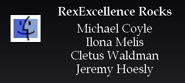 You'll like this totally unneccessary ResEdit modification from Colin Kelly (webmaster at NoBeige GUI). You'll like this totally unneccessary ResEdit modification from Colin Kelly (webmaster at NoBeige GUI).
Colin found a way to modify the text in the "About the MacOS 9" Easter Egg. The list of programer names is stored in the Finder's SABT resources.
- Open a copy of the Finder in ResEdit and select the SABT resources.
- In my example, I deleted all be one ID to make the mod easier.
- Open the ID using the STR# template (Under the Resource menu)
- The first string is the Heading, then a blank line, then your list of names.
- As Colin mentioned, don't feel limited to a list of names, you can type anything!
Why would you go through all this trouble for an Easter Egg? Because this egg also doubles as a privacy screen saver when you walk away from your computer!
The latest chapter of "The University of HyperCard: Chapter 1" can be found at MacInstruct.
KGoodStuff - Like a Super DragThing for Linux/KDE!
 One of the first things you may have noticed in Linux desktop snapshots is the cool way that icons and applications can dock into a panel. Under the MacOS, we are fortunate to have many fine utilities like DragThing or even Apple's Launcher. While these hold folders or links to programs, in LinuxPPC, you can even have running applications with updating displays! (Continued...) One of the first things you may have noticed in Linux desktop snapshots is the cool way that icons and applications can dock into a panel. Under the MacOS, we are fortunate to have many fine utilities like DragThing or even Apple's Launcher. While these hold folders or links to programs, in LinuxPPC, you can even have running applications with updating displays! (Continued...)
User Contributions:
Software News 1-28-00
Software News: – by Cletus
I have begun adding some of the software that was mentioned in Jeremy's excellent article dealing with very useful freeware programs. Over the next week or so it should all be there for you.
Everyday Software has updated clipEdit. There were several enhancements and bug fixes made in this update which make it even better if that is possible. I have updated the Archive.
Aqua? K-Scheme by SilkyChan has been updated to the next beta level. Alternatively it is listed in the Japanese Scheme Archive.
ProcessInfo was updated to version 1.2.1. This little app will display the current processes running on your system such as: applications, desk accessories and background processes.
Also updated the other day was Eradicator which will rid your Temp Folder of unwanted files that may be accumulating and eating up your hard disk space.
Both of these programs have been updated in their respective archives.
Please remember to let me know if any of the software in the SW Archive needs attention for one reason or another. As it gets bigger and better it also is a little harder to keep on top of everything. So please do not hesitate to let me know. Thanks.
Submit Software News Suggestions!
Icon/Desktop News 1-28-00
Icon &
Desktop News by Ilona
A new OS X icon set popped into our
Icon
Archive, and we also have one
Pixelpalooza
entry set! Two wintery DOCKs are waiting for you in the
Desktop
Archive! Enjoy! And don't forget:
They are always open for your contributions!
Saffron
Graphics has some good looking
Glassy Folders for you, plus lovely desktop pictures in
seven colors to make your desktop complete!
My latest discovery: There are great
looking art works and desktop pictures on this site, but
what caught my iconist-eyes were the "LustRazor Pod" icons.
When you look at them, they bring out feelings just like
psychedelic rock music did in the sixties. (No, I'm not that
old!) Who else could describe these icons better than the
author himself: "The icons are hard, metal, sharp,
intricate, and bleeding-edge!" Now, after this much tickling
on your curiosity, go and get them at LustRazor!
The poor Devil is still sick but he
managed to release "Marvel VS. Capcom" and "Mars Attacks
TVs" icon sets! Get them at Devil's
Desktop! Get well soon Devil, we
miss your great desktop pictures!
Artificial
Intelligence life forms do exist!
They make desktop pictures! If you like them to make more,
just let them know!
PixelAddict
had a facelift! On its white, simple pages are neatly
arranged icon previews waiting for you. Using cheerful fonts
in the titles throughout the pages, makes the site
friendlier than it was before. Now if only new icons were
there...
Waferbaby
has also been redesigned! It is still a work-in-progress,
but your favorite contents: Pixhell providing wacky things,
pixhellish icons and desktop pictures, will all be there for
your enjoyment.
What's new on your site? Icons?
Desktop pictures? Inform
us! We'll post it!

Ilicon Graphic Design
1/26/00
A hot topic in the Mac community has been the runaway size of the Temporary Folder contents. Several little applications has been written to keep the problem in check.
ResEx regular, Rams, sent this little script to do the job for you.
Just a quick one for the sloppy script archive. It cleans out the temp items folder and puts the contents on the desktop for your inspection. I've been using it for as long as MT-Newswatcher 3 has been available. I didn't realize such a tool was a huge deal to anyone but myself ! The only problem you are likely to run into is reusing the Temp Items folder, because the script does not check for duplicate file names. It works with my copy of 8.6, I don't foresee any other problems using it with 9.
set x to (path to temporary items folder as text)
set y to (path to desktop folder as text)
tell application "Finder"
if (count of (list folder x)) < 1 then return
if not (exists alias (y & "Temp Items:")) then ¬
set z to (make new folder at alias y ¬
with properties {name:"Temp Items"})
repeat with i in list folder x
move alias (x & i) to z
end repeat
end tell
Freeware Gems
There are some fabulous utilities that are available to the Macintosh user that cost absolutely nothing! This article by Jeremy Hoesly calls attention to just a few of these fabulous freebies. (Continued...)
 Remember ResFind 2.5? It's a program that lets you search through a program's resources for a particular sting of ASCII or HEX. Remember ResFind 2.5? It's a program that lets you search through a program's resources for a particular sting of ASCII or HEX.
Jean-Jacques Cortes submitted some modified ResEdit resources to make ResFind's window Platinum. To update the application, open both ResFind and the new file in ResEdit. Copy all the new resources to the clipboard, paste them into ResFind. Save and you're all set. (French Version)
He also offers this explanation for the odd Apple IIe dialog we saw on Monday:
About the strange DITL talking about Apple IIe, I think it is related to the Apple IIe card you could install in the Mac LC. It was a card connected to the PDS bus shipped in the LC models (LC, LC II, LC III, LC 475, and LC 630), and with it, you could emulate an Apple IIe thanks to the 65C02 chip, and the related Apple IIe components soldered on it. This dialog is still present in my MacOS 9.0, which means Apple didn't totally clean-up MacOS 9.
Change the Security Key Chain Sounds in MacOS 9
 This handy tip by Glenn Batuyong will show you how to change the sounds when locking and unlocking your keychain. If you're looking for cool Mac sound files, head over to Click Sounds and see if you can pick out some replacements. After you have new sounds you'll need to edit the Security Library in the System Extensions folder. (Continued...) This handy tip by Glenn Batuyong will show you how to change the sounds when locking and unlocking your keychain. If you're looking for cool Mac sound files, head over to Click Sounds and see if you can pick out some replacements. After you have new sounds you'll need to edit the Security Library in the System Extensions folder. (Continued...)
User Contributions:
Mac Users are a creative bunch! Here are some of their recent submissions:
- Assuming you like the look of Aqua, Patric Lee has a great collection of splash screens for you! Two for OE5, and one for Explorer.
- Jjaro redesigned the default slider control in GoMac. This new 3D version looks way-cool.
- Suffering from a little post-holiday depression, Ra created this Death MOSS!
Software News 1-26-00
Software News: – by Cletus™
With between 8-10" of snow outside I predict that I will not be golfing for a while. I am not sure if it was because everyone was off because of the snow, but I think it is safe to say I have never received so many emails concerning software updates and releases. Thanks!
Michael Rabe wrote to tell me that the Aqua Theme has been updated at The World of Mac Themes. He says the responses have been overwhelming to the theme and so they "updated it so it would look more like X"
Ya gotta love this one: Timm (yes that's two m's) Hoff thinks "ResEx Rocks!" and alerted me to an update to Power Windows. What is so very cool about this update is that it replaces the much disliked "zoom rects" with a "fade in and out" feature. I think this is really cool. The Archive is updated. Mike! can we change our company motto please? :)
A few weeks ago I mentioned the release of Gravité by Sylvain Demongeot. Yesterday it was released in a Japanese version. Peter Hein and Peter Harte (no relation) report this is another cool app. It is however virtually useless, but you must agree with the page that it is fun. So into the archive it goes.
John M. Schilling who released EmptyTempFolder on Monday has updated it to v1.6. He also released another product called AutoPurge. Which he describes as another "twist" on the Temporary Item problem. With AutoPurge, you place an alias of it in your startup folder and it takes care of the problem. This has also been placed into the SW Archive.
Double Touch has quickly been updated to fix a bug that prevented a person whose name was 8 letters long from registering. It also fixes the shareware limitation notice when a person has registered.
Requested reports about TaskMenuBar came in from Jon Simpson and Michael Pflepsen. They both said that it works fine with one exception — it does not display well when the menu bar color is changed with Kaleidoscope schemes. Thanks.
Happy shoveling...
Submit Software News Suggestions.
Icon/Desktop News 1-26-00
Icon &
Desktop News by Ilona
Another beautiful OS X folder icon set
has arrived in our Icon
Archive! And a great looking
Hubble space image is in the Desktop
Archive! Enjoy! And don't forget:
They are always open for your contributions!
IconHood
released 44 new icons, based on the game StarCraft. IconHood
is also prepared a page to hold desktop pictures in the
future.
Perfect
Yosemite has taken my advice and
now we can see his great looking desktop pictures in smaller
previews. Professionally reduced too I may add! But not only
that, would you like to know how John makes his perfect 32
bit icons? Well, you can deep dive into the four pages
tutorial he has just released!
Icon.CX
just released "More Quake" icons, and when they say more,
they mean it. There are 117 icons in this set
folks!
I've suffered a severe "Icon News
Shortage"! It is an epidemic that only icon broadcasters get
around the time of Pixelpalooza.
But their entry period will end within a week, and so will
my suffering. Good! I was promised a tremendous amount of
icon news after the contest. Therefore I'm not only excited
to see all the great icon entries, but also excited to have
back the diligent iconists to keep me busy! I have checked
the entries and I have to tell you that I do not envy the
judges. There are some excellent icon sets over there, it's
hard to select the winners. Good luck to you all!
What's new on your site? Icons?
Desktop pictures? Inform
us! We'll post it!

PowerLogix Upgrades On Sale Smalldog.com
1/24/00
 What! Not even 20% of you would vote for our First Lady if you lived in New York state! Well fine, be that way, but when I and the future Mrs. Coyle take over the world, we will remember those of you who voted against us! What! Not even 20% of you would vote for our First Lady if you lived in New York state! Well fine, be that way, but when I and the future Mrs. Coyle take over the world, we will remember those of you who voted against us!
To be honest, overseas readers of ResExcellence express it best when they shake their heads and say, "You crazy Americans!"
Bruce Dickstein creates sound sets. His web site has two dozen of them! He wonders if his efforts are all in vain, so this week's Polling Place asks, "Do you use Soundsets?"
Employee Appreciation Day at ResExcellence!
You can finally see pictures of this good-lookin' crew on our new Staff page. Find out a little about us, and start stalking! The Snapshots Gallery features a new desktop from each of the editors!
Company Motto: The Beatings will stop when morale improves!
I don't happen to use it, but Mark Evans wrote this AppleScript that should be of use to you if you use ircle:
What it does is launch a URL right from ircle in one of two ways. You can type "/URL TheURLHere" or just type "/URL" and a dialog box prompts you for the URL. Created to work with IE but the browser can easily be changed. Note : You must save the script as "URL" and place it in the ircle scripts folder for it to work.
on run
tell application "ircle3.0.4 US"
set MyURL to argstring
if MyURL = "" then
set Blah to display dialog "URL To Get?" default answer ""
set URLtoo to (text returned of Blah)
end if
tell application "Internet Explorer 4.5"
Activate
GetURL "" & URLtoo & ""
end tell
if not MyURL = "" then
tell application "Internet Explorer 4.5"
Activate
GetURL "" & MyURL & ""
end tell
end if
end tell
end run
(Added to the Sloppy Applescript Archive)
Raoul Sinier recently had this error message appear on his Mac.

A rough translation is "You must hold the keys "Command Control and Escape" to quit the Apple IIe mode before turning off your computer".
Any idea where that came from readers?
MacInstruct has published a new tutorial. "How to Travel With Your
PowerBook". It will give you a few helpful tips regarding TCP/IP and Remote Access configurations while traveling.
Software News 1-24-00
Software News: – by Cletus Software Archive Man
MacNN has started a page concerning the Temporary Items folder which appears to become bloated over time. For some the figure is as high as 1 GB in size. One of the main problems appears to be in part that items are not deleted upon restarting or if you crash. John Schilling has created an application called EmptyTempFolder to show you what is in this folder and then delete these items if you wish.
And... even as I write this, another program hits the web. Eradicator by Scott Crick will perform the same function as listed above. So pick your weapon! Both have been added to the SW Archive.
I found this interesting control panel while looking around called TaskMenuBar. It lets you use the unused portion of the menu bar as a switcher/ launcher. It seems like a great idea. If you have tried it let me know and I can add it to the archive.
Osato's Utility Room has released Double Touch which should appeal to the keyboard users among you. Using this control panel you can invoke the Window Shade feature using the only the keyboard. It is for PPC only.
KSA has updated their archive with 6 new and 10 updated schemes. (No there are no Aqua ones)
YourHead has updated aClock to version 2.5.
Michael Teper was wondering as was I, if there is a back-up program that can replace the now defunct Speed Doubler Smart Copy feature. None I have tried have been as transparent, slick or easy as Smart Copy. They all offer too much for me. Let me know and I will spread the news.
Submit Software News Suggestions!
Icon/Desktop News 1-24-00
Icon &
Desktop News by Ilona
Brows through our Icon
Archive for great icons! And look
in the Desktop
Archive for new pictures! Enjoy!
And don't forget: They are always open for your
contributions!
IconIcon
has released two new sets, Castle and iMac System which is
also his entry into this year's Pixelpalooza
contest! Good luck!
Pink
Palace have joined the
Icon
Amazons with her introductory set
called Xenophile!
Sara from Icon
Parade would like you to know
that she is going to redesign her site, so please be patient
when you don't see it updated as often. Sara also whispered
me that there will be some great new features too, therefor
we have something to be excited about!
"It doesn't look at all like Aqua" - said
Layne, about his new desktop picture "Migration" at
Blue
Sky Heart Graphics! It also
contains many DOCKs. Oops! Wrong word! I mean many DUCKs!
<grin>
NoBeige'
GUI has taken my advice and now
we can see previews of his new desktop pictures! "Believe"
is the first one to seen!
Creative
Box released two new Desktop
Pictures, "Aquatic" and "Day". The second is the desktop
picture of the week at MacOS
Zone!
What's new on your site? Icons?
Desktop pictures? Inform
us! We'll post it!
Register to Win a G4 Titanium PowerBook at Smalldog.com
1/21/00
It's a small thing, and it won't get me a Lear Jet, but I take a certain amount of pride in the fact that ResExcellence just entered the top 20 web sites at Sitelink.net. (We happen to be right at number 20, but world domination has to start somewhere.)
Thanks to all the readers, Ilona, Cletus, Jeremy, my Mom, my 9th grade math teacher....
Snapshots:
Changing Icons System wide under Linux and KDE
Previously, I showed you how to convert Mac icons for use under Gnome and KDE. but what if you want to replace an icon system wide?
In this example, we will change the default folder icon viewed in kfm, the "Finder window". (Continued...)
Bonus Linux Icons!
 Here are some Linux replacement icons I recently made and found useful! The hard disks are based on Mathew White's Linux set. They have text under them so I can tell what they are when placed in the panel. The black and red icons are for my mounted/unmounted Orb drive, and the AOL AIM icon gets used with GAIM! Here are some Linux replacement icons I recently made and found useful! The hard disks are based on Mathew White's Linux set. They have text under them so I can tell what they are when placed in the panel. The black and red icons are for my mounted/unmounted Orb drive, and the AOL AIM icon gets used with GAIM!
Download.tar - Download.sit
And while we are on the topic of Linux, let me begin to tell you how happy I am with my LinuxPPC server! Since moving the entire site to the PowerMac a few weeks age, the server is averaging over 200,000 hits a day, and over 2 Gigs of data throughput.
With your own server comes added responsibility, (!) so yesterday I purchased an 2.2 Orb Drive and extra disk from the good folks at Small Dog for the purpose backing up our friendly little site. Other than the additional fstab entry, the drive has performed perfectly.
 Total software cost? $32 for the LinuxPPC 1999 disk! All updates and additional network utilities have been free. Total software cost? $32 for the LinuxPPC 1999 disk! All updates and additional network utilities have been free.
The three utility windows shown above let me monitor the number of people connected, the load on the cpu, and the load on the ethernet/SDSL line.
Did I forget to mention that I'm having fun managing my new server? :)
Well looky-here! There is a new beta of AOL's Instant Messenger, and this one supports additional Smileys! I wonder where they got that idea!
And does anyone else find it ironic that their screenshots feature the banned Gizmo Theme!
Regarding Jeremy Hoesly's recent Launcher article, Greg Weston wrote a LaunchStrip, a Control Strip module that's freely distributable. It dynamically builds and displays a menu of the first level of the Launcher Items folder. He liked the concept of the Launcher, but hated giving up the real estate.
Software News 1-21-00
Software News: – by Cletus _ _FT _ _RE- _RCH_ _ E- _AN
Just in case you didn't check back in with us yesterday, as it was an off day, you may have missed the proliferation of Aqua Themes and Schemes. I have re-posted the links I know of below. I am sure there will be more. I received absolutely no negative emails about them. I did receive many emails pointing me to either new links or those already known about. Thanks!
I found an interesting article on Mac OS X and the Aqua Interface here.
David Lawson pointed me to RAMGauge. This control panel will add the amount of available Ram left into the menu bar numerically. Since it's origins date back prior to the Platinum interface, it leaves a white background in the menu bar. Apart from that it is fully moveable in the menu and the font and color are yours to choose.
Bryan Bortz sent a link for Mac-OS-Tray-11b4 that he found while rummaging around the Info-Mac HyperArchive. The download link is here. Neither he nor I have had a chance to try it. Let me know how it goes. Brian also is starting a page for the cursors that he makes.
Jérome Foucher has released the next beta of DeskTray. This version now allows a url clipping to be correctly dragged onto DeskTray.
MacinMind has updated their Moose Phraseology package. The fixes include major ones for 68K and the ability to correctly save when save is user initiated. You'll need version 2.1 of Uli's Moose to use these of course.
Several new themes make their appearance at Themes.org and a couple of new desktops are up at KDE.Themes.
If your into sounds then you may be interested in this package of "Steve's Sounds". There are also OE sound sets available too on the page.
Aqua Themes and Schemes.
Aqua? — K-Scheme -in the Japanese Scheme Archive
Aqua — K-Scheme -by InterfaceLift
AquaX — K-Scheme -by Maury McCowan
Aquacid — K-Scheme -by JinSan
Aqua — Theme -by Mac Themes
Submit Software News Suggestions!
Icon/Desktop News 1-21-00
Icon &
Desktop News by Ilona
We received the first 128x128 icons made
for OSX in the Icon
Archive! And three new pictures
in the Desktop
Archive! Enjoy! And don't forget:
They are always open for your contributions!
Perfect
Yosemite has released four new
desktop pictures and a new system icon set is in
preparation for the upcoming iControl!
John has created a more efficient layout at Perfect
Yosemite. Now you can see previews of his perfect 32 bit
icons, and a popup window shows the content of different
sections. Looks great, though I still miss the small preview
of the desktop pictures.
Anti_Icons
released Simple Plain Dude. The icons are what it says,
simple and plain but they are lovely that way!
After many demanding letters, Gary added
his old style Copland Replacement Icons back to the new
IconHQ.
Aldie's
Site has a new picture called
MatriX and we have also placed it in our Archive! Thanks for
the contribution!
InterfaceLift
has came out with another "think" desktop picture, this time
it's Think MacDonna!
Interview
with Hideki Itoh!
What's new on your site? Icons?
Desktop pictures? Inform
us! We'll post it!

500MHz iMacs below cost! At Smalldog.com
1/19/00
 Peter Lang asked: Peter Lang asked:
I heard about a tool, called "ResFind", which allows to search within all resources for text strings. Do you have an idea, where it could be found? On your site and by searching with version tracker I couldn´t find it.
This was a tough one, but after a little digging, I found a copy of ResFind 2.5. This little program comes in handle when you're looking for a piece of text to modify in a program. In the example above, I opened the finder and looked for "Special". The program showed me that if was found in resource fmn2, ID 531, but we already knew that, correct?
The Launcher
Jeremy Hoesly provides a look at Apple's overlooked, but useful utility. Whenever I get volunteered to help a friend with a new Mac, I never leave my buddy's house without making sure the Launcher is configured and set to automatically Launch. It's the closest thing to bulletproof.
ResEx contributor, Peter Mellows wrote a program called The Associator that is a cross-platform file associator with it's own database. It works by updating File Exchange to map Windows extensions to macintosh creator codes. So if you are constantly exchanging files with the Wintel crowd, this $10 utility can make your like easier.
Add Menu Icons to ACTION Menus.
When it comes to adding functional menus to your Mac, few programs rival ACTION Menus, ut do you find yourself getting bored with the selection of available icons? This simple ResEdit modification will show you how to add new ones. (Continued...)
Use Contributions:
- The two MOSS, Donna and Picasso, by Enio Rigolin have been fixed and are now ready for you to download again.
- Scott Chitwood submitted a Netscape splash featuring fellow Illinois native, Cindy Crawford.
- Peter McHugh created another nice looking Blue MOSS.
Software News 1-19-00
Software News: – by Cletus (_ _F_ _ _R_- _R_H_ _ _- _A_) UPDATED 9pm
Everyone wants it! No one can get it! So be quick it, it may not last or it could just be the beginning!
Aqua Themes and Schemes. We're swimming in these!
Aqua — K-Scheme -by InterfaceLift
AquaX — K-Scheme -by Maury McCowan
Aquacid — K-Scheme -by JinSan
Aqua — Theme -by Mac Themes
(if these links go down DO NOT ASK ME FOR THEM!)
Public Access Software has updated Sherlock Menu. This release turns off the debugging option that would cause a crash if a debugger were not installed.
The "Speeding Up Your Mouse Chronicles©" continue.Cotten Kelsh sent in yet another alternative for this: Mouse2 is an older control panel that will adjust your speed. Cotten reports that he has used it from 8.6 up through 9.0.
Clare N. Shumway wrote in to suggest giving QuickStart a try which is a simplified launcher. It will open folders and applications as well as allowing for keyborad mapping.
Submit Software News Suggestions!
Icon/Desktop News 1-19-00
Icon &
Desktop News by Ilona
There is a Painter replacement set and a
Next Icon set in the Icon
Archive! And three new pictures
in the Desktop
Archive! Enjoy! And don't forget:
They are always open for your contributions!
After I mentioned IconHq's
"The Lord of the Rings" icon set in my last news,
Jean-Jacques
Cortes kindly informed me about a
site dedicated to this subject. I visited The
Lord of the Rings Move Site and
noticed that besides some interesting info, they also have
some beautiful fantasy art pictures for your desktop. So,
jump over and choose one or more to go with the mentioned
icons!
Could this be the end of the usual hustle
with ResEdit - changing the System icons and Trash icons?
... Will you be able to change these icons only with a
single click here and there?... Would it be possible to
change only those icons you choose?... According to
Iconfactory,
the answer is: YES! The magic word is: iControl, the newest
wonder product from Iconfactory's software department! Now,
start to arrange a huge smile on your face your next
favorite program is due to the end of this month!
One of my favorite parts of the
Iconfactory
are the tutorials. The third part "Details, Details" just
hit the shelf, written by the Factory's leading icon master,
Dave Brazgalla! The whole tutorial is exceptionally
informative and I recommend it to all future artists who
want to try the 32x32 pixel "icon canvas"! I can't hardly
wait to praise their MacWorld Expo demonstration about the
making of 32 bit icons!
InterfaceLift
kindly gave out another corner on their server to house a
new icon site called Anti_Icons.
Their first icon set is Tin Folder! Welcome to the icon
community Antioco!
Though Steve's Mac was sick for days and
now Steve is sick, he managed to update Devil's
Desktop with two icon sets: Comic
Icons and Adam Warren; and three desktop pictures: Hands Off
(with an iMac in the background), Rollins, and Pink Floyd!
If you are interested how he creates his pictures, there is
a little demonstration which you can also download. Plus we
got a great looking Painter 5/6 replacement icon set for our
Icon Archive! Thanks for the contribution. Now, get well
soon, Steve and draw many more great characters
soon!
If you wanted to download the contributed
Brycetopia
desktop picture from our Archive but you couldn't, try again
please. The "oops" has been chased away!
Interview
with Hideki Itoh!
What's new on your site? Icons?
Desktop pictures? Inform
us! We'll post it!
PowerLogix Upgrades On Sale Smalldog.com
1/17/00
 It appears that MacOS X with Aqua will be a big hit with current users of the OS. A whopping 55% of you rate is as the best. Count the top three ratings and 90% give it a favorable rating. It appears that MacOS X with Aqua will be a big hit with current users of the OS. A whopping 55% of you rate is as the best. Count the top three ratings and 90% give it a favorable rating.
But all is not sunshine in land of Aqua. I received several emails expressing concerns, best summed up by Stephen Poprocki:
When I saw OSX, I was shocked. It seems as if Apple is trying to make their products appealing to kids with the fruity flavors and all. Don't get me wrong, I mean I really like the iMacs, but I think the iBooks just kinda weren't meant to be colored on and Mac OS X just went overboard.
How can a professional be taken seriously using a system with fruity colored gems as buttons and such? It really looks like a great operating system and all, and I'll probably buy it, but I don't understand why Apple has shifted to the kiddy market! I want an OS that looks professional, doesn't distract me, and doesn't have all kinds of bright colors all over the place. what disturbed me mostly was when I thought about how the "shadow" on the windows would affect working in graphic programs like Photoshop.
I remember several years ago when Apple Platinum came out. I was so upset with the look that I had the nerve to email Arlo Rose (who still worked for Apple at the time), and complain about how "bulbous" the new windows were. But in time, I grew to love Platinum, so much so that nothing else has ever replaced it on my desktop. Arlo, forgive me!
I imagine OS X will be the same way. There will be a period of adjustment.
Get Well wishes go out to David Letterman who had quintuple heart bypass surgery. Last week, Dave hosted Hillary Clinton, the wife of our President, and candidate for Senate in the state of New York.
She held her ground against the acerbic talk show host, and so impressed me that she inspired this week's tongue-in-cheek Polling Place question, "Would you vote for Hillary?"
I admit that I have never dabbled in HyperCard, but after reading the latest MacInstruct tutorial, I'll have give it a spin.
"The University of HyperCard" is going to be a series of tutorials to get you familiar with one Apple's oldest software applications.
Here's a nifty Applescript for those of you who distribute your Applets from John Grow:
I am submitting to you this wicked simple (but really useful) AppleScript that I made. This script is like a lot of the others I've seen in the AppleScript listing, EXCEPT...in those others, you have to change the creator code in the script every time.
Not in this one. This one opens a dialog box when you drop a file on it. The dialog box contains the file name and file type, but puts the creator code in a default answer box, allowing you to edit it right there. No more editing the script every time. This has come in really handy for me because I deal with cross-platform all the time, and I'm too lazy to edit the script every time I need this thing, which is several times a day.
on open (theList)
tell application "Finder"
repeat with theItem in theList
if class of theItem is file then
set locked of theItem to false
end if
set fileName to name of theItem
set fileType to file type of theItem
set creatorType to creator type of theItem
set dialogResult to display dialog "File name: " & fileName & return & ¬
"File Type: " & fileType & return & "Creator Code: " buttons "OK" ¬
default button 1 default answer creatorType
set creatorType to text returned of dialogResult
set creator type of theItem to creatorType
end repeat
end tell
end open
Snapshots:
Use Contributions:
I had a mental lapse last Friday and somehow uploaded all the contributions as text files instead of binaries! This rendered them all useless. I apologize to the artists, and the links will reappear as I replace the corrupt files.
- maffewyay put together a new version of our Smilin' Mac MOSS with the new MacOS X look.
- Bryan Bortz created a MOSS for lovers of Myth. His web page also features a dozen custom cursors.
- Another images featuring Calvin and Hobbs were submitted by James Pelletier. This time it's an About this Mac replacement, and Explorer Splash 5.0 (just so you'll be ready for the final release!)
Software News 1-17-00
Software News: – by Cletus (code name)
Today we start off by adding PreviewMaker by Maury McCowan to the SW Archive. An application tool that shows off all the important attributes of a Kaleidoscope scheme. For example it will show all forms and fashions of windows and controls: all variations of Bevel Buttons, Finder-like window, Utility window, Modal and Movable Alert and Dialog windows, and every control type available. Additionally it shows you 122 patchable icl8 icons and 160 patchable ics8 icons by resource ID and name. Maury writes: "If your scheme has the resource, you'll get to preview it — if it doesn't, you'll know what you need to fix."
D. Lawson wrote in to suggest I add Navi iRae to the ResExcellence Archive. It is done. Navi iRae, by Jérome Foucher is a control panel that will provide you with a menu when you command-click in a windows title area. This menu will then allow you to navigate through the path of that file. What is even nicer is that it is compatible with Apple Menu Options, OtherMenu or BeHierarchic 4.0.
Derek Briton dropped a note to us about an older, but useful piece of software called Help Lock by Lawrence D’Oliveiro. This freeware INIT will let you use the caps lock key to turn help balloons on and off. It is in the Archive.
L. D. Ford sent me to the Doghouse to check out a new theme called "Y3K" This theme is a dark theme. Nice, but a tad dark for my liking. Thanks L.D.!
Process Info received an update. It will display the current processes running on MacOS: applications, desk accessories and background processes. It adds a feature to get Information on the Processes File using the Finder, reduction of code size using the StdCLib and correction of the sort problem with the % Memory column. The archive is updated.
I received many good reports back from readers concerning Speedy Mouse. There was a suggestion by Dan Flax of Flax Creations concerning the fact that the extension can "really" speed up the mouse. To much in fact for some users. If this happens you may want to go into the mouse control panel and back the speed down a little. This, in conjunction with the Speedy Mouse extension should make things more tolerable. Thanks Dan!
On the other hand... Scott Boettcher offered an alternative if your running with the newer USB crowd — "you can get USB Overdrive - it allows for many tweaks to your mousing/trackball." It is available here.
Submit Software News Suggestions!
Icon/Desktop News 1-17-00
Icon &
Desktop News by Ilona
One icon set arrived in the
Icon
Archive! And three new pictures
in the Desktop
Archive! Enjoy! And don't forget:
They are always open for your contributions!
IronDevil
takes you on a Journey! He puts you on a motorcycle or make
you sit behind the wheel, and drives you through mountains,
or lets you rest in a log house. Then... your hair gets
blown by the wind while you rip the waves of the ocean with
a yacht... The sun is shining on your face and yes, you get
poetic if you let your imagination goes as you look at these
icons! I got carried away and almost forgot to mention that
there are three new lovely desktop pictures too.
IconHq
usually makes Copland style icons, but from time to time
Gary creates some lovely character sets. Currently there are
three sets in this category: Happy MacOS Characters,
Characters of Ancient Lore, and The Lord of the Rings! I
have "only" read the books (in a wonderful Hungarian
translation), but I have never seen a cartoon or movie about
Tolkien's magical story. If my information is correct, there
is a new movie in the making and will be finished two years
or so. If it will be less than a third as captivating as the
book, then I'll be happy. I'm looking forward to it, and I
hope I won't be disappointed.
After a two weeks break, Icon
Parade is back and extended its
list of several hundred icon links with 11 more new ones to
visit!
The webmaster of Milkman
Enterprises sadly said that no
one knows how to get to his site. So I'll let you know that
it exists. After seeing his icons, desktop pictures, or
playing his game, please let him know you were there by
sending him a few nice words!
Etherbrian
has several new pictures and two new fonts! No icons this
time... As one of last year's Pixelpalooza
winners, he's helping the Factory
workers judge this year's contest entries.
Brycetopia
has 6 new amazing pictures! Among them the incredible Dining
Room from Gavin! We also have one of their beauties in our
Desktop Archive. Thanks for the contribution!
Intergalactic
Desktops was updated with a new
desktop picture!
NoBeige'
GUI has a new look and a new
picture! This time there are no previews but Colin promised
me that he is working on it.
BParis
Gallery, home of Bill's K-schemes
and desktop pictures, has a new URL! Don't forget to update
your bookmarks!
Interview
with Hideki Itoh!
What's new on your site? Icons?
Desktop pictures? Inform
us! We'll post it!
Register to Win a G4 Titanium PowerBook at Smalldog.com
1/14/00
 Last update, I mentioned an Applescript by Mike Perry to offset Finder windows. While the script is a great example of coding, The Bach Man recommends a handy little program called Neatnik. Last update, I mentioned an Applescript by Mike Perry to offset Finder windows. While the script is a great example of coding, The Bach Man recommends a handy little program called Neatnik.
Neatnik performs three tasks. It will offset subfolders by a user determined number of pixels. It will set the zoom size of a window, it will set the views of all subfolders to match the parent's. Until you register, the program only works on the first five folder levels. Cletus added it to our software archive.
Would you like to trigger an Applescript when you quit or launch an Application? For example, quitting Netscape could launch a script that would disconnect your PPP connection.
Chris Haagen recommends the freeware "ScriptSynch". From the READ ME:
When you first restart with ScriptSynch installed, you will notice a new folder called “ScriptSynch Aliases” in your Preferences folder. You can create it yourself if you’re the gung-ho type. Whenever an application starts up, ScriptSynch will look for an item in that folder called “<Application Name> launch” (ex: “SimpleText launch”). Likewise, whenever an application quits, ScriptSynch will look for an item called “<Application Name> quit” (ex: “SimpleText quit”).
So if you make an Applescript with the command RA Disconnect, and name it Netscape quit, you will get disconnected when you quit Netscape!
Modify Older Epson Print Drivers to work with MacOS 9.
Roger Oren sent these detailed instructions for modifying older print drivers to work with MutiUsers on MacOS 9.
MacOS 9 limits for some types of users the locations where they can save files. For the early Epson printer drivers, this means limited and panel users can not print, because the printer driver saves temporary files in a fixed location in the System Folder. Later model drivers have the option to change where these temporary files are made. To change the early Epson drivers so all users can use the printer, do the following... (Continued...)
Use Contributions:
- Joe Mitz created a cool blue MOSS of our old friend, "Smilin' Mac".
- Graham Brown made a hot looking splash for Hotline.
- Enio Rigolin submitted two Think Different MOSS. One of a lovely lady, and the other features Picasso.
Software News 1-14-00
Software News: – by Cletus (what day is it?)
No golfing this weekend! burrrrr....... :(
Sig Software has updated Drop Drawers, adding Get Info to file actions along with several other minor tweaks and fixes. It just keeps getting better. If you need to find out more about this cool piece of software check out our archive page or read the interview with Gideon Greenspan, author of Drop Drawers.
A few weeks ago a reader sent me an email asking about a way to speed his mouse up. The only thing I could recommend was an alternative "mouse". Such as Kensington Mouseworks which I use. After searching around the deep, dark caverns of the internet I found a freeware product called Speedy Mouse that appears to work on Mac OS 9. I have added this to the SW Archive.
KSA has been updated and believe it or not there were no "Aqua" schemes. In any case 8 new and 8 updated schemes have been added.
It appears ironically that Windozes users will be able to test run the new "Aqua" interface before us Mac users. If your forced to use Windows at work the least you can do is download WinAqua from Skinz.org. This themes existence may or may not be short lived however as AppleSurf reports.
Themes.org has also provide 5 new screen shots, give them a looksee.
Submit Software News Suggestions!
Icon/Desktop News 1-14-00
Icon &
Desktop News by Ilona
There is an OS X Apple Menu icon in the
Icon
Archive! And three new pictures
in the Desktop
Archive! Enjoy! And don't forget:
They are always open for your contributions!
Hell's
Half Acre released their second
set of icons commemorating pixhell series!
Valentine's Day comes a little early to
Iconfactory,
due to the workers being busy with Pixelpalooza.
So get your lovely Candy Hearts today! Just about every
iconists I know is working on their Pixelpalooza entry this
time around... And though I'm excited to see the great sets
made for Pixelpalooza, I also blame it for the lack of new
icon submissions I can post! :)
Icon
Museo extended its "Nature"
series with a new set of icons called With
Nature!
What is common between "Pippin, iNewton,
G5 and and X"? That they are all members of the "Future
Apple" icon set at Chemicon
!
The newly redesign Rampant
Mac was updated with seven new
desktop pictures, some new patterns, and two startup
screens! What will you see in the seven pictures? From
Nature through Cindy Crawford to OS X, you'll find something
which will please you.
It's not too late to let you know, there
is a font called Y2K at RAILhead
Fonts! Lovely fonts folks, and in
every month they give out one for free!
Interview
with Hideki Itoh!
What's new on your site? Icons?
Desktop pictures? Inform
us! We'll post it!
Ilicon Graphic Design
1/12/00
After a few rocky days, the ResExcellence domain is finally "attached" to my LinuxPPC server. In honor of the occasion, I made a few "Served with LinucPPC" buttons that are free for you to use. If any readers wish to create more, I'll be happy to post them.
(Note: Many readers are emailing with reports of bad links, while I appreciate the effort, they are due to the fact the domain name change has not propagated to your local domain name server. It may take another day to settle down. If a link with http://www.ResExcellence.com is broken, please try http://207.208.148.74/. Thanks!)
 A slow day at the recording studio, while bad for the kid's college funds, is great for ResExcellence readers. I used the time to update the Resource/Template Archive, collecting five ResEdit templates that were dispersed around the web site. In the future, I hope to make more regular updates. A slow day at the recording studio, while bad for the kid's college funds, is great for ResExcellence readers. I used the time to update the Resource/Template Archive, collecting five ResEdit templates that were dispersed around the web site. In the future, I hope to make more regular updates.
The January issue of Apple Wizards is available for reading, and it contains an article by the webmaster of ResExcellence - hey, that's me!
Interesting Applescripts
Mike Perry sends the first script. Because it is a rather long listing, you can download it.
 |
What it does is to align all your folder windows so that each subfolder's window is a consistent offset from the parent. It's very cool to watch work. (warning: it can take a long time if you have a lot of subfolders).
To use it, save as an application, and drag and drop a folder onto it. That main folder is used as the template, and all child folders will be aligned to it (including all the subfolders of those subfolders, etc...)
|
The next demonstration script for you to download is by Dan Harrison. It displays a small dialog listing the name of each running application, including hidden processes.

In appreciation to everyone who sent their MacOS ROM file for him to analyze, Dan Schmidt has updated his patcher to remove the 2 minute Disk Check delay.
Dan also updated the CD/DVD patch for mounting third party drives.
Thomas Lascher was nice enough to drop a note with a new URL for my Marathon Infinity scenario - The Attack. :)
Stop by Ryan Martinez's web site and take a look at the desktop pictures he created, or the iCab replacement icons with the Quicktime 4 look.
Use Contributions: (1/12/00)
- Petter Sundlöf created a MOSS that pays tribute to the MPC7000 series of processors (The G4!).
- Graham Brown created a space-based replacement splash for Netscape.
- With a tip-of-the-hat to Aqua, Doug Polk submitted a nice Giant MOSS.
- Macster is a program used to search for MP3's on the net. Chris Donovan created a replacement splash screen.
- Anto submitted a bold MOSS, and Enio Rigolin sent a Think Different one featuring John Lennon.
Software News 1-12-00
Software News: 1/12/00 – by iCletus™
Script Software has released iClock 2.0. This is a very well done clock that will provide much information. It resides in the menu bar and uses a drop down menu to provide additional, useful information which is easily customized by the user. It is ideal for businesses and travelers who need to know the time in multiple time zones quickly and easily. The menu will display the time in any city in the world, international dialing codes and dates.
If you are beta testing or interested in beta testing DeskTray 1.1 then head over to Ze Products. This first beta release of DeskTray now features scrolling, the ability to list a chosen folder instead of the desktop and disclosure triangles to show/hide desktops content.
DragonOne recently released FinderMenuTuner v1.2 which is now compatible for Mac OS 8.5 or later, up to Mac OS 9.0.1 beta (um.....) This control panel enables you to add hot keys with combinations of modifier keys such as the command, option, control, and shift keys to most Finder menu items.
If your anxious to get your patties on the new "Finder" from Mac OS X then Greg's Browser 2.6.1 is where you begin — atleast until the real thing gets here (man I can't wait either!) This update has "over a dozen improvements and bug fixes". Including a rewrite to the anti-aliasing code, displaying of URL's in the bottom of the window and fixes for crashes that appeared when StuffIt SpaceSaver was running. The SW Archive has been updated.
If your into screen savers you just may want to give SOHO a try. This screen saver is free and made available by the European Space Agency. These images come "directly from 1.5 million kilometres away in space, and will flash on your computer screen courtesy of ESA's Solar and Heliospheric Observatory (SOHO).
Lunar Software has updated it's EarthBrowser program to version 1.0.3. EarthBrowser will provide an image on your screen that is not static but rather very dynamic. It can be grabbed and manipulated in just about any fashion. You can zoom in and out as well. EarthBrowser "shows the latest weather, earthquake, volcanoes and clouds on a very intuitive and enjoyable three-dimensional model of the Earth." Additional features can be found here.
My new email address is: iCletus@Mac.com This is what you want to use to drop me a line on any releases or news you may have. :)
Submit Software News Suggestions!
Icon/Desktop News 1-12-00
Icon &
Desktop News (01/12/00) by Ilona
Another OS X icon set, arrived in the
Icon
Archive! And we have OS X
pictures too in the Desktop
Archive! Enjoy! And don't forget:
They are always open for your contributions!
Saffron
Graphics released some new MP3
file and folder icons for those who use her Alien City
scheme!
Devil's
Desktop has a new look, six new
pictures and a Judge Joe Brown icon set. The subjects of the
desktop pictures are mostly Aliens. Though this creature is
not the most beautiful creature I would ever want to meet,
the pictures are! If you prefer something cute, get the
Devil&Angel!
power/Mac
has been updated with a new bulletin board on many GUI based
topics such as icons and themes. It is the first central
place for the GUI community to congregate; discussing ideas,
asking questions, posting news and much more. It is new and
it needs your posts to start it going. This is an exciting
area that is barely touched on. Look out for more
interactive features coming soon.
Chemicon
has received a nice birthday present, their long awaited new
URL, kindly served by InterfaceLift!
InterfaceLift
has also updated with some new desktop pictures!
A beautiful Moon could be shining from
your screen through a new desktop picture from
Blue
Sky Heart Graphics!
IconsPlus
must thought it was time for him to create some new
fonts!
Interview
with Hideki Itoh!
What's new on your site? Icons?
Desktop pictures? Inform
us! We'll post it!
500MHz iMacs below cost! At Smalldog.com
1/10/00
After many months of pleading from readers, ResExcellence is proud to announce the opening of SnapShots - a collection of active desktops to show you the how other Mac users are customizing their Macs. Maintained by Jeremy Hoesly, the grand opening features Snapshots from the following:
- Edward O'Rourke
- Paul Thiem
- Pete Mellows
- Robert Percival
Send your contributions to Jeremy, and be sure to include as much information as you can about the icons, desktop picture, and running applications. For more details, read the Submission Policy.
 Wow! If readers follow through on their Polling Place votes, 2000 will be a great year for Apple. Only 22% of readers have no plans to make a new purchase. After seeing all the cool Firewire and USB devices, I can't wait to get a Pismo Powerbook! ADB and SCSI are soooo twentieth century. Wow! If readers follow through on their Polling Place votes, 2000 will be a great year for Apple. Only 22% of readers have no plans to make a new purchase. After seeing all the cool Firewire and USB devices, I can't wait to get a Pismo Powerbook! ADB and SCSI are soooo twentieth century.
On the off chance you haven't seen MacOS X Aqua, do it now and then come back for this week's Polling Place question, "Rate MacOS X Aqua from 1 to 5."
5 is the best, as in - "I would pay $500 to the engineer that smuggles out an alpha CD for me!", and number 1 is the worst, "I liked Windows 3.1 better."
Curious about Internet Explorer 5.0? AppleWizards has posted sneek peak of the anticipated browser.
My fourth grade alter ego entered the wrong URL for new Mac infrared remote control: ZephIR.
A few more tidbits from MacWorld.
 At first glance, I thought this Powerbook cover was made for these frigid Midwest winters, but the patient sales rep informed me it was to block external light, so you can more easily use your Powerbook in direct sunlight. At first glance, I thought this Powerbook cover was made for these frigid Midwest winters, but the patient sales rep informed me it was to block external light, so you can more easily use your Powerbook in direct sunlight.
Called the Hoodman, this $40 soft nylon cover folds up like a camping tent to fit inside your carrying case.
I almost bought one, but I figured I look scary enough in direct sunlight.
 This will keep you playing Quake III all day long. This will keep you playing Quake III all day long.
The Intensor is a specially designed chair with a built in subwoofer, and full compliment of speakers in back support. Starting at $159, you could pay more for desktop speakers that wouldn't pack half the wallop. Believe me, when you get fragged in this chair, all that's missing is the blood!
I don't know how he does it, and frankly I'm jealous!
Seventeen year old Matthew Cone from MacInstruct has snagged an interview with Steve Wozniak. Unlike the recent tech heavy Slashdot interview, Matthew's questions are very personable. It's an enjoyable read.
(When I was seventeen, I was a soda-jerk at the local drive-in movie theater. Now I'm just a regular jerk...)
From the User's Forum:
Senior Cooter posted a great tip for users of Internet Explorer.
 Grab any applications icon and drag it into the opened Favorites folder (found by Favorites>Organize Favorites) and place it where you'd like inside of the folder. Now you can have an "app launcher" menu within Explorer. This works with document files as well. I placed my ICQ and Copernic apps inside of my toolbar favorites folder. Very cool. Maybe this is old news, but I had never seen this posted before. Enjoy!! Grab any applications icon and drag it into the opened Favorites folder (found by Favorites>Organize Favorites) and place it where you'd like inside of the folder. Now you can have an "app launcher" menu within Explorer. This works with document files as well. I placed my ICQ and Copernic apps inside of my toolbar favorites folder. Very cool. Maybe this is old news, but I had never seen this posted before. Enjoy!!
Use Contributions: (1/10/00)
- We have our first Aqua submission. Graham Brown created a nice looking Giant MOSS in the style of the new MacOS X.
- Do you like Calvin and Hobbs? Jim Pelletier sent a funny splash screen for Outlook Express 5.
- Peter McHugh submitted a cool looking Giant MOSS featuring a photo of solar dish reflection. Very pretty.
- Darren Russell makes a bold statement with this clean Netscape splash.
- We haven't had one in awhile, so Todd Powell created an Explorer Throbber of a ladies high heel shoe!
Software News 1-10-00
Software News: 1/10/00 – by CletusZipper
Yesterday we had some wonderful weather and I was able to get a round of golf in. With the help of some frozen ponds and lakes I did not loose any balls either. Can this warm Pennsylvania weather go on forever?
YourHead has released an updated version of aClock 2.5 designed for the iMac computers it looks wonderful on my desktop. I especially like the look of the Chronograph Skin and more skins are available here.
Public Access Software has released Sherlock Menu 3.0.1. This version will provide support for the new KidSafe features in Sherlock 2. Additionally they have uploaded the update to their iDisk public folder "pasoftware". Of course you must be using Mac OS 9 and already have an iDisk of your own to access the update at this time.
Olivier Honauer wrote in to suggest a great little Apple Script called Desktop Icon Manager for resetting the desktop icons after you become "disarranged" from a screen resolution change. Addtionally, DIM doesn't get confused when you store the icon positions at one screen resolution and then restore them at a different screen resolution. Best of all it is Free! It is in the archive.
How has your luck been with iDisk? I have had intermittent success with it. Cool idea though. The Apple forum talks about other users woes with it also.
Alas, I have no clicker.....
Submit Software News Suggestions!
Icon/Desktop News 1-10-00
Icon &
Desktop News (01/10/00) by Ilona
Two new sets, arrived in the
Icon
Archive! One new picture in the
Desktop
Archive! Enjoy! And don't forget:
They are always open for your contributions!
While everybody is busy trying to make OS
X inspired icons, Gary at IconHQ
expressing his excitement at becoming a first-time father by
creating something different called Teddy Bear
OS!
More TinyStars were born at
SMD's
Web! This time they feature the
Adam's Family! And now Sandy is working on more TinyStars
based on your suggestions.
Iconmaniac
has finally opened the door on its newly designed site! Not
fully operational yet, but it is a lot there - waiting for
your comments and suggestions!
Hell's
Half Acre has introduced the
not-so-nice ecards that you can send to your enemies (or
friends you are not too pleased with at the moment). As an
added bonus, each ecard has your choice of icons for you,
your friends, and enemies to download!
Ra's
HomePage treats you to a flashy
showcase on his growing icon page!
Brycetopia
has released seven new pictures! Soon, they plan to post an
interview with Bryce artist Bill
Munns!
Aldie's
Site has an OSX inspired desktop
picture! I don't have to be a psychic to see there will be
many more OSX pictures really soon all over the
net.
Waferbaby
is busy creating more and more icons and desktop
pictures!
A new desktop picture is available at
MacOS
Zone from Creative
Box. It's called
Night!
Interview
with Hideki Itoh!
What's new on your site? Icons?
Desktop pictures? Inform
us! We'll post it!
PowerLogix Upgrades On Sale Smalldog.com
1/7/00
What I did on my trip to MacWorld by Michael Coyle.
Dear Teacher,
Today I arrived in San Francisco for the MacWorld Convention. San Francisco is a lot warmer than Chicago, but its buildings are tiny (Nah, nah....)
I talked to a reporter from a local radio station. She said MacWorld was the coolest things she had ever seen. She asked how come everyone doesn't have a Mac. I said I didn't know.
 I saw lots of nifty stuff that I am going to ask Santa to give me next Christmas. I saw lots of nifty stuff that I am going to ask Santa to give me next Christmas.
There was a company called Matsucom that was selling a pda you could wear on your wrist like a watch. It had Mac software and everything! It could store names, addresses, phone numbers, and reminders. I forgot to ask if it would also tell you the time. I hope so because I will look dumb if I have to wear my pda and my Star Trek watch at the same time. The kids on the playground will beat me up.
 Another cool thing was the ZephIR. It turns your Mac into an infra-red super universal remote control. Not only will it work with most TV's and VCR's, but it will also control a cd changer while loading in MP3's into your Mac. It's only $49, but I don't have enough paper-route money to buy it. Another cool thing was the ZephIR. It turns your Mac into an infra-red super universal remote control. Not only will it work with most TV's and VCR's, but it will also control a cd changer while loading in MP3's into your Mac. It's only $49, but I don't have enough paper-route money to buy it.
I asked the nice sales-rep if I could program it to transmit Satanic messages to my Furby, but he just turned and walked away...
I'm getting sleepy so I have to go to bed. After my nap, I' m going to go party-hopping thanks to all the invitations I received because of ResExcellence.
Having your own web site sure is cool!
Michael Coyle. 4th grade. Room 107
|
Late Update: Slashdot has an excellent interview with Steve Wozniak.
Control Strip Follow Up!
He's a little more information pertaining to Wednesday's article by Jeremy Hoesly on Apple's Control Strip. If you have been trying to modify the colors of the Control Strip to match a favorite theme or scheme, give it up! Instead, download Extension Strip. It's scheme-aware, and you can customize it a dozen different ways.
And where can you find more modules to stuff on your strip? Past ResEx contributor Joel Saas runs the Control Strip Outlet, the definitive module site!
Error Messages from the Pope's iMac... submitted by Richard Key
Lock in the BootX kernel settings.
As an administrator of a school's computer lab, you may want to lock the kernel arguments in BootX to keep students from entering a video setting that may actually damage a monitor.
The simple edit, performed on both the Extension and the Control Panel, will keep people from altering the kernel arguments. (Continued...)
Software News 1-7-00
Software News: 1/7/00 – by Cletus
Launay Software has updated their Freeware product—Title Free. The page does not specify the reason for the update. One assumes an update is good though eh?
Kaleidoscope Scheme Archive has updated with 10 new and 3 updated schemes. I wonder how many Aqua schemes we will have next week.....:)
Themes.org has posted several new themes to check out. One of which happens to be Aqua.
Submit Software News Suggestions!
Icon/Desktop News 1-7-00
Icon &
Desktop News (01/07/00) by Ilona
Two great sets, arrived in the
Icon
Archive! One new pictures in the
Desktop
Archive! Enjoy! And don't forget:
They are always open for your contributions!
When you open Lindkvist's
newest set you'll find all kinds of lovely 32 bit "Heads"
smiling at you! Every single icon makes an excellent desktop
companion to cheer you up when you feel blue. They also have
a desktop calendar for January and of course the plan is to
make one for every month.
Also a 32 bit set but different subject,
has been released at Interface
Plaza. Though the "bees" are not
part of the "Floppy" collection, that's what I like most in
this set. The Floppies look good but the bees are always
making me smile! If you don't know Interface Plaza's work,
download any of his great set and you'll see what I mean!
:)
Mad
Science Laboratories newest set
is Disney's Robin Hood. Though the stories are never
accurate in Disney's movies, all characters are cute and
lovely. I have never seen the whole Robin Hood cartoon, only
bits and pieces but after seeing these excellent icons, I
have to watch the whole movie too! And I'll look for Nutsy
and Rhino, the two characters which must be my favorites as
I imagine them from the icons. Oh, and while I'm at the
Laboratories, I have to mention about their successful
experiment, Igor, the cute desktop oddity! The scientists
asked, if Igor is behaving good. So, I report: Igor is
trying really hard to be good! In fact he is doing a great
job - when activated, he makes me laugh!!!
If you are a Peanuts fan, go to
Tomomi's
Girlie Mac. She has not only a
Snoopy icon set but also has a matching K-scheme!
Creative
Box has a new desktop picture
called "In the Sky"! I don't know if you are familiar with
the expressions "pink dreams" or "walking in the clouds,"
but those are the things that this picture reminds me
of.
Interview
with Hideki Itoh!
What's new on your site? Icons?
Desktop pictures? Inform
us! We'll post it!
More MacWorld toys on Monday...
Register to Win a G4 Titanium PowerBook at Smalldog.com
1/5/00
While the date on Monday's update was meant as a joke (1/3/1900), ResExcellence did have a few minor Y2K problems.
The date in the User Forums went from 99 to 100, and all the cookies for the Polling Place immediately expired. You may have noticed you were given the option to vote more than once.
Both were small problems due to human errors in the perl scripts, not a system limitation, and have been fixed.
A Closer Look at the Control Strip
Our latest article by Jeremy Hoesly covers Apple's rubber band at the bottom of your monitor. Get the skinny on his favorites as he reviews the best of them. (Continued...)
 Make Control Panels Theme Compliant Make Control Panels Theme Compliant
If you use a theme other than Apple's Platinum, you may have noticed some of your control panels are not theme savvy, even if you are running Apple's most recent release - MacOS 9.
These instructions, submitted by Jean-Jacques Cortes, allow you to modify most of your control panels to pick up the colors and controls of your favorite theme. (Continued...)
Dan Schmidt has been busy updating his web site! He has posted a comprehensive look at MP3 encoders, a page of resource patches, and updated a HOW-TO for Appleshare under Linux. Take the rest of the week off Dan!
In my old Marathon map making days, I used a program called ResCompare 2.6 to create patches for the game's sound and shapes files. A question by Dan Frakes in our User Forum reminded me of it, and it has been added to the Software Archive.
(Selfish plug: Play my great Marathon Infinity Scenario - The Attack.)
Use Contributions: (1/5/00)
- In addition to the icons that Ilona mentions below, Ethan Padgett from Chemicons also submitted a nice looking ATM replacement for MacOS 8.
- We have our first splash replacement for The Palace. Tommy T. created two colorful mountain scenes for you.
- Jay Amici created a replacement splash for ever prevalent Stuffit Deluxe.
- Peter McHugh has created another clever MOSS. This slightly oversized version also sports some special text elements.
- Simon Kornblith also submitted a nice MOSS. His features Apple's latest hardware.
Software News 1-5-00
Software News: 1/5/00 – by Cletus Expo bound (Not!) :(
There is very little news to report still. Hopefully everyone is hanging loose until the Macworld Expo really kicks in before release. But we can bring you a few tidbits.
Lanny Chambers wanted everyone to know that Gravité is "absolutely hilarious" and drips with "wacky kewlness." Does look a bit over the top, but its concept is firmly grounded! If you all like it and the response is good I will add it to the archive.;)
Bob Friede found an interesting app while looking around the "net" called Icon Extractor which I have uploaded to the server and added it to the Archive. It will allow you to drag an application on to it and extract all the icons as individual ResEdit files and place them in their own folder. It even goes so far as to entitle the new folder with the applications name.
If anyone has had any problems with anything in the archive let me know. As to commercial programs MacFixIt and Macintouch have started pages concerning readers experiences with "glitches" that may help you solve your particular problem.
St. Clair Software has released a fix for the Default Folder Expiration problems that occurs when ever we enter a new year. Recently we have been doing this once a year so the fix is welcome! ;)
At the request of several readers SoundApp was recently added to the Archive. True it isn't GUI but it is so very useful and requested by many so I acquiesce. It has been added.
Submit Software News Suggestions!
Icon/Desktop News 1-5-00
Icon &
Desktop News (01/05/00) by Ilona
One new set, Play It Cool replacement, in
the Icon
Archive! Three new pictures in the
Desktop
Archive! Enjoy! And don't forget:
They are always open for your contributions!
Chemicon
has released Parasites! Ugly subject, but great looking
icons - at least as much as an infected face can look great!
:)
Do you want Martians invading your
desktop? Go to Devil's
Desktop and get the Mars Attack
icons! They also have a Mars Attack MacOS 9 MultiUser
Picture Set, and four new desktop pictures!
PixelPress
has released "My Stuff Vol2", an icon set of his stuff, and
his wife's stuff! Is their child too young to have icons of
his stuff? He might object to that :)
Aldie's
Site updates with a Y2K picture
which we also have in our Desktop Archive! Thanks for the
contribution!
Waferbaby
has candy for you! A new desktop picture called "Candy" that
is!
Interview
with Hideki Itoh!
What's new on your site? Icons?
Desktop pictures? Inform
us! We'll post it!
Ilicon Graphic Design
1/3/00
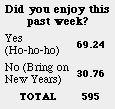 Ho, ho, ho or No, no, no? 30% of readers didn't quite enjoy the Holidays. Ho, ho, ho or No, no, no? 30% of readers didn't quite enjoy the Holidays.
I'm not a Scrooge, but the holidays really take their toll on me. Picking out presents, decorating the house, and eating too much, all make me more that happy to get back to work on Monday! This week, I'm particularly anxious because Thursday morning, I leave for MacWorld! Watch for Friday's update from the floor of the show.
One item I was hoping to buy at the show was a Pismo Powerbook. If the rumors are true, they may not be ready in time. Since I'm all set to plunk down cash for a 100 Mhz buss, I am wondering if you are too! This week's Polling Place asks, "Do you plan to buy a new Mac this year?"
Roving reporter, Ilona Melis has snagged an excellent interview with Hideki Itoh, icon artist from Hide's Icons. He discusses his icons, software, and even a little Linux! Find out all about his new icon site.
Here's a great web site chronicling the history the Netscape browser. What will make this site of interest to ResEx readers is that it contains all the splash screens from all the versions of Netscape. In fact, there is even a link to download the old version - then you could extract icons and throbbers! (Be warned, ResExcellence looks terrible in N1.1.)
Michael LeRoux sent this funny "iMac Banner". Watch it for a moment to have a chuckle.
I'm not sure if you'd even want something like this, but what the hell. I created it yesterday after an application crash took down the entire Mac OS for the umpteenth time.

Macalicious has a new look! The freshly redesigned version 2.0 is now Y2K compliant and has new desktops, ATM's and Splash screens for you to download.
AppleWizards has posted a glowing review of Play It Cool, a Quicktime 4 savvy movie player.
This handy Applescript by John Crossley will open the folder containing the front most application.
tell application "Finder"
set currentApps to every process whose frontmost is true
-- This list will be empty if Finder is frontmost
if (count of currentApps) > 0 then
reveal file of item 1 of currentApps
activate -- Finder
end if
end tell
I wrote this because I was testing a beta version of a favorite program. I wasn't sure, however, if the copy in memory was launched from the beta or the previous release. So this script tells the finder to reveal the application file of the frontmost application.
(Added to the Sloppy Applescript Archive.)
Use Contributions: (1/3/00)
- Stacy Horton was getting tired of her husband Tim's bragging about all the downloads on his Matrix ATM, so she made her own two ATM's featuring the movie Braveheart.
- This a first at ResEx, Jjaro submitted a replacement World picture for the Map Control Panel. Just paste this hi-tech replacement into the program, and all the city locations become more apparent because of the dark nature of the image. Look at a preview.
- Douglas Polk put to gether a nice looking Giant MOSS for MacOS 9 users.
- Continuing his series of Eudora splash replacements, Peter McHugh adds one more for you view.
- And in case you're using Outlook Express 5, Matt Celia created this splash screen for you.
Software News 1-3-00
Software News: 1/3/00 – by Cletus100 –Updated 7am.–
Power Windows has been updated to fix a couple of bugs. "Solid dragging now supports a limited form of multitasking, which lets background applications redraw windows that were initially covered by the window you are dragging." Plus bug fixes for dragging where the window would sometimes shift up by one pixel after you release the mouse and drawing glitch in the menu bar clock when dragging a Finder window while using Kaleidoscope.
T-Minus Ten also has been updated for compatibility with Mac OS 9 and Multi-user formats. Additional changes allow for ffaster loading and New tasks for displaying reminders and for inserting keystrokes.
The archive has been updated for both Power Windows and T-Minus Ten.
Well... Here we are. Minor update.
Tower Maker has moved his site and updated it with some nice themes.
Themes.org has also posted five very nice screenshots that you should check out.
If you you are using Wapp pro and TapGuard 1.0 there appears to be an incompatibility. TapGuard 2.0 is in development and is compatible. Read here.
Jérome Foucher author of Wapp pro is also looking for someone to continue his translation of Wapp pro into Japanese. He asks you contact him if you can help out.
Submit Software News Suggestions!
Icon/Desktop News 1-3-00
Icon &
Desktop News (01/03/00) by Ilona
One new set and an interview
with Hideki Itoh in the Icon
Archive! One new picture in the
Desktop
Archive! Enjoy! And don't forget:
They are always open for your contributions!
You'll see a unique angle of System
Replacement icons when you open the new Pseudoroom
icon set!
PixelAddict
has three new items: MyDesktop - a Copland style set based
on Lauri's real life desktop, SmoothEdge System - a very
clean elegant System Replacement set, and a new URL to his
site!
SMD's
Web has started a series movie
caricatures called TinyStars! The first set was Star Wars
and now it's Gone With The Wind! Anyone with an idea for
other "tiny stars" can vote for them online. I just sent my
idea to Sandy, whom I'm sure will laugh out loud. And if she
makes them, I'm sure you will too! :)
Is there an Anniversary of the Gone With
The Wind? If your favorite movie character is Scarlet
O'Hara, you can find a fashion show of her "icon dresses" at
Bry-Back
Manor!
Santa has been to Hell and dropped some
present down the chimney. Fiends must be very happy in this
Hell! Oh, no! Not that hell! It is Hell's
Half Acre! Well, get surprised
because the site went through a dramatic redesign. They also
have a new toy for you to play with called "ick" (icon
construction kit). With this, you can create your own icon.
The site has something else to report: a new domain! So,
don't forget to bookmark the new URL!
Congratulations!
Do you fancy strange funny looking tiny
icons? There are two new sets like that at Waferbaby!
There is a new site called
IconsIcons!
What else can the subject bee on this site than icons...
icons... Well, there are not too many sets yet, but give a
warm welcome to Patrick, our newest member in the icon
community!
Icon
Parade has six new links for you
to visit! Also, there is a Parade creation set called
KidPix! The January theme is Apple as OS and
edibles!
Something is going on at Iconmaniac,
but I couldn't see what it is! I know they had to switch to
a PC a couple of months ago... Maybe the Y2K bug is guarding
the "enter" link. Anyway, the site has prepared a new look
and when I know more I'll let you know.
Blue
Sky Heart Graphics has a great
new desktop picture for the new year, called
Dragon!
Iron
Devil has started the Y2K with
three new desktop pictures!
Brycetopia
has also started the new year with new pictures. Eight of
them, to be precise! And many exciting things are happening
at this site, like "Image of the Week", and showcasing
Bricetopia's favorite pictures from the past with an
explanation on how they were made!
InterfaceLift
appropriately started the new year with a "Year 2000"
desktop picture!
Another "2000" picture, creation of
Creative
Box, is the picture of the week
at MacOSZone!
What's new on your site? Icons?
Desktop pictures? Inform
us! We'll post it!
Thanks to everyone who sent "Well Wishes" for the Holidays. The best thing about this web site is the people you meet.
500MHz iMacs below cost! At Smalldog.com
previous news pages...
|



