






 |
 |
 |
|
 |
 |
 |
Add Menu Icons to ACTION Menus. When it comes to adding functional menus to your Mac, few programs rival ACTION Menus, but do you find yourself getting bored with the selection of available icons? This simple ResEdit modification will show you how to add new ones.  Open a copy of the Power On Menu Icon Library. You will find it in the System:Extensions:Power On Extensions:Action Utilities™:Action Menus™ folder! Open a copy of the Power On Menu Icon Library. You will find it in the System:Extensions:Power On Extensions:Action Utilities™:Action Menus™ folder!
Open the ics8 resources with a double-click. From the Resource menu, select Create New Resource.
 Create from scratch, or paste your new icon into the various icon editor windows. Create from scratch, or paste your new icon into the various icon editor windows.
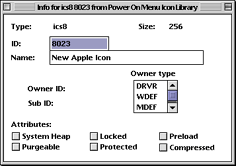 Once the icon is complete, from the Resource menu, select Get Resource Info. Once the icon is complete, from the Resource menu, select Get Resource Info.
The next icon ID in the series is 8023, s ochange your new one from 128 to 8023. Give it a name if you want, but it's not neccessary.
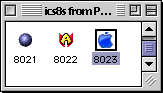 Close the Info and Editor windows, and you will see that your new icon was added to the end of the list. Close the Info and Editor windows, and you will see that your new icon was added to the end of the list.
 next, we need to tell the program that a new icon is in the list. next, we need to tell the program that a new icon is in the list.
Find the ILST resources and open them with a double-click. There is only one ID, number 8000. Open it with a double-click.
 Scroll to the botom of the window and click once on the number 24. Scroll to the botom of the window and click once on the number 24.
From the Resource menu, select Insert New Field. Into that field, type the ID numbewr of your new icon. in our example, 8023.
That's it! Save your work and quit ResEdit. Replace the original library with the modified one. There is no need to restart.
The next time you open ACTION Menus, your new icon will be in the list! You can download a 30 day demo from Power On's web page.
|
 |
|
 |
 |
 |
|
 |


 |
 |
 |
||||||||||||||||||||||||||||||
 |
|
 |
||||||||||||||||||||||||||||||
 |
 |
 |
Maintained by the Staff of ResExcellence. This entire site ©1997-2006 ResExcellence
Privacy Statement? Sure we gotta Privacy Statement.
[an error occurred while processing this directive]