






 |
 |
 |
|
 |
 |
 |
Remove individual items from the Finder's Contextual Menus by Derek Scott I saw the recent hack "Shorten the Finder's Contextual Menus" and it made me wonder if you could get rid of individual menu items. I tinkered with the fmn2 resource in resedit and figured it out. Like the "Shorten the Finder's Contextual Menus" edit, you start by opening IDs 14612 of the fmn2 resource. In this example, we will delete the Encrypt contextual menu option. Make a copy of the Finder and open ID 14612. Notice the Count. It's the number of total Items in the resource. It matches the last item number at the bottom.
Scroll down to Item #11. It's the Encrypt option. Select 11)***** with a mouse click and from the Edit menu, select Clear to delete it. Note that there will still be an Item 11, but Encrypt will be gone and everything else moves up one number.
If you scroll to the bottom of the list, you will see the last number is now 14. Be sure to change the Count at the top to match!
While we performed the edit on Encrypt, you can delete any combination of text items and dividers in fmn2 ID's 14612 and 14614. So dig in and build your perfect menu!
|
 |
|
 |
 |
 |
|
 |


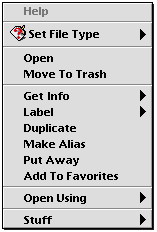 Save your work and quit ResEdit. Replace the original Finder with the modified one and restart the computer. The Encrypt contextual menu will be gone!
 |
 |
 |
||||||||||||||||||||||||||||||
 |
|
 |
||||||||||||||||||||||||||||||
 |
 |
 |
Maintained by the Staff of ResExcellence. This entire site ©1997-2006 ResExcellence
Privacy Statement? Sure we gotta Privacy Statement.
[an error occurred while processing this directive]