






 |
 |
 |
|
 |
 |
 |
Today's edit was submitted by Greg Sadetsky. Most people don't use many of the options in the Finder's popup contextual menus. This simple edit removes those menus, leaving you only the menus created by third party programs like FinderPop. On the right is what my contextual menu looked like before the edit. I never used Get Info, Label, Favorites, or Duplicate. In fact, the only contextual menus I ever use are those offered by FinderPop, and StuffitCM, and CMTools.
Find the fmn2 resources and open them with a double-click. Scroll down to ID numbers 14612 and 14614 and delete them. That's it! Save your work and quit ResEdit.
Your contextual menus will now contain only items from third party software.
|
 |
|
 |
 |
 |
|
 |


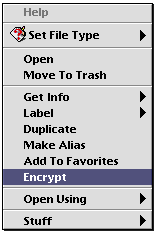 Shorten the Finder's Contextual Menus.
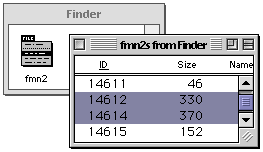 To remove the unused menus, make a copy of the Finder and open it in ResEdit.
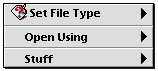 Replace the original Finder with the modified one and restart the computer.
 |
 |
 |
||||||||||||||||||||||||||||||
 |
|
 |
||||||||||||||||||||||||||||||
 |
 |
 |
Maintained by the Staff of ResExcellence. This entire site ©1997-2006 ResExcellence
Privacy Statement? Sure we gotta Privacy Statement.
[an error occurred while processing this directive]