






 |
 |
 |
|
 |
||
 |

Articles 3D Audio Custom Controls General RB Graphics Hacks Mac OS X Menus Novelty Printing REALbasic 2005 REALbasic 2006 Registration Resources Reviews Serial Speech Sockets XML Video Resource Links News Current News February 2006 January 2006 December 2005 November 2005 October 2005 September 2005 August 2005 July 2005 June 2005 May 2005 April 2005 March 2005  REALbasic for Dummies by Erick Tejkowski  Learning REALbasic through Applications REALbasic for Macintosh REALbasic Cross-Platform Application Development 
Older files are in Stuffit 5 or greater format. Newer files are ".Zip". Download StuffIt Expander |

|
 
Text Field Placeholders
How It Works
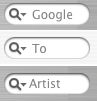
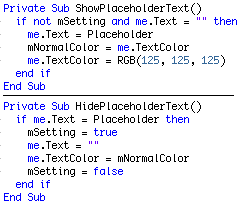
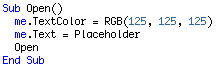
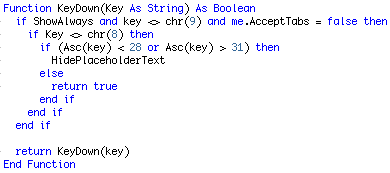
The rest of the code is simply determining when to call these methods based on whether there's text in the field, whether it has focus etc.. When the field first is shown, we set the text to the Placeholder string with a gray color.
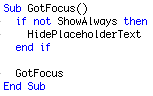
When the user clicks in the field (or tabs to it) we hide the placeholder text if ShowAlways is false. ShowAlways is a boolean property which when true, will show the placeholder text even if the field has focus. It disappears when the user starts typing something. This is useful in the case of showing an example of what should be typed, as opposed to when the placeholder describes what the field is. The behavior in Cocoa is the same ShowAlways being false.
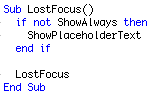
Similarly when the field loses focus, we call ShowPlaceholerText
When the user types in the field, if the user tries to arrow around in the field when the placeholder text is there, then the arrows are ignored. Same as with the delete key. This is to prevent the user from actually editing the placeholder text while it's in the field.
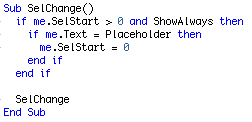
Similarly, in the SelChange event we check to see if the user clicked inside the placeholder text, and if they did, we move the selection to the start of the field, so they can't edit the placeholder text.
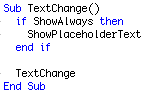
And last but not least when the text of the field changes, we call ShowPlaceholderText so that if the field ever becomes empty, the placeholder is shown.
Finished
|
 |
||
 |
 |
 |
|
 |




 |
 |
 |
||||||||||||||||||||||||||||||
 |
|
 |
||||||||||||||||||||||||||||||
 |
 |
 |
Maintained by the Staff of ResExcellence. This entire site ©1997-2006 ResExcellence
Privacy Statement? Sure we gotta Privacy Statement.
[an error occurred while processing this directive]