image ResEx Logo
ResExcellence www : Powered by Google
Cell Phone Themes Icons Mighty Mouse Cursors Software Reviews Widgets & Widgets

Articles
   3D
   Audio
   Custom Controls
   General RB
   Graphics
   Hacks
   Mac OS X
   Menus
   Novelty
   Printing
   REALbasic 2005
   REALbasic 2006
   Registration
   Resources
   Reviews
   Serial
   Speech
   Sockets
   XML
   Video
Resource Links
News
   Current News
   February 2006
   January 2006
   December 2005
   November 2005
   October 2005
   September 2005
   August 2005
   July 2005
   June 2005
   May 2005
   April 2005
   March 2005


REALbasic for Dummies
by Erick Tejkowski


Learning REALbasic through Applications
by Clayton E., Crooks II


REALbasic for Macintosh
by Michael Swaine


REALbasic Cross-Platform Application Development
by Mark S. Choate


Older files are in Stuffit 5 or greater format. Newer files are ".Zip". Download StuffIt Expander
Tell us about a bad link. Thank You!

Making a Metronome by Seth Willits
12-31-03

Printer Version


Metronomes
For those non-musicians out there, Dictionary.com defines a metronome as "a device used to mark time by means of regularly recurring ticks or flashes at adjustable intervals." For my friends who don't know how a metronome works, yes, they still make them by putting little gnomes that hit things in a box. Being a musician myself, I can't emphasize enough how important being able to play in sync. with a metronome (not the band) is. As the members of my drumline know, it's not about how well you play, it's about how well you play in time together.

With that in mind, we're going to create a very small application to create a metronome on your computer. For years I heard nothing but "go buy a metronome!" but I never did. I wrote one in REALbasic instead.

Design
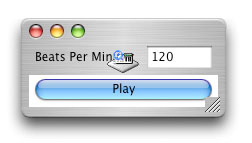
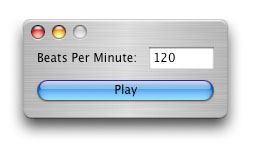
The design for a metronome is really simple. Simple create a new window with an EditField named EFBPM and a button named BtnPlay. We'll use an instance of the NotePlayer class to make the noise for the metronome (since an alert beep would be pretty annoying), so drag one of them to the window and set its Instrument property to 128 in the properites window.

The Few Lines to Make It
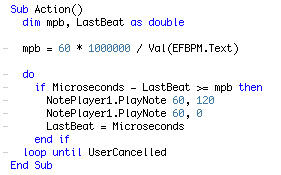
All that our application must do to work is turn the Beats Per Minute value in the field into a minutes per beat value by using a very simple calculation. We'll be using Microseconds to do our timing so we know that 1,000,000 microseconds multiplied by 60 gives us 60 million microseconds for one minute, and then dividing that value by the beats per minutes will give us minutes per beat.

The time keeping aspect of the program is a simple do-loop which contains an if-statement that constantly checks to see if the right amount of time has passed since the last beat. If enough time has passed then we use the NotePlayer to play a sound and record the current time. To stop the metronome the do-loop will exit if the user presses Command-Period or the Escape key.

The instrument 128 is a gunshot sound. When played and silenced immediately after, the resulting sound is sort of a cross between a snare drum and a bouncing ball. If you don't silence the gunshot immediately after playing it then it has a pretty interesting effect! Put the BPM value up at 400 and you have yourself a machine gun!

The Finished Product
That's all there is to it. It may be a simple project, but if you expand on it and have some kind of flashing thingamabob, I guarantee you'll have a great application on your hand. I once had a metronome to compliment the popular Freaky Tuner and people loved it despite it's horrible appearance. You can download the project here.


Cell Phone Themes Icons Mighty Mouse Cursors Software Reviews Widgets & Widgets

Maintained by the Staff of ResExcellence. This entire site ©1997-2006 ResExcellence
Privacy Statement? Sure we gotta Privacy Statement. [an error occurred while processing this directive]