






 |
 |
 |
|
 |
||
 |

Articles 3D Audio Custom Controls General RB Graphics Hacks Mac OS X Menus Novelty Printing REALbasic 2005 REALbasic 2006 Registration Resources Reviews Serial Speech Sockets XML Video Resource Links News Current News February 2006 January 2006 December 2005 November 2005 October 2005 September 2005 August 2005 July 2005 June 2005 May 2005 April 2005 March 2005  REALbasic for Dummies by Erick Tejkowski  Learning REALbasic through Applications REALbasic for Macintosh REALbasic Cross-Platform Application Development 
Older files are in Stuffit 5 or greater format. Newer files are ".Zip". Download StuffIt Expander |

|
 
In this tutorial we're going to learn of one specific use for subclassing the MenuItem class. What we'll be doing is creating a Templates menu which has a menu item for each of the files in the application's "Templates" folder. When the menu item is selected, the application will create a new untitled document window and display the contents of the template file. About The MenuItem Class MenuItem is a class which represents a menu item. Properties of the MenuItem class include the name of the menu item, the style (bold, italic, underline), the keyboard shortcut, and a boolean for whether or not the menu item has a sub menu. Menu items directly in the menu bar (aka, "menus"), must have sub menus, cannot have any styles, and cannot have a keyboard shortcut. Although "menus" are treated a little differently from "menu items", they are all still instances of the MenuItem class. The Implementation
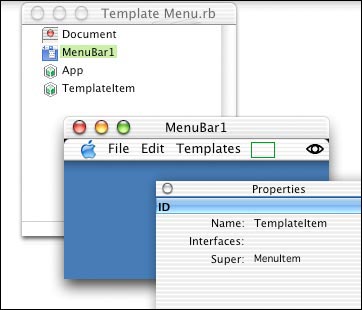
After this, we'll implement the TemplateItem class. We're first going to want to create a new property, "File as FolderItem". The File property will be the folderitem pointing to the file which the menu item represents. When the menu item is selected, the application will use the File property to know which template to open. The EnableMenu event of the MenuItem class is just like the EnableMenuItems event. Whenever the menu bar items need to be enabled or disabled, first the EnableMenu events of all of the MenuItems in the menu bar are called, then then EnableMenuItems event of any controls in the window, next is the EnableMenuItems event of the window, and finally the EnableMenuItems event of the application class instance. In our case, the menu items in the Templates menu are always going to be enabled so we simply write "me.enable" in the event. The Action event of the MenuItem is the Menu Handler for that menu item. It behaves in the same manner as the Menu Handlers in other classes and windows. When a template menu item is selected the Action event of the TemplateItem class is fired and in response, we're going to open the template, create a new document window, and set the text of the editfield in the window to be the text inside of the template file.
Creating the MenuItems
As you can see from the code, what we do first is remove any existing items in the "Templates" menu since the EnableMenuItems event is called many many times and we need to remove the existing items so we don't add duplicates. Next we get the folderitem to the Templates folder. In the code above, the folder is named "Templates" and is in the same folder as the application. We then test to see if the folder exists. If it doesn't exist, then we know there obviously aren't any templates inside of it, so we just skip over the code which adds the menu items. If the folder does exist, we then loop through each folderitem inside of the templates folder. If the file is visible and not a folder, then we assume that files is a template. I emphasize assume because you should really do whatever kind of validation is necessary to make sure that the file is actually a document your application can open, but for the sake of simplicity, this tutorial simply assumes that any file in the folder is a template. Once we determine that folderitem we have is a document template, we create a new instance of the TemplateItem class, set its caption to the name of the file, and set its File property to the folderitem of the template. The last step is to add the menu item to the "Templates" menu we created earlier. Now, remember that everything is a subclass of the menu item class. This applies to the "Templates" menu as well. If you'd like to verify it for yourself, look at the "Templates" menu in the Menu Editor and see that its super is "MenuItem". Also note that the name is "TemplatesMenu". With these two facts, we can call the "Append" method of TemplatesMenu, a MenuItem subclass, to add the given MenuItem instance to "Templates" menu. Side note: Using the Append method with any menu item will automatically set the "SubMenu" property of the item to true. The very last step in the even is to hide the "Templates" menu if no menu items are inside of it. We do this because it's quite useless to display a "Templates" menu if there are no templates to display in it. Our First Run Find the project for the tutorial in Finder. Next, create a folder named "Templates" and drop a couple of text files into it. (Files are included in the project download for your convenience.) After doing so, return to REALbasic and run the project again. Tada! I hope this tutorial has been a help to you in some way.
|
 |
||
 |
 |
 |
|
 |




 |
 |
 |
||||||||||||||||||||||||||||||
 |
|
 |
||||||||||||||||||||||||||||||
 |
 |
 |
Maintained by the Staff of ResExcellence. This entire site ©1997-2006 ResExcellence
Privacy Statement? Sure we gotta Privacy Statement.
[an error occurred while processing this directive]