






 |
 |
 |
|
 |
||
 |

Articles 3D Audio Custom Controls General RB Graphics Hacks Mac OS X Menus Novelty Printing REALbasic 2005 REALbasic 2006 Registration Resources Reviews Serial Speech Sockets XML Video Resource Links News Current News February 2006 January 2006 December 2005 November 2005 October 2005 September 2005 August 2005 July 2005 June 2005 May 2005 April 2005 March 2005  REALbasic for Dummies by Erick Tejkowski  Learning REALbasic through Applications REALbasic for Macintosh REALbasic Cross-Platform Application Development 
Older files are in Stuffit 5 or greater format. Newer files are ".Zip". Download StuffIt Expander |

|
 
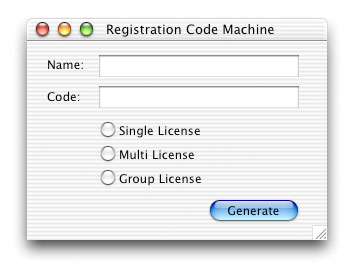
Registration schemes are always "beyond" new programmers. If you're on the REALbasic mailing list, you'll see a message about once every other month on the topic, and the main reason is, new programmers, or more correctly, new registration scheme coders, don't know what a registration scheme is and are afraid of doing it wrong. (And you can believe me because I was one of them.) The strange thing is, there is no way to do it wrong. What are registration numbers and generators? An Example ABC12345 and 10A20763, but QEP10310 would not work because Asc("Q") * Asc("E") / Asc("P") + 10310 is equal to 10379.86 which does not meet our requirement. Also note that 10A2076B would not work because the last character is a letter and not a digit. So you see, all that a registration code generator must do, is produce numbers which meet a strict set of rules created by the registration code validator. This Tutorial's Project Ok, well start by creating a new project and make an interface that looks like this:
Ok, now the format of the registration numbers we're going to be making will have two letters, 3 numbers, a hyphen, and then two sets of four numbers also separated by a hyphen: SF100-4944-9222 The first character will be what kind of license it is. S is for single, M is for multi, and G is for group. "F" is just a single character for you to know which application the registration code belongs to, and the next three characters are the version number of the application and can be used to test different versions of the registration algorithm, but we won't go into that so just call it filler space, and then the next 8 numbers are the real meat of the code. These 8 bytes will be the realy "generated" part of the number, and the bytes we use to do validation with. Code Generation
(Now we reall don't need to do this, but it really helps to clarify what is where as far as which character is in which byte position. All that we really need to do is assign a character to byte 1 to represent which application it is, the version number to bytes 2-4, and hypens in bytes 5 and 10. All of the other bytes are just overwritten.) Next, assign the value of the first byte to be a character representing which of the three license types the user bought (S for single, M for mutli, and G for group).
(Now from here on, the numbers and characters you use are ultimately up to you; Just keep in mind that this is one example of how you might create a registration code generator, it's not the "right way.") Next we're going to assign the 8th, 4th, 3rd, and 1st characters of the user's name to the 6th, 7th, 8th, and 9th bytes of the "code" memoryblock respectively. After that, we're going to do some random math with the value of these four bytes and come up with a number. Using "Seth Willits" as an example, the number generated by the code below is 4076.
Then we're going to take that number and place it in those 4 bytes (6, 7, 8, and 9).
Then for our next four bytes, or the last for characters of our registration code, we're going to a very similar process but change the math just a little bit and use different characters of the name to start with.
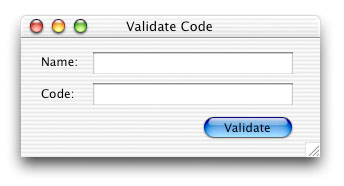
Now after assigning those last four characters, you're done generating the number for that name, so go ahead and put that number into the code field: CodeField.Text = code.StringValue(0, code.size) Code Validation Ok, well anyway, go ahead and implement this interface:
Next, copy the code which creates the registration code into the validate button, delete the lines that test which radio button is selected, and instead of the last line (CodeField.Text = code.StringValue(0, code.size)) write: if Mid(CodeField.Text, 2) = code.StringValue(1, code.size - 1) then So the code you end up with is:
Go ahead and try it with different names and test validating with the correct codes and wrong codes. Pretty cool, huh? As you may have noticed, this example is not 100% "perfect" but works 100% of the time. For example, names with fewer than 8 characters will generate semi ununique numbers. In reality, even with this possibility, the method still works and works well. I've even implemented a version of this same type of algorithm in my own applications because it's simple and effective. With registration validation, anything goes. The really tricky part is trying to keep crackers or warez groups from redistributing your serial numbers! |
 |
||
 |
 |
 |
|
 |




 |
 |
 |
||||||||||||||||||||||||||||||
 |
|
 |
||||||||||||||||||||||||||||||
 |
 |
 |
Maintained by the Staff of ResExcellence. This entire site ©1997-2006 ResExcellence
Privacy Statement? Sure we gotta Privacy Statement.
[an error occurred while processing this directive]