






 |
 |
 |
|
 |
||
 |

Articles 3D Audio Custom Controls General RB Graphics Hacks Mac OS X Menus Novelty Printing REALbasic 2005 REALbasic 2006 Registration Resources Reviews Serial Speech Sockets XML Video Resource Links News Current News February 2006 January 2006 December 2005 November 2005 October 2005 September 2005 August 2005 July 2005 June 2005 May 2005 April 2005 March 2005  REALbasic for Dummies by Erick Tejkowski  Learning REALbasic through Applications REALbasic for Macintosh REALbasic Cross-Platform Application Development 
Older files are in Stuffit 5 or greater format. Newer files are ".Zip". Download StuffIt Expander |

|
 
Ever feel like your bosses are making things up as they go along? Well, they probably are! Today's project is a simple one, but it evens the score. Now you can produce all sorts of buzzword-filled phrases and impress that boss with your knowledge. Only you will know that its complete nonsense! Build the Interface Launch REALbasic and open Window1. Add a PushButton and a Listbox to the interface, making certain to give the Listbox 3 columns. You can arrange the interface however you wish, but it might look something like this: 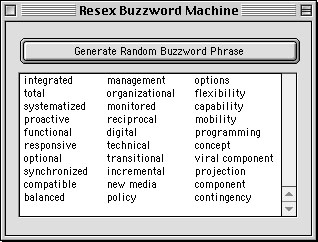
There, that was easy, wasn't it? Add the Code Double click Window1 and place the following code in the window's Open event. 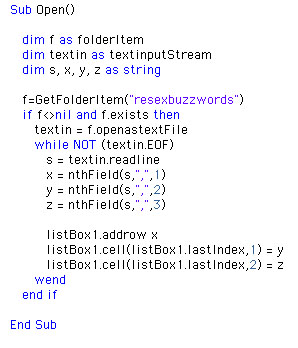
This code opens a text file named resexbuzzwords and reads in all of its data. The data is a list of jargon arranged in groups of three words. Each word is separated by a comma. As the data is read from the file it is placed within a particular column in the Listbox. 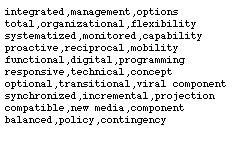
Next, navigate to the Action event of PushButton1 and enter this code: 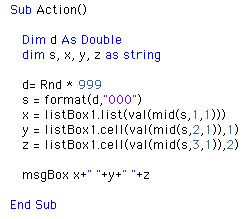
This code creates a random three digit number between 000 and 999. Each digit represents a row from the Listbox. Using these random row numbers, we pull out the data from the Listbox to finally form the random buzzword phrase. Conclusion If you'd like to download this week's example instead of typing it in, you can get it here. See you next week! |
 |
||
 |
 |
 |
|
 |




 |
 |
 |
||||||||||||||||||||||||||||||
 |
|
 |
||||||||||||||||||||||||||||||
 |
 |
 |
Maintained by the Staff of ResExcellence. This entire site ©1997-2006 ResExcellence
Privacy Statement? Sure we gotta Privacy Statement.
[an error occurred while processing this directive]