|
Today's News by Cletus™ The ScreenCatcher Giveaway has ended. Thanks to all who have entered. Three more days left to get entered for the ScreenCatcher Giveaway. Simply download a copy of ScreenCatcher and answer the question asked on the giveaway page. Correct answers qualify for the random drawing on Sunday for one of two free registrations. I will announce the winners on Monday.  Tomorrow we are supposed to reach the mid 50’s. I don't know if it is Spring fever or what, but I may have to head over to the driving range and hit a few! Tomorrow we are supposed to reach the mid 50’s. I don't know if it is Spring fever or what, but I may have to head over to the driving range and hit a few!
Window Monkey has been upgraded to give full support for Mac OS 9.1. Even better is that it includes over one dozen new patterns to help customize your Finder windows. The Software Archive has been updated. A-Dock has entered into another phase of beta testing. 2.3b3. This version continues to fix some bugs and provide even more features. If your not happy with the built in application switcher of the Mac OS, give A-Dock a try. You will not be disappointed. Jérome Foucher (creator of A-Dock) is also working on the next version of Wapp pro. 3.0b3 is the next release of this window management tool. Wapp pro displays a menu that lists the windows of the front most applications, the background applications and their windows in submenus. Barring any further bug reports, this should be the last release under the "beta" title. Maury McCown posted a fairly detailed list of the new install procedure yesterday at RAILhead for Mac OS X. The new procedure certainly seems to eliminate any possible confusion or missed steps as he suggests. He also promises a plethora of screenshots of the newest system in an upcoming update. Possibly in today’s update. Keep an eye out! Gilles writes in with news that he has updated his PowerBook resources page. Also included in this update is a brand spanking new version of his black and gray Kaleidoscope HiTech Scheme. There is also a SiTech (Slim HiTech) scheme available also. Grab them while you can! Theme.org has posted batch of new screenshots and themes to look over. Kine is courtesy Rob Gentile. Visit his site! Submit Software and General News Suggestions!

 Tools of the Trade by Michael Tools of the Trade by Michael
Well, it looks like it's my turn to go for a swim in the frigid waters around Gilligan's Island. The Tribal Council has spoken and my torch has been extinguished.
The funny part is, I had no trouble eating the cow brain or worms, but I freaked out when I was given the candy bar! Do you have any idea what they put in those things!!

Are you still adding to our world's landfills and throwing your old desktop folder in the Trash? Visit Folder Recycling. They'll take your old folders, clean them up, and pass them on to those less fortunate that can't afford folders of there own. :)
Here's a weird one for you. Karl Baron noticed that if you name a QuickTime movie "iTunes Splash.mov" and put it in the iTunes folder. It will be played in the About box. The effect is very cool. The entire normal splash is replaced by the move.
Another batch of Adobe Easter Eggs.
Paul Sahner: "Today, I tried the thing in Illustrator 6.0, where you get the list of the creators. I don't know how well known this is, but, if you go to "about Illustrator (the normal way) and then click on the adobe logo, you get a whole little show, with letters flying around, and if you wait long enough, you get pictures of people."
Diane Jennings: "Has anyone seen the Wolverine picture in Image Ready 3.0?"
Cody: " I found ANOTHER Photoshop Easter egg. I tested this on 5.5, so it may or may not work on 6. Hold down option (same as before), and once the credits are done scrolling, click the upper right hand area. Right above the word "Adobe" in red. There's some bizarre phrases hidden in there. I took a couple snaps, too."
 X-Tips X-Tips
Under MacOS X, in the General Controls panel, you can select the selected highlight color for text.
Apple provides seven colors for your use, but this simple edit provided by Jeff Frey will show you how to add as many additional colors as you wish. (Continued...)
User Contributed Splash Screens: by Michael Coyle
- Hot on the heels of his CowGirl MOSS, David Messick submits another great looking MOSS titled "Creation".
- Want to give your iTunes some Aqua buttons? Checkout this makeover pack from Anders Vessel.
- Tom Hastings adds his great bubble look to two new splash screens for Illustrator and Outlook Express.
- Two more Apple website MOSS were sent by Gregory Meach. They feature the cube and G4 Tower.
Snapshots by Jeremy Hoesly The past year of contributions has brought the Snapshot Section to an important milestone: the 1000th snapshot! Thanks to all for the steady stream of submissions that has made this accomplishment possible, and as always keep them coming as we forge ahead toward the next milestone, whatever that might be.
It’s time for Friday’s round of snapshots: - This contribution from Hilton features the “Xtop Transparent” desktop picture coupled with Maury McCown’s very popular AquaX III K-Scheme. Audion, overhauled with the ENI00 face, supplies the background music at right center. Icons were provided by Xicons.
- EndEffect’s “Forget the Norm” desktop picture debuts in this contribution from Erik Hope. Audion, tweaked with Albie Wong’s BlackHot & Blue face, is cranking out songs in the upper right. Icons from Icon Factory and icons.cx abound.
- Matthew Johnston sent in this screenshot bearing a custom desktop picture and the Aqua K-Scheme. Audion, retooled with the Audion X face, is taking music requests in the upper right-hand corner. Various icons obtained from ResExcellence’s own Icon Archive roam the desktop.
- A tweaked “Psycho Mantis” desktop picture coupled with Maury McCown’s AquaX III K-Scheme are showcased in this submission from Tim Kubista. Audion, retro-fitted with the Elphin face, is kicking out soundwaves in the lower left. Various icons, some of which are from icons.cx, propagate the desktop.
- This snapshot from Sergio Recabarren spotlights the 4K17 build of OS X. ’Nuff said.
- This snapshot from Dan Yang touts Alex’s “Blue Wave” desktop picture in conjunction with Maury McCown’s AquaX III K-Scheme. iTunes is dishing out tunes along the right edge. The Spiffy Apps collection from icons.cx is also shown off.
Captivated with the thought of sending your own snapshot? Read our submission guidelines and then hop to it!
Icon/Desktop News 02-09-01 Icon & Desktop News by Dan  There's blood in the water, and the sharks are circling Gilligan's Island tonight. For all intents and purposes, it looks like our fearless leader Michael is going to end up as the main course for dinner. If you know of any good Webmasters looking for a job, please drop us a line or a message in a bottle. There's blood in the water, and the sharks are circling Gilligan's Island tonight. For all intents and purposes, it looks like our fearless leader Michael is going to end up as the main course for dinner. If you know of any good Webmasters looking for a job, please drop us a line or a message in a bottle.
Icons - Desktops: We've got three more excellent Icon Sets, all Pixelpalooza contest entries, and 6 great new desktops. All on display for today's update.
- "Cyan Hg" by Aaron Sportack is his first full system replacement icon set. Cyan-Hg is designed to be a fresh interesting look for the Mac (OS 8.5+) while retaining several of the familiar elements and the look and feel of the Classic MacOS.
- Welcome to L.Winter's "Dresscode icons", featuring spring fashions carefully handcrafted in the finest digital pixel quality. The catalogue offers 36 outfit pieces for the fashion conscious Macintosh running system 8.5 or greater.
- Jorg Kuijl says his english is not so good, but his "Orange Files Icons" makes up for it. This set includes 47 handsome and colorful system replacement icons. Visit Jorg's website for more of his creations.
- "GlassBox Fractal" by Scott Chitwood of Rampant Mac is another of his amazing 3-D desktops to debut on ResExcellence. Visit Scott's website for the download, and view the other 11 new creations just posted.
- "Mirror" by Jon Reid is an original photograph with zero additional imaging, save for a little localized darkening and saturation control. John works as a newspaper photographer in Sydney Australia and the photograph was taken at a media call for a ballet called Mirror Mirror (based on the Snow White story). Comes in 1024x resolution.
- Garrett Walbridge's creative juices keep on flowing with his latest desktop "Nova". This one comes in three resolutions.
- "X_rise", by FlaxCreations heralds the dawning of a new era for the Macintosh operating system. Comes in 800x and 1024x resolutions.
- You have to admire Josh Bishop's sense of style with his desktop creation "Paper Plane". In case you have forgotten how, instructions are included in 1152x resolution.
- "Liquid Amber", shot by Australian photographer Peter McHugh was taken through a window and a gauze screen. The subject is the fall colored American Sweet Gum tree in 1024x resolution.
News From Around the Web: The Devil's Desktop has been updated with a total of 8 new desktops. Rampant Mac updates with 12 new desktops. Colheres updates with the new desktop picture "In the Rain by Rosa and Daniel. DOME-O-RAMA Dome-O-Rama gets drunk and falls in love: with three new sets of neato keen patterns. Tray's Trove updates with 12 new desktop designs BREDSTIK Entertainment has just updated their site with a whole pile of new goodies. Iconfactory announces the end of submissions being taken, and the final tally for Pixelpalooza 2001. (125 entries) It's finally time to begin the People's Choice Voting process. This is your chance to help choose who will walk away with the "People's vote". DV Graphics is updating almost everyday now. Check out the 4 newest desktop and moss sets, not to mention another IE splash set and icons set in the making. There's a new icon set available at one-button mouse titled "Snowed-in". So what's up WWW? Icons? Desktop pictures? News? Inform us! We'll post it!

Complete Cable Management For The Home & Office.
2/8/01 Snapshots by Jeremy Hoesly Get your fill of snapshots with Thursday’s lineup: - Roger Cordes submits this gorgeous snapshot sporting a “Final Fantasy X” desktop picture in conjunction with Maury McCown’s AquaX III K-Scheme. iTunes is sitting in as digital DJ along the right edge. Icons from Xicons abound.
- A modified version of Misery in Motion’s “Trendwhore” desktop picture and William Bart’s HyperSleek Pro Graphite K-Scheme debut in this contribution from Mark Puhl. Audion, retooled with Akio’s Sharp Graphite face, is cranking out music in the lower left. A smattering of icons from Perfect Yosemite is also shown off.
- Back with another snapshot, Sara Romini touts this custom “Neko” desktop picture. iTunes shuffles songs in the upper right.
- This submission from Carlos Salazar-Sazo features a desktop pattern similar to the one on Blue Sky Heart’s main page. Selections from the Sports Photonica and QNX iPacks are scattered throughout.
- Scott Brown’s “Mined Reflections” desktop picture and Maury McCown’s AquaX II K-Scheme are showcased in this screenshot from Shawn. Audion, tweaked with the Chromium face, is serving up music in the lower left-hand corner. A wide array of icons from Icon Factory, Mozco, and Gort’s Icons is also showcased.
- This screenshot from Steve Sobek sports the “Blue Wave” desktop picture from ResExcellence’s own Desktop Archive along with Maury McCown’s AquaX III K-Scheme. Icons from Xicons and icons.cx lurk about.
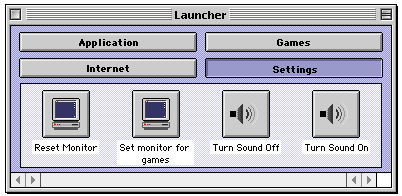
Captivated with the thought of sending your own snapshot? Read our submission guidelines and then hop to it! Applescripts 02-08-01 Applescript/Scripting by Michael When I setup iMacs for friends (something I'm happy to say I do quite regularly), I alwayss onfingure the Launcher with helpful folders to group applications. I have found it also helps to add a folder with some simple Applescripts. If the friend has childern, many kids games still prompt you to change the monitor resolution to 256 colors, so I include scripts for that. It also helps to give them a simple way turn sound on and off. To save yourself time download my prepared set of scripts. -- turn sound off
set volume 0
--turn sound on (not all the way, but 5 out of 7)
set volume 5
-- set to 8 bit for kids games
set monitor depth 8
-- reset to 32 bit
set monitor depth 32

Click here to learn more about Toast 6 Titanium
\ Today's News by Cletus™ I will not pursue legal action for being voted off the island. There is still plenty of time to enter the ScreenCatcher giveaway. Answer the question asked on the giveaway page to enter. If you are not sure of the answer, you can easily download a copy and test-drive it. Who knows, that simple little activity may just be enough to make you qualify to win. Aladdin has posted their update for DragStrip. 3.7.2 brings compatibility to this one-click launching utility for Mac OS 9.1.  CopyPaste is now at version 4.4.2. Replace the Macs one keyboard with up to 100 with CopyPaste. I have posted a partial list of changes to this excellent program: CopyPaste is now at version 4.4.2. Replace the Macs one keyboard with up to 100 with CopyPaste. I have posted a partial list of changes to this excellent program:
- The clips in the Clip Extender are now saved immediately on changes, which mean even through crashes.
- The clips in the Clip Recorder are now saved through restart. They are saved independently of the Clip Extender files in a folder “CopyPasteRecorder” in the “CopyPasteFolder” in your Preferences folder.
- The preferences now are not saved at shutdown, but immediately on changes. This should help with preferences file damage which sometimes happened at shutdown.
- The scrollbars in the Clip Viewer and the Clip Recorder now work as they should.
If you click the palettes trash can with the option key pressed the clips are deleted without warning.
- Many Carbon programs somehow handle the clipboards differently. E.g., AppleWorks 6.0 had a problem with pasting the clips, CodeWarrior IDE 4.1 could not copy. I fixed that problem, but I had to remove the “Multi-paste” feature.
 ExtensionOverload by Teng Chou Ming & Peter Hardman has been updated with definitions for 2960 Extensions, 1070 Control Panels, 1070 Control Strip Modules and 108 Contextual Menu Items. Wow! I didn't realize there were that many. If you have a question about what is on your computer, this is where you go to find out what it is. ExtensionOverload by Teng Chou Ming & Peter Hardman has been updated with definitions for 2960 Extensions, 1070 Control Panels, 1070 Control Strip Modules and 108 Contextual Menu Items. Wow! I didn't realize there were that many. If you have a question about what is on your computer, this is where you go to find out what it is.
Themes and Schemes: Qwer has updated all the Hi-Tech styled Kaleidoscope schemes. Find updates to Hi-Tecue 1.9.4, Hi-Tecue Transparent menu 1.9.4 and Hi-Teque 1.9.4. Desktopper has previews of all the schemes. Submit Software and General News Suggestions!

Calendar & Appointment Scheduler for Mac OS X
Tools of the Trade by Michael
Larry sent a couple of good links for information on Open Firmware, that hidden little program that tells your Apple hardware which OS to load at boot. This first TIL from Apple covers the nitty-gritty, then this MacFixIt Forum thread has some practical solutions when Open Firmware goes haywire.
Phil from Waferbaby was the first to tell us how you can see those funky Adobe splash screens we posted Monday without using ResEdit.
For most of the applications (I tested Photoshop 6 and ImageReady 3) if you hold down command when going to the about screen for the app you see the alternate picture. For Pagemaker 6 you hold down shift instead. In Illustrator 6, if you hold down option you see a list of the creators.

iMatt adds, "In Photoshop 5.5, hold option and select "About Photoshop..." then type "burp", without quotes. Crazy people at Adobe.
And finally, Paul Hollingsworth chirps in with, "The Venus in Furs splash, for example, was not only the code name used by Adobe for Photoshop 6 but incidentally the name of the band one of the lead developers is in."
In case you missed it, yesterdays Applescript news (at the bottom of this page) covered an extension that allows Folder Actions to work on closed folders.
The worse part about updated your MacOS is performing a clean install (something I always recommend) The latest MacInstruct tutorial shows you how to simplify the process.
X-Tips
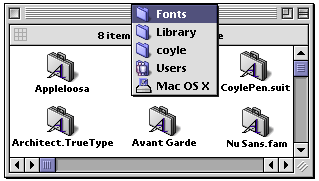
Want to use your Classic TrueType fonts under MacOS X? Every user has their own font folder in which to place fonts. MacOS X gladly uses standard MacOS Classic TrueType fonts without any conversion. If you are on a multiuser MacOS X machine, place the fonts in System-->Library-->Fonts for them to be available to all.
User Contributed Splash Screens: by Michael Coyle
- Gregory Meach sent two more silver metal MOSS featuring Apple's web pages (iTune and G4 Tower).
- At Macworld, we were lucky enough to have a few brews with ResEx contributor XOCHI. Today, he sends us a way-cool Interarchy Interface based on the Eazel Desktop.
- A very humorous, but beautiful cowgirl MOSS was created by David Messick.
- Alex MacDonald sent another of his great Toast skins!
- Frank contributes two splash screen. One for Eudora and the other for Norton Firewall!
- Sean King sent a nice looking splash for Explorer. Hey Sean, how about a full set for Office 2001!
- Another fine looking MOSS was created by Nicolas Cardot.
- One of the classic images from MacOS 8 was the "About this Mac" picture of the Earth. Tupring updates the image for MacOS 9.
Snapshots by Jeremy Hoesly Satisfy that mid-week snapshot craving with Wednesday’s batch: - This snapshot from Christopher Brown features Akio’s BIG Graphite K-Scheme. Audion, outfitted with a skin most likely by Akio, is dishing out tunes in the upper right. He also got a hold of our staff pictures and spruced them up a bit in Photoshop. It’s not everyday that we star in a snapshot!
- The Joy of Cola settles on top of this submission from Gerrit Dalman sporting the custom “Pespiman” desktop picture. I wonder if that Pespi girl is under there…
- Phillip De Vita sent in this contribution showcasing a custom “Caprice” desktop picture and a custom K-Scheme blended from the AquaX III and Aqua II schemes as well as the Liquid Theme. SoundJam, overhauled with the OSX Player skin, is sitting in as digital DJ in the upper right. Icons from Xicons along with some of the custom variety are also featured.
- Robert Erwin has a craving for titanium in this snapshot featuring the “Titanium PowerBook G4” desktop picture. iTunes, cleverely situated within the PowerBook G4’s screen, is disseminating various song selections.
- A custom desktop picture and Kei Kinoshita’s Grafito K-Scheme debut in this screenshot from Minge. Macast pumps out soundwaves in the upper left-hand corner. Icons from Icon Factory’s Pixelpalooza 2001 contest are also spotlighted.
- Faithful contributor Sara Romini graces the Snapshot Archive with another submission this time bearing a custom “Oni” desktop picture. iTunes provides the music along the top.
Captivated with the thought of sending your own snapshot? Read our submission guidelines and then hop to it!
Icon/Desktop News 02-07-01 Icon & Desktop News by Dan  I have to admit to loving this job. It's like Christmas in July every time I open my mail box and download all the goodies people have sent. Thanks for all the great submissions, and please keep them coming! I have to admit to loving this job. It's like Christmas in July every time I open my mail box and download all the goodies people have sent. Thanks for all the great submissions, and please keep them coming!
Icons - Desktops: We've got three more excellent Icon Sets, all Pixelpalooza contest entries, and 6 great new desktops. All on display for today's update.
- Forrest Walter does it again with "Gort's Icons Volume 5". Behold 23 very strange and amusing 32 bit icons. System 8.5 and above is required to use these. Other "Gort's Icons" can be found at http://www2.fwi.com/~forrest/icons.html.
- "Inventions for the junkfood junky" by Mathew Halpern is a collection of icons designed to enhance the snacking experience of the junkfood junky. If you ever were in need of a popcorn catapult or a robotic drink coozie, these icons are for you. Stop by the MadScience Labs for more icons games and whatever they come up with in the labs.
- If you like glamor, Deco and glitz, "Starlet Icons" by Sue Blime is a must have for any chic icon aficionado. This set of 12 glamorous icons is Sue's first foray into icon creation.
- Another variation on a theme, "Blur" by Garrett Walbridge comes in three resolutions.
- Juan Santiago of gecko-graphics thanks everyone for all the support he has been getting for his great desktop pictures. "Gold" is another of his unique signature creations in 1280x resolution.
- G'day, and welcome to more photographic journeying through Australia with Peter McHugh. Stroll through "Solomons Cave's" in Tasmania and admire the awesome beauty in 1024x resolution.
- "Space Apple" by Steve Sobek, started it's life as a huge 22 MB file from the NOAA site, a composite picture of the planets done by Arizona State University. It was a beautiful photo, but Steve though it was missing something. So he brought the size down to a manageable level and made it "ours". SpaceApple comes in 1024x resolution.
- Zora Arkus Duntov, the "Father of the Corvette is Adam Smith's hero. His "Think Different Zora" desktop immortalizes this creative genius in 800x600 resolution.
News From Around the Web: Colheres updates with the new desktop picture "In the Rain by Rosa and Daniel. DOME-O-RAMA Dome-O-Rama gets drunk and falls in love: with three new sets of neato keen patterns. Tray's Trove updates with 12 new desktop designs BREDSTIK Entertainment has just updated their site with a whole pile of new goodies. Iconfactory announces the end of submissions being taken, and the final tally for Pixelpalooza 2001. (125 entries) It's finally time to begin the People's Choice Voting process. This is your chance to help choose who will walk away with the "People's vote". DV Graphics is updating almost everyday now. Check out the 4 newest desktop and moss sets, not to mention another IE splash set and icons set in the making. There's a new icon set available at one-button mouse titled "Snowed-in". The Devils Desktop has updated with 10 new desktops, 2 New Icon Sets and 1 New Picture Frame PDF File. So what's up WWW? Icons? Desktop pictures? News? Inform us! We'll post it!

Visit the Mac Experts!
2/6/01 Snapshots by Jeremy Hoesly Craving desktop ideas? Grab Tuesday’s snapshots: - This creative contribution from AlgaeScraper showcases a modified desktop picture from MacDesktops in combination with Akio’s BIG Graphite K-Scheme. Audion, equipped with Lacerate’s Corrosion face, is serving up music in the upper left-hand corner. Icons from William Bart’s BBX Platinum K-Scheme along with selections from ResExcellence and Icon Factory are scattered throughout.
- Timothy Breihan submitted this snapshot comparing his OS 9 and OS X desktops. The “BMW M5 Cockpit” desktop picture is featured on both desktops.
- Akio’s “Applegg 2” desktop picture and RAILhead Design’s Aqua III K-Scheme debut in this snapshot from Jake Fowler. iTunes is tickling the eardrums at center stage.
- The custom “Platine” desktop picture is showcased in this contribution from Josselin Guédes along with William Bart’s BBX Platinum K-Scheme. Audion, retro-fitted with Ablie Wong’s BlackHot & Blue face, is cranking out songs along the left side. Custom icons line the right edge.
- Regular contributor iNeusch is back with another screenshot this time sporting a desktop picture from Customize Your Mac. SoundJam, overhauled with the converted Cutting Edge Audion face, is dishing out tunes in the upper left-hand corner while iTunes supplies some background music in the lower left. Icons lifted from Akio’s Aquafine Tangerine K-Scheme are also used.
- This OS X Beta screenshot from Robert Marking sports the “MacFaced” desktop picture from ResExcellence’s own Desktop Archive in conjunction with Akio’s Graphite Theme. iTunes, running in Classic, is kicking out soundwaves along the top. Icons provided by Xicons inhabit the right edge.
Captivated with the thought of sending your own snapshot? Read our submission guidelines and then hop to it! Applescripts 02-06-01 Applescript/Scripting by Michael Ryan Colley was the first of many to let me know of a solution to triggering Folder Actions on closed folders...  I don't know if you knew this, but you CAN run Folder Action Scripts on "Closed" folders. Thanks to a nifty 3rd Party, Freeware extension created by Eric Grant. He is more well known for some of his Scripting Additions. His System Extension named "Folder Actions Plus" can be found at here. This extension lets a Folder Action Script be triggered even on "Closed" Folders. I don't know if you knew this, but you CAN run Folder Action Scripts on "Closed" folders. Thanks to a nifty 3rd Party, Freeware extension created by Eric Grant. He is more well known for some of his Scripting Additions. His System Extension named "Folder Actions Plus" can be found at here. This extension lets a Folder Action Script be triggered even on "Closed" Folders.
Ryan is correct (and he snuck in the work "nifty!). This small extension does the trick. You may need to edit your scripts changing the first line from on opening folder... to on adding folder items to....
This next "Drag & Drop" script by Federico Cervelli will open unknown files or files which are opened by the wrong application with an application of your choosing. on open myFile set fileName to (myFile as string)
set chooseApplication to ¬
(choose file with prompt "CHOOSE APPLICATION TO OPEN WITH" of type "APPL")
set applicationName to (chooseApplication as string)
tell application applicationName
open file fileName
activate
end tell end open

Visit the Mac Experts!
Previous News Page...
You can now upload your contributions (include a READ ME) to the ResExcellence
ftp drop box, and let us know with an email. Be sure to read the Submission Policy
Today's News by Cletus™ Today we are really excited to be having another giveaway. St. Clair Software has kindly offered to giveaway two copies of their fantastic screen capture utility; ScreenCatcher. This is right up a our readers alley too. Head over to the contest page and get yourself entered!  Paul Sexton has updated LaunchControl to version 1.3. LaunchControl is a Control Panel that allows you to change the memory size of an application when opening it. From the read me: "Version 1.3 fixes a few (unreported) bugs and adds support for locked files and/or disks (such as CD-ROMs). LaunchControl has always been able to open these correctly, but it was impossible to save the changed settings until now." Paul Sexton has updated LaunchControl to version 1.3. LaunchControl is a Control Panel that allows you to change the memory size of an application when opening it. From the read me: "Version 1.3 fixes a few (unreported) bugs and adds support for locked files and/or disks (such as CD-ROMs). LaunchControl has always been able to open these correctly, but it was impossible to save the changed settings until now."
Rearrange Folders 1.2 is an application which lets you optimize the positioning of windows, disks and folders in the Finder. It will stack windows neatly so that at least part of the window is always visible. The Free Memory Show 2 will display the available system memory in a tiny "unobtrusive floating window." Additionally it will notify you when the free memory drops below an adjustable value, or it can quit applications to help defragment memory. Fire Imp Software has released version 2.0 of Desktop Demon. DesktopDemon is an AppleScript that memorizes nearly everything about your desktop setup. This version is a major upgrade, with lots of changes in functionality. You no longer have to hold down the "Option" key to bring up the main window - unless it is in "Launch on Startup" mode. The main dialog window/ panel has been redesigned slightly; you now have a direct link to the preferences panel and two of the new options; Trash Desktop Clutter and Archive Desktop Clutter. All the new features are available whether registered or not. Jonathan has started a thread in our forum asking for input on this release. PalmIcon v1.0 by Mark Chao-Kuang Yang is a drag and drop application for MacOS that will allow the generic icons you receive when you download a Palm program to become visible. Stonk sent in an e-mail about this page at Apple that lists the requirements for running Mac OS X. Lee had this question in the forum as did Henrik in this forum thread. Does anyone ever read the manuals included with software? I typically do not. Had I read Turly's manual for FinderPop I would have noticed this secret "Configuration Dialog" control panel instead of finding out about it in a newsgroup thread. When FinderPop's Control panel is open, Command-Option click the FinderPop image to open the secret Configuration Dialog box. From now on I am going to Read The FinderPop Manual! :) Do you think this screenshot comes a little too close to Apple's Mac OS X? Apple Legal apparently does. Themes and Schemes: Klassik 1401 is webmaster Butt_O'sigh's latest version of this Aqua based Kaleidoscope Scheme. Submit Software and General News Suggestions!
Click here to learn more about Toast 6 Titanium
Tools of the Trade by Michael
The links page has been updated with 12 new sites. Check them out and use the form at the bottom of the page to send us sites we're still missing.
Last Friday, Cletus found himself bobbing in shark infested waters as he was voted off the Island by readers. Who will be left eating grubbs at the end of this week? Time for you to check the side bar give the next editor the boot.
Did you think you were getting a deal when you bought that old piece of computer hardware at a garage sale only to discover you could not find any drivers to make it work with your Mac? Sounds like you need a trip to the Mac Driver Museum. They have a ton of legacy drivers stored in neatly organized sections.
Icon/Desktop editor, Dan Flax, was poking around in the resources of various Adobe products and versions. Low and behold burried down in the PICT resources of many are some very silly and strange alternative splash screens obvioulsy put there by the designers. Open a copy of the program in ResEdit, open the PICT resources, and copy/paste to replace the original splash with this hidden ones.
MacInstruct has posted a new tutoial, How to Edit Graphics with an application called BME.
If you have updated to MacOS 9.1 and are using some of the cool Clocks from our archive, you may be getting some "Out of Memory" errors. To eliminate them, remove the custom icon from the clock applications Get Info window. We don't yet know why this works, but it does!
 Update: Removed at Apple's request. ButtonMaker has been updated to version 2.0. It has been almost completelly re-written. The changes are as follows: Update: Removed at Apple's request. ButtonMaker has been updated to version 2.0. It has been almost completelly re-written. The changes are as follows:
- Two button types, disabled aqua and beveled aqua have been added.
- The button window now updates live instead of with the help of the "Do It!" button.
- The main window can now fit on 640x480 screens.
- Text can be aligned at the left, right or center.
- Many new saving formats have been implemented.
- JPEG saving has much better quality now.
Ummmm.... Tom Buzzeo wants your help to save an American Institution!
 In a current pre-release beta of Mac OS X, Apple mysteriously removed the beloved Clarus the Dogcow from not only the Printer setup/page options, but the entire system. I have been so distraught by this move that I am organizing a movement to bring back our beloved Clarus. It is my personal mission to see to it that Clarus gets put back in the System where she belongs. Apple values it's customers input and it is my hope that the resounding cries of Moof! from the public will be heard. Please fill out the small petition to show your support and love of dogcattle everywhere. In a current pre-release beta of Mac OS X, Apple mysteriously removed the beloved Clarus the Dogcow from not only the Printer setup/page options, but the entire system. I have been so distraught by this move that I am organizing a movement to bring back our beloved Clarus. It is my personal mission to see to it that Clarus gets put back in the System where she belongs. Apple values it's customers input and it is my hope that the resounding cries of Moof! from the public will be heard. Please fill out the small petition to show your support and love of dogcattle everywhere.
 The Polling Place by Michael Coyle The Polling Place by Michael Coyle
It appears one Classic OS feature that won't be missed in MacOS X is the Folder Action. While I have sometimes used them over the years, I have found they have one major draw back: the folder has to be opened in order for the scripts to trigger. When Folder Actions were first possible, I spent several days trying to create a "New Attachments" folder whose icon would change when a new file was added. Unfortunately, it couldn't be done. The Applescript to change the icon would only activate once the folder was opened, but by then I already knew if anything had been added!
Melissa, the ResEx Links Editor and my daughter, showed me a skin she recently made for a new MP3 player called Cabrio. I had never heard of it, and that inspired this week's Polling Place question, "Which is your main MP3 player?"
User Contributed Splash Screens: by Michael Coyle
- Whoa! Nicolas Cardot sent a series a five beautiful MOSS screens. There is one to match any Mac color, so give them a look.
- The creator of the Interachy Interface Builder program, Daniel Bondard has teamed up with Todd Wheeler to submit a great looking Interface to ResEx. Daniel says, "The special feature of this interface is that it allows storing twelve frequently-used URLs in customizable slots, taking advantage of the editor's seamless integration&Mac250; with Interarchy (I hope you did see this feature? menu Settings:Edit Interface). It comes in two parts: PersonalFTP [with the custom URLs] and a minimized version, StandardFTP [generic ftp commands].
- A nice looking splash for Outlook Express was created by Seb Carley. Its design compliment an earlier Explorer splash.
- Another fine Toast skin was submitted by Alex MacDonald. This one is made to look good with MacOS 9 Platinum.
- Ryan Meek adds a shadow to this replacement cursor extension.
- No matter which OS version you're running on your Bondi Blue iMac, Christoph Meyer has an About this Mac replacement for you!
Snapshots by Jeremy Hoesly Get your mitts on Monday’s snapshots: - A desktop picture bearing an artwork from Vincent Van Gogh’s “Sunflower” series is spotlighted in this snapshot from Brian Foley. Audion, equipped with the Bi-Polar face, is taking music requests along the bottom.
- This submission from Mike features a custom desktop picture. SoundJam, retooled with the AquaX skin, is serving up music in the upper left-hand corner. Icons provided by Xicons are also showcased.
- It’s not everyday that ResExcellence gets a theme named after it! Michael Rabe from Doghouse Online sent in this snapshot christening the new “ResEx” Theme accompanied by a matching desktop picture. Apple’s iTunes music player is cranking out music selections along the top.
- Lei Fang from Dead or Alive 2: Hardcore drops by in this submission from Benjamin Rivers sporting an Aquafied desktop picture of the character combined with Peter Harte’s Aqua II+ K-Scheme. iTunes is providing the background music in the upper left-hand corner.
- This screenshot from Michael Schnepf touts the custom “Plane” desktop picture. Audion, outfitted with Akio’s SlickCorner Graphite face, is dishing out tunes in the lower left-hand corner. Icon Factory’s Smoothicons are nestled in the upper right-hand corner.
- A desktop picture from Perfect Yosemite coupled with power/MAC’s Dimple Theme debuts in this contribution from faithful contributor Evan Sharp. Macast is sitting in as digital DJ in the upper right, and a smorgesbord of icons from Icon Factory, icons.cx, and Perfect Yosemite is scattered throughout.
Captivated with the thought of sending your own snapshot? Read our submission guidelines and then hop to it!
Icon/Desktop News 02-05-01 Icon & Desktop News by Dan  In my effort to make our Icon Archive one of the best around, I extend an open invitation to any and all who wish to submit their icon sets to ResExcellence. If you find your recent Pixelpalooza entry needing a home, we will be happy to host them. Please note that I can only display a few at a time for each update, and that your submission may take a bit of time to show up. Rest assured they all will find a permanent spot here, and will be coming soon to a screen near you. In my effort to make our Icon Archive one of the best around, I extend an open invitation to any and all who wish to submit their icon sets to ResExcellence. If you find your recent Pixelpalooza entry needing a home, we will be happy to host them. Please note that I can only display a few at a time for each update, and that your submission may take a bit of time to show up. Rest assured they all will find a permanent spot here, and will be coming soon to a screen near you.
Icons - Desktops: We've got two more Icon Sets from some talented pixel artists, both Pixelpalooza contest entries, an iTunes Aqua makeover kit and 6 great new desktops. All on display for today's update.
- Nicolass Cardot does quite nicely for his first attempt at icon making. "Fablue Icones" is a set of 15 spherical symbol icons will certainly lend a touch of elegance to your desktop. French suggested but not required.
- The graduating "Class of QYQ1000" may not look like you expected after all. This whimsical set of 12 futuristic icons includes some pretty strange but friendly characters.
- Anders Vessel decided that Apple's new iTunes software needed a bit of a visual tweak. "AquaButtons for iTunes" includes the resources and instructions to make the necessary changes. ResEdit Required.
- SoulRocka Nasty Nene returns to ResExcellence with his "Beholder-iBeauty" desktop. Another in his Think Different Ok series, this one come in 1024x resolution.
- Feel the raw power of the new Power Mac G4 with Jason Johnson's "Burn" deskpic. Comes in 1024x resolution.
- Spice up your screen with "Hot and Blue" by Jacob Simpson. Download this provocative and sexy desktop in 1024x resolution.
- Our final set of desktops submitted by the talented young English digital artist Fred Stidson, contains two very different styled pictures. "Desktop" and "SubMarine Scene Desktop" are both freestyle illustrations and come in 1024x resolutions.
- Kevin, Cherre, Tim and Erika Ranck show some team spirit with their "Jets" desktop. If you're an NY Jets fan yourself, then you can proudly display this backdrop in 1024x resolution.
- Mark Sutton created "Wooden Apple" in Photoshop using a variety of methods. He likes his desktop pictures to be calm and relaxing with visual interest, but still be able to see your icons. This classy Apple-Centric backdrop comes in 1280x resolution.
News From Around the Web: Tray's Trove updates with 12 new desktop designs BREDSTIK Entertainment has just updated their site with a whole pile of new goodies. Colheres updates with a new icon set "Hands" by Luisa. Iconfactory announces the end of submissions being taken, and the final tally for Pixelpalooza 2001. (125 entries) It's finally time to begin the People's Choice Voting process. This is your chance to help choose who will walk away with the "People's vote". DV Graphics is updating almost everyday now. Check out the 4 newest desktop and moss sets, not to mention another IE splash set and icons set in the making. There's a new icon set available at one-button mouse titled "Snowed-in". The Devils Desktop has updated with 10 new desktops, 2 New Icon Sets and 1 New Picture Frame PDF File. DOME-O-RAMA -- An Unhealthy Obsession for Snowdomes updates with some new backgrounds Shroomgfx has got the rest of the "Glass Eye" icons ready to download. So in total that's 49 icons - 4.7megs worth. Crazy BlueSkyHeart announces the long awaited release of "Desktop Consoles Volume 6". There's 27 brand-spankin' new desktop pictures looking for a home.
So what's up WWW? Icons? Desktop pictures? News? Inform us! We'll post it!

Visit the Mac Experts!
Previous News Page...
You can now upload your contributions (include a READ ME) to the ResExcellence
ftp drop box, and let us know with an email. Be sure to read the Submission Policy
|