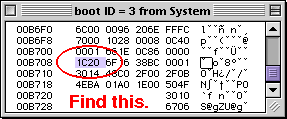
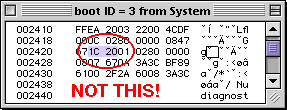
 It needs to be all in one column as shown on the left. It needs to be all in one column as shown on the left.
It will also be located towards the end of the resource in a row beginning with 00Bxxx.
Unfortunately, I can't be more specific because the location changes slightly depending on the system version.
For example, in my version of 8.5.1, the location was in row 00B708. Fortunately, it appears that 1C20 appears (in a single column) only once in boot resource 3.
Once you find 1C20, change it to 0001 and the startup delay will be eliminated.
That's all it takes. Save your work and quit Resedit. Replace the old System suitcase with the new one. Because of the ambiguities in this particular edit, you'll want to make sure you hang on to the old System suitcase until you test the edited one.
And how do you test your work? By deliberately crashing your Mac! No, not by running Netscape Communicater in a one meg memory partition, but by hitting Control-Command-Powerkey.
Make sure that the Shutdown warning it checked in the General Controls control panel. Then perform the "Three Finger Salute" (Control-Command-Powerkey), and when the computer restarts, the MountCheck repair program will run.
There will be no delay when it finishes, the boot process will immediately continue.

Richard Rice adds, "Not a comment so much as an update to the 'Remove the 2 minute delay from the startup disk check' edit. I got it to work under MacOS 9.1. The 'boot' resource is now in the System Suitcase, and the hex '1C20' is located on line 00B2D8.
Sonic Purity offers up some additional notes on new offset locations for 1C20 in OS 9.2.1 and OS 9.2.2.
System 9.2.1: offset 00B9D8 (beginning of this offset line).
System 9.2.2: offset 00BA90 (second word in line beginning with offset 00BA88).
It may also be helpful for folks to realize that the proper 1C20 is preceded by 0000 and followed by 6F16. This shows up as true in the existing screenshot for 9.0.4 in the article, and I have verified that it is true for System files for OS 9.1, 9.2.1, and 9.2.2. It is very likely true for earlier operating systems going back to 8.5, though I did not verify this.
This can be useful information to know if one has changed the tick count, yet does not remember what they changed it to. For example; I wanted a 15 second delay, so I changed the count to 0x0384. If I were to forget this, I would have trouble finding what to re-change without reverting to a clean System file.
|


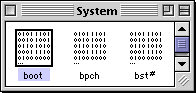 Open a copy of the System suitcase is ResEdit and find the boot resources.
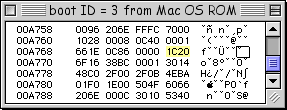 If you have an iMac or Blue G3, open the MacOS ROM file instead.
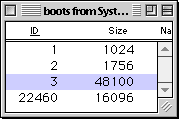 Open ID# 3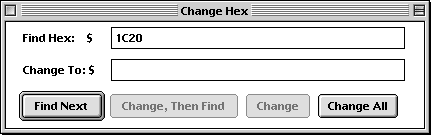
 But just not any old 1C20 will do!

