






 |
 |
 |
|
 |
||
 |
 |

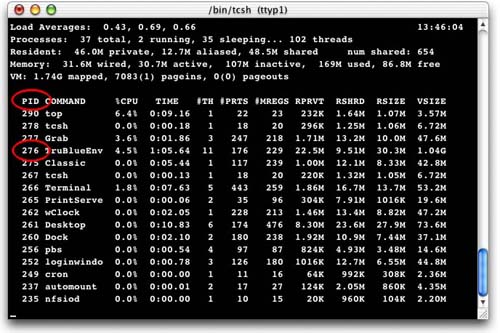
Terminal Commands: View and Kill an Errant App by Michael Coyle One of the most problematic applications that runs under MacOS is the Classic environment. It often freezes and resists a Force-quit. Part of the problem may be the fact that two applications make up the Classic environment: TruBlue and Classic. While you can force-quit Classic, the TruBluEnv may continue to run. A symptom of this is the System slowing to a crawl. One of the great benefits that Mac users will finally enjoy with the arrival of X is preemptive multitasking. In theory, this prevents an application seizing all the system resources; locking the computer up, and forcing a Quit. To see all the applications running, launch a terminal and type: top The window below shows the output of top . There are a total of 37 processes running and they are sorted by the percentage of CPU power they use.
Beside the name of each running process or application is its Process ID number (PID). In the case of TruBlueEnv that number is 276. In the image above, TruBlue is using only 4.5% of the CPU, but if it goes rampant, it may hog more than 99% of the processor! In MacOS X, Command-Option-Escape brings up the Application Manager which would allow you to kill the Classic App, but sometimes TruBlue managers to hang on for dear life - and it never appears in the Application Manager. To kill a process that hides from the Application Manager (in this example TruBlue) use top to get the process ID, then open another terminal and type:
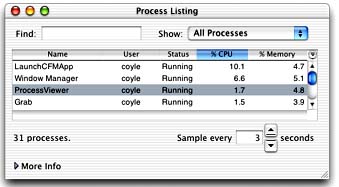
Think of -9 as an instruction to kill with extreme prejudice. It forces the application kill to try real hard to stop the process ASAP. MacOS X provides a graphical utility called ProcessViewer that can accomplish the same task. To kill an application, double-click on the name and you will be provided a dialog with an option to force-quit the offending program.
There are two reasons why I prefer to kill processes in a terminal rather than the graphical application. The first is that top and kill are available on any unix-like system, including Linux. The second is that the operation can be performed remotely over a telnet connection.
If my Powerbook is running Linux or MacOS X and the window manager freezes, I can use Nifty Telnet from the family iMac to telnet into my Powerbook. Once logging in, I can keep killing processes until I can reclaim control, or even remotely restart the computer with the reboot command. This is much more preferred than doing a forced restart (Command-Control-Power) because it properly shuts down the remaining processes and file system.
|
 |
|||
 |
 |
 |
|
 |




 |
 |
 |
||||||||||||||||||||||||||||||
 |
|
 |
||||||||||||||||||||||||||||||
 |
 |
 |
Maintained by the Staff of ResExcellence. This entire site ©1997-2006 ResExcellence
Privacy Statement? Sure we gotta Privacy Statement.
[an error occurred while processing this directive]