 |

Running 37 days
without a restart.
|
|


 X-Tips - Get to know your Terminal X-Tips - Get to know your Terminal
For more than 15 years, the Intel/Unix crowd have looked down on the MacOS because it didn't have access to a command line interface. Now, with MacOS X, we can stand proud!
Now that you have it, what the heck do you do with a command line? I have several common uses for the Terminal.
pico in a terminal. Click for larger.
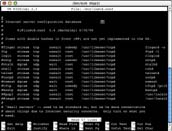 |
- The text editor pico is saves files as ASCII, without the extra control charactors of Apple's TexEdit, the default editor in MacOS X. It's my preferred method for editing system text files. The window on the right shows pico editing /etc/inetd.conf. It controls internet services on MacOS X. Items such as: telnet, ftp server, news server, and more can all be turned on or off here. Apple provides Graphical System Preferences for most of these, but not all.
- The Process Status: ps. The command ps -aux | more will display every program running on the computer - not just the ones visible in the Force Quit window. For example, sometimes Classic doesn't quit cleanly, hanging in limbo. Calling up ps in a Terminal displays the offending program with its PID number (Process ID). Typing kill (PID) terminates the offending application. Below, I kill the Clock.
Partial listing from Process Status (ps)
[pismo-macosx:~] coyle% ps -aux | more
USER    PID %CPU %MEM      VSZ    RSS  TT  STAT      TIME COMMAND
coyle    51  11.0  4.8    34340  12608  ??  Ss     0:17.19  Window Manager
coyle   263   9.0  2.8    41956   7304  ??  S      0:20.62  Classic Menu
coyle   264   1.3  3.3    47000   8744  ??  S      0:01.91  Battery Monitor
coyle   269   0.1  4.4    51860  11648  ??  S      0:01.36  Terminal
root    191   0.0  0.1     2272    284  ??  Ss     0:00.06  syslogd
root    198   0.0  0.1     2272    244  ??  Ss     0:00.02  portmap
root    201   0.0  0.1     2328    320  ??  Ss     0:00.02  nibindd
coyle   260   0.0  2.9    38028   7604  ??  S      0:01.94  Dock
coyle   261   0.0  7.2    65144  18928  ??  S      0:02.00  Desktop
coyle   262   0.0  3.4    47388   8800  ??  S      0:01.13  Clock
more
[pismo-macosx:~] kill 262
|
- Another handy program that runs in the Terminal is ping. If I want to get a quick feel for the ResEx DSL line, I can ping the server and check the round trip time.
If MacOS X hangs so badly that the mouse and keyboard are frozen, I can telnet into the computer from another box on the network and either attempt to kill the offending app, or cleanly shutdown the server as shown below.
ping, and remote telnet shutdown
[pismo-macosx:~] coyle% ping www.ResExcellence.com
PING www.resexcellence.com (207.208.148.74): 56 data bytes
64 bytes from 207.208.148.74: icmp_seq=0 ttl=249 time=68.526 ms
64 bytes from 207.208.148.74: icmp_seq=1 ttl=249 time=53.18 ms
64 bytes from 207.208.148.74: icmp_seq=2 ttl=249 time=51.939 ms
64 bytes from 207.208.148.74: icmp_seq=3 ttl=249 time=45.21 ms
--- www.resexcellence.com ping statistics ---
4 packets transmitted, 4 packets received, 0% packet loss
round-trip min/avg/max = 45.21/54.713/68.526 ms


% telnet 10.200.16.2
Darwin/BSD (Pismo-MacOSX) (ttyp3)

login: ResExcellence
Password:****
Welcome to Darwin!
[pismo-macosx:~] coyle% su
password? ****
[pismo-macosx:~] root% shutdown now -r
|
If you would like more info on any of these commands, and most of the commands in any /bin directory, type man (program name) in a terminal.

|
 |








