






 |
 |
 |
|
 |
 |
 |
slackjaw sent this simple tip to create a popup dock folder that allows you directly jump to any control panel. Find the preferences for the System Preferences. They are located in this folder: /System/Library/Preferences. Then create a new folder titled Control Panels in your Home folder. Make aliases of your most commonly used preferences and move them into the Control Panels folder. You can even rename and change the icon of the aliases. Drag the Control Panels folder to the dock, and enjoy your popup menu. Selecting one of the aliases launches the Systems Preferences and brings up the correct panel.
|
 |
|
 |
 |
 |
|
 |


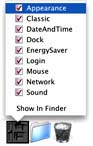 Create a PopUp Dock folder for Preferences
 |
 |
 |
||||||||||||||||||||||||||||||
 |
|
 |
||||||||||||||||||||||||||||||
 |
 |
 |
Maintained by the Staff of ResExcellence. This entire site ©1997-2006 ResExcellence
Privacy Statement? Sure we gotta Privacy Statement.
[an error occurred while processing this directive]