|
12/12/00 Snapshot Gallery by Jeremy Hoesly Christmas is around the corner; so start sending your yuletide snapshots!
Tuesday’s snapshots are on display: - Perry Fjellman from AppleSource contributed this screenshot sporting Akio’s “Bio Apple” desktop picture and BIG Graphite K-Scheme. The Spiffy Apps icon set from icons.cx is prominently displayed.
- This contribution from Michael Gargas touts a custom “Deftones” desktop picture. Audion is pumping out soundwaves in the lower right-hand corner.
- A custom desktop picture and the Hi-Tech Theme debut in this submission from Andrea Longhurst. SoundJam, equipped with the Broken skin, is serving up the music in the lower right-hand corner. Icons from Pseudoroom are also shown.
- This screenshot from Justin Tarango features a modified version of the “SleekGraphite” desktop picture coupled with William Bart’s HyperSleek Pro Graphite K-Scheme. Audion, outfitted with the F1 face, is cranking out the music in the lower right.
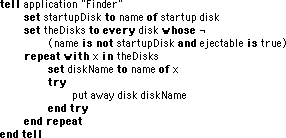
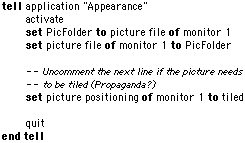
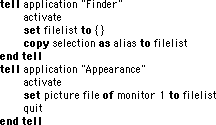
Like the snapshots that you see? Inspired enough to send one of your own? Read our submission guidelines, and then bring it on! Applescripts 12-12-00 Applescript/Scripting by Michael The other day I was complaining about the kids leaving CD's in the iMac. Brian Marsh sent this expanded script to check for ejectable media (hopefully a CD), and then spit it out. This is just a little modification to the "eject CD" applescript posted yesterday the modification just adds a check to make sure the "disk" is ejectable, so it doesn't put away any drives connected over a network, nor even try to unmount other partitions/hard drives. (I'm sure this could be refined even more, but it works for my purpose). In my case, I have an iMac DV from 1999 without the new keyboard and it's CD eject button, so I set up a keyboard function key (MacOS 9 ability) as a CD eject button (by making the script a run only application) I hope it's useful to some other people out there. Joel Benson sends one more script to change the desktop picture with these comments: If one's only goal is to get a different, randomly selected desktop picture every time your Mac starts up, all you have to do is open the Appearance Control Panel, select the Desktop tab, drag the icon of the picture folder to that panel's Desktop, and click on the Set Desktop button. The advantage to doing this with an AppleScript is that it can randomly change the selected picture any time you choose to run it. Once you've already configured the control panel to randomly select a picture from some folder, the enclosed Cycle Desktop script will cause it to select a different picture from that folder. Those with more than one monitor should use the Cycle All Desktops script.
Today's News by Cletus™ St. Clair Software has provided a maintenance release to Default Folder in the form of version 3.0.9. This version provides more compatibility with Mac OS X. Several fixes also are included in this release. - Default Folder runs correctly in the OS X Classic environment Carbon applications running under Mac OS 9.1 are now supported.
- A new scripting addition allows AppleScripts to set the folder displayed by Standard File and Navigation Services dialogs.
- Compatibility problems with MPW and QuicKeys 5 have been resolved.
- Navigation Services can be turned off on an application-by-application basis.
 AliasMultipler by Angelo Scicolone was previously mentioned here and has since ungone an update to version 2.0. Creating the functionality that AliasMultipler allows is a simple two-step process. Simply drag items you want the alias to open over the application icon and click save. That is all. Version 2.0 contains the following enhancements: AliasMultipler by Angelo Scicolone was previously mentioned here and has since ungone an update to version 2.0. Creating the functionality that AliasMultipler allows is a simple two-step process. Simply drag items you want the alias to open over the application icon and click save. That is all. Version 2.0 contains the following enhancements:
- Multi-Aliases are files, not applications, and they are only 2K instead of previously 292K.
- References to files are stored in Multi-Aliases using the Alias Manager, so you will not have to fix the Multi-Alias when you change the name of an item, or move that item.
- The "AliasMother" auxiliary file disappeared, saving another 300K.
- Now AliasMultiplier asks you to save Multi-Aliases before closing them.
- You can easily fix damaged aliases directly from the error window.
RAMEdit is now at version 1.2. This is a utility for changing the RAM allocation to applications while they are running. This version contains several improvements requested by users such as an improved graphical interface, live scrolling and page up and page down key support. iControl 1.2.1 repairs a bug that told some registered users they were not registered. This would be a good fix I imagine. The Icon Software Archive has been updated.  Kanex Group Inc. has released one of the smallest MP 3 players around. Built as a ControlStrip Module, it is always available and read for use. Some of its many features include a full album listing, hierarchical menu in the album listing and various sorting options. Additionally the CSM will update automatically with additions and/or deletions to the lists. Drag and Drop is supported, as are keyboard controls. They are very interested in what you have to say about this release. You can write them here. Kanex Group Inc. has released one of the smallest MP 3 players around. Built as a ControlStrip Module, it is always available and read for use. Some of its many features include a full album listing, hierarchical menu in the album listing and various sorting options. Additionally the CSM will update automatically with additions and/or deletions to the lists. Drag and Drop is supported, as are keyboard controls. They are very interested in what you have to say about this release. You can write them here.
MacFixIt has posted "The MacFixIt Toolbox Awards 2000" on their site. Stop by and compare the winners to what you carry in your toolbox. DragThing is included in the list of winners at MacFixIt and to celebrate James Thomson is providing a "sneak-peek" of what one can expect in the upcoming year with the award winning DragThing. This is going to be so cool! Themes and Schemes: Michael Rabe is releasing the previews for iThemes on Friday at Doghouse Online. Also be on the look out for the release of Pastel Blue. Submit Software News Suggestions!

Calendar & Appointment Scheduler for Mac OS X
The Big ResEx Reader Survey
To date, the results of the survey are fascinating. For example, they show that 32% of ResEx readers are only 3 feet tall and cross-dress. Oops, wrong survey....
Seriously, the insights are amazing, and the reader comments are going to help shape ResExcellence for 2001. The survey ends a week from today, and shortly after, the results will be posted for all to read.
One common misconception in readers' comments is the belief that ResExcellence only updates on Monday, Wednesday, and Friday. No, no, no! For the past several months the page has been updated every weekday! Generally, Tuesdays and Thursdays are for Applescripts and Snaphots, but you never know what may get posted. So stop by daily!
Tools of the Trade by Michael
 AOL's AIM Express is the company's new Browser/Java based IM Client for people on the go. Anthony Wu found a great way to use AOL's AIM Express without a browser and it's advertisement free. It involves Apple's Java Applet Runner. AOL's AIM Express is the company's new Browser/Java based IM Client for people on the go. Anthony Wu found a great way to use AOL's AIM Express without a browser and it's advertisement free. It involves Apple's Java Applet Runner.
I know a lot of people already have AOL Instant Messenger, so this might not be useful all the time, but when you have connection problems with your Mac app or you're on the road, the online AIM Express is a good substitute.
Usually when you go on the AIM Express web page, you click on a link and your browser would load a window with a java applet in there, but that applet is on the same page as other html elements and some ads also.
Here's how to do it with the Apple Applet Runner that comes with MRJ:
Now you have an AIM Express item in the menu
Selecting this menu option will connect the user to the page with the applet, and the program will not load any html or gifs, which means no ads!
For international readers of this page, Sebastien Lavoie created 20 new Flags to match your Keyboard layouts. Included is a ResEdit template/editor so you can make your own.
X-Tips
OS X Talk has links to Dock Poofs and Applescripts to make changing the Poofs easier.
In MacOS X, when you launch the Terminal and get the prompt, you are running a shell program. While the shell can be changed in the preferences, my favorite one choice from LinuxPPC is Bash. Now thanks to James Weisbin, Bash is available for MacOS X. His web site is loaded with links to may other MacOS X tips and tricks pages.
User Contributed Splash Screens:
- In his final set of Eudora Splash screens, Fergus Bremner sends three new beauties.
- A rare Father/Son dual posting today from the McHugh's Family. Big Daddy Peter sends a Giant MOSS called "Looking Out the Mac's Backdoor"...
- ... while his son Alex contributes a very cool irregularly shaped distressed MOSS. Let the download counter cause a family feud!
- A new Toast skin was created by Derek Gordon. It's available in Aqua and Graphite.
- A beautiful Explorer splash was sent by Seb Carley. Come on Seb, make one for Netscape 6!!
Snapshot Gallery by Jeremy Hoesly Hark, Christmas is on the horizon! Now’s the time to send those snapshots dripping with holiday cheer.
Friday’s snapshots are ready for public consumption: - Brenda von Ahsen provides a view of the world in this contribution featuring the “Global City Lights” desktop picture from NASA’s Planetary Photojournal in combination with Toren Valimir’s I/OS X K-Scheme. Audion, outfitted with Toren and Twist’s I/OS Audio face, is kicking out tunes in the lower left. Icons from icons.cx are also featured.
- This drop-dead gorgeous snapshot from Chris Coleman struts the capabilities of OS X’s Quartz graphics engine. Customize.org’s “Gravity Well” desktop picture and Akio’s Graphite Theme are showcased. Terminal has been made translucent with an opacity hack. Applications in the background and the desktop are revealed with various levels of translucency.
- OS X: fast, stable, and Platinum!? At least that was the case for Jason Hardcastle in this OS X DP4 submission when he installed Akio’s Graphite Theme. A collection of 128x128 icons are also displayed.
- Regular contributor Sergio Recabarren sent in this screenshot featuring the custom “Graphite-Aqua” desktop picture. Music Player is providing the background music in the lower right-hand corner. The icons were provided by icons.cx.
Like the snapshots that you see? Inspired enough to send one of your own? Read our submission guidelines, and then bring it on!

Visit the Mac Experts!
Icon/Desktop News 12-08-00 Icon & Desktop News by Dan  Tis the season to remember old friends, family, and loved ones. Why not send an unexpected kindly word with a ResExcellence Postcard? You will be glad you did! Tis the season to remember old friends, family, and loved ones. Why not send an unexpected kindly word with a ResExcellence Postcard? You will be glad you did!
Icons - Desktops - Postcards: Three brand new icon sets, two very lovely holiday postcard submissions and five new desktops on display for 12/8/2000. As always, Enjoy! - T.J. Mahaffey's releases an update to his FuturFolders-Volume#1 icon set. This time you will find 22 separate download and upload folders with your favorite applications represented in standard folder format.
- Martin Valdes submits his latest work for your perusal, A-MAZE-ZEN Icons Vol.1. This collection includes 50 colorful icons with maze designs containing standard folders, files, documents and more in ResEdit format.
- Adams Carroll of ACiCons shares this very cute set of 8 hand drawn icons entitled "Artsy Icons". All in standard folder format.
- Peter Mac continues to experiment with his transparent and non transparent dock sets. Download Transparent Docks Vol 2. Matching sample background patterns included. Multiple resolutions of each.
- By now you can see that SoulRocka "Nasty Nene"really does "think different", and AquaSoul Refreshing fills the bill. Add this new one to your collection in 1024x resolution.
- If you're scratching your head as what to buy your favorite video game junky for Christmas, check out these three awesome new desktops from some of the most popular games around. Diablo2 by Blizzard Entertainment, Marathon2, by Bungie, and Blade of Darkness. All in 1024x resolutions.
News From Around the Web:
Creative Box has updated with a new desktop picture named "Letter".
Just a note to say that shroomgfx has had a COMPLETE makeover, and that by the time people read this, will have christmas desktop pictures up.
Robin Enhorn updates with six recently added desktop pictures . So what's up WWW? Icons? Desktop pictures? News? Inform us! We'll post it!

Click here to learn more about Toast 6 Titanium
12/7/00 Snapshot Gallery by Jeremy Hoesly Christmas is around the corner; so start sending your yuletide snapshots!
Fresh snapshots for Thursday have just been posted: - MacDesktops’ “Monk” desktop picture and the Sugarplate IC K-Scheme debut in this submission by Vincent Absous. SoundJam, equipped with the Transient skin, is sitting in as digital DJ in the upper left-hand corner.
- Faithful contributor Alberto Chávez returns with this screenshot touting a custom “Batman” desktop picture and the WS Black and Bronze K-Scheme. Audion, overhauled with the Detonator face, is pumping out soundwaves in the upper left-hand corner.
- This snapshot from Ronalam sports the Hi-Tech Theme. Audion is kicking out music in the lower right and a television feed is playing in the upper right.
- Rich Trouton contributed this OS X Beta snapshot featuring the Star Wars Modeling Alliance’s “X-Wing/B-Wing” desktop picture. ShowDrives displays mounted volumes and the trash on the desktop.
Like the snapshots that you see? Inspired enough to send one of your own? Read our submission guidelines, and then bring it on! Applescripts 12-07-00 Applescript/Scripting by Michael Jim Flach rose to the challenge of creating a detailed Applescript for quickly changing the desktop picture. This little ditty is just about darn perfect. It supports drag and drop, and presents a dialog box with positioning options. Jim Flach rose to the challenge of creating a detailed Applescript for quickly changing the desktop picture. This little ditty is just about darn perfect. It supports drag and drop, and presents a dialog box with positioning options.
If you would rather display a random desktop at every restart, take a look at this script by Erik Barzeski from Applescript Central. Edit the first line to match the path to your picture folder, and place the script in the Startup Items folder. What will you do now that you have all these Desktop Picture Applescripts? Duh! Head to our Picture Archive and start downloading some of those beauties!

Visit the Mac Experts!
Today's News by Cletus™ Greg Landweber has announced a special "Bundle" of his software products for the holidays. You can obtain Power Windows, SmoothType and Greg's Browser together for only $20. That will give you three wonderful software pieces for half off the normal price. To take advantage of this deal, you must register "Greg's Bundle" by December 31 online at Kagi.  The "Bah Humbug Special Edition" version of FinderPop has found it's way out from under Turly's Christmas tree and is available as a stocking stuffer. All for a pint of beer! I don't think many thought there would be further updates to this near perfect CMM control panel. Version 1.9.2 contains the following: The "Bah Humbug Special Edition" version of FinderPop has found it's way out from under Turly's Christmas tree and is available as a stocking stuffer. All for a pint of beer! I don't think many thought there would be further updates to this near perfect CMM control panel. Version 1.9.2 contains the following:
- New Re-popup Key (defaults to ENTER -- this pops up a new contextual menu on whatever you select from a FP menu),
- Better Multiple User support
- New Lock/Unlock "FinderPoplet"
- Sort by Label
- Items whose name ends in "mbar" only show up in FP menus when you click in the menu bar. Names ending in "fsel" only show up if there is a Finder selection
 BrightnessRocker is the latest release from Evological. This ControlStrip Module is designed with PowerBook and iBook users in mind. Providing the ease of use that their previous product, Volume Rocker did, BrightnessRocker allows for toggling the brightness of your screen. BrightnessRocker is the latest release from Evological. This ControlStrip Module is designed with PowerBook and iBook users in mind. Providing the ease of use that their previous product, Volume Rocker did, BrightnessRocker allows for toggling the brightness of your screen.
Color My Web is a solution for saving color sets out for your different projects and clients. The author writes: "Instead of having to re-create the color scheme every time someone wants to make a change, simply save the set. When you need to make a change, simply double-click the Color My Web file and your saved color setting reappear. You can then tweak those settings and re-save the file. You can pick colors in RGB or CMYK mode and have the hex color code ready to copy and paste into your favorite HTML editor." There is something about the site that makes me wish I had bought the Key Lime iBook instead of the Graphite. REALbasic 3.0a14 is out! This release adds several significant improvements; including editing REALbasic database schemas! Additionally REALbasic now also allows you to export/import your projects in XML format. John Monemi has provided a major update to Forest. This relaxation software is now at version 1.4. Although the number indicates an incremental update, there are plenty of worthwhile enhancements to this version. Take a look at the changes. Also stop by the Forest site as they are offering several holiday specials. - Forest World updated! New high-quality recording with less bird sounds (more relaxing).
- Garden World updated! New high-quality recording sans the cuckoo.
- You can change the treble & bass as well as the balance of Forest's sounds.
- This is mainly a user-request; you can now hide/show Forest's window.
- Better supports Relax environments.
- A few interface updates.
I have added MenuStrip to the Mac OS X Software Archive after several requests. This has been a very popular release from Mac PowerUser.com. Speaking of Mac OS X, RAILhead Design posted a bit of news yesterday concerning "Appearances." "...OS X will be “skinnable” much in the same manner as QuickTime 5." Read more here. Themes and Schemes: Doghouse Online will be releasing "VR" tonight along with previews for Vortex, Y4K and "GlassWorks v4.0." Be sure to stop by and check them out. Submit Software News Suggestions!

Complete Cable Management For The Home & Office.
The Big ResEx Reader Survey
Over 400 surveys have been submitted and already some surprising trends have emerged. If you haven't answered the thirteen questions yet, take a look. You could win a ResEx T-Shirt.
Tools of the Trade by Michael
MacFixIt is reporting that ResEdit has been pulled from Apple's software listings, and I confirm that a search of the site does not provide a download link. However, for the time being, direct download links still work, so get it while you can. You may also want to download Apple's PDF booklet on ResEdit.
With all the data coming in from the ResEx Survey, I needed to write a little program to parse the test data and prepare it for importing into a spreadsheet or database. The language I selected was none other than BASIC!
Grab a copy of the free Chipmonk Basic and come along for the ride as we use the survey data to demonstrate how it can input text, carve it up, rearrange it, and spit it out to a new file. (Continued...)
Arctic Software released a great utility for MacOS X called haXmanager 1.0. It lets you set many of those hidden little items that you previously had to use a terminal text string to modify. One very appealing feature of this software is that it supports plugins, so as new mods are discovered, it's easy to extend the features of haXmanager. On my computer, some settings required a reboot while some only required a log out.
Dear Mom,
You said I would never amount to anything, but today I was quoted in a Wired article on customizing MacOS X! What I said wasn't very witty, but it's a start.
Love, Your Son,
Michael
Have you ever wondered what you could do in one day with 25 Apple G4 Cubes and 4 dual G4 towers? Bobby Kinstle used that mega-crunching ability to jump to number 95 for the day in the DES/RC5 challenge.
User Contributed Splash Screens:
- This MOSS from Joe Daniels is sort of a cross between the MacOS X MusicPlayer an and the brushed aluminium Quicktime Player. Give it a look.
- I have two more cool Eudora splashes from Fergus Bremner: one in the style of Aqua, and another nice blue one.
- And incase Eudora isn't your emailer of choice, Timm Hoff continues his Thyme series of splashes with one for Entourage.
- The final two Netscape splashes in the Commoonicator series from Sacha Quester-Semeon are here! These colors are Graphite and Lime.
- With Toren Valimer's blessing, Peter McHugh took one of Toren's great desktops and turned it into a cool Giant MOSS.

Visit the Mac Experts!
Icon/Desktop News 12-06-00 Icon & Desktop News by Dan  If you send it, we will post it. We don't have a preferred digital artist list, have a panel of judges to scrutinize your creations, or serve wine and cheese with every posting. It's not necessary to suck up to the editor to get your work displayed. Just send us your best, and that's good enough! If you send it, we will post it. We don't have a preferred digital artist list, have a panel of judges to scrutinize your creations, or serve wine and cheese with every posting. It's not necessary to suck up to the editor to get your work displayed. Just send us your best, and that's good enough!
Icons - Desktops - Postcards: New desktops and icons on board for today. - Andrew Van Atta is hot with his latest creation "Apple Fire". Comes in 1024x and1280x resolutions.
- If you've ever been to an underwater park, FB_eye wants to know if it looks anything like his new desktop entitled Aqua Park. Comes in 1152x resolution.
- Peter Mac provides us with more of his dallying with pixels and this nicely done set of transparent and non transparent Different Docks. Matching background patterns included. Multiple resolutions of each.
- "Frost", another desktop by FB_eye was inspired by a nightmare about being stuck under a frozen lake. Includes a drop shadow for the menu bar in1152x.
- "Da man", Nasty Nene rocks with another collection of his work entitled SoulRocka_4. Four desktops, all in 1024x resolutions.
- Our most recent holiday desktop comes from Jimmy Hilario. Enjoy "Give love on Christmas Day". Created from a photo of a baby Jesus pin.
- T.J. Mahaffey makes this icon set with a purpose entitled FuturFolders-Volume#1. You will find 22 separate download and upload folders with your favorite applications represented. All in ResEdit format.
News From Around the Web:
Brycetopia has been updated with 9 new and wonderful desktop pictures. Be sure to check out their submissions gallery for more art work by other Bryce users.
The Devil's Desktop has been updated with 2 new icon sets and a new desktop.
Jason Maki updates with the release of 2 new desktop pictures. Behold "Aqua's Birth" and "Ruby's Birth", both in 1280 & 1024x resolutions. So what's up WWW? Icons? Desktop pictures? News? Inform us! We'll post it!

Support ResExcellence By Visiting Our Sponsors!
Snapshot Gallery by Jeremy Hoesly Hark, Christmas is on the horizon! Now’s the time to send those snapshots dripping with holiday cheer.
Come get a fresh set of snapshots for Wednesday: - This snapshot from iNeusch sports a cool-looking desktop pattern. SoundJam is kicking out soundwaves in the upper left-hand corner. Icons lifted from Duncan Cowen’s Co-Pilot K-Scheme are on display.
- The Janitor contributed this submission bearing EndEffect’s “Fail” desktop picture. Audion, retooled with the onetouchDeluxe™ face, is dishing out tunes in the lower left-hand corner. Perfect Yosemite’s High-Level Abstraction iPack is featured as well.
- This contribution from Pablo Mingo touts a “Quake” desktop picture from MacSurfshop coupled with Butt O’ Sigh’s Goinsane K-Scheme. Audion, outfitted with the Chaos Design face, is tickling the eardrums in the upper right. Icon selections from Xicons and Icon Factory also abound.
- The “Blue Dawn Orbs” desktop picture and Yoshihiro Kondo’s Another Sugar Plate III K-Scheme are showcased in this submission from Mike Pfelpsen. A television feed is playing in the lower right-hand corner.
Like the snapshots that you see? Inspired enough to send one of your own? Read our submission guidelines, and then bring it on! Applescripts 12-05-00 Applescript/Scripting by Michael Arion Paylo has taken a previously posted script for cleaning up Findeer Windows and added a few new options. You can now conform all windows to the same dimensions and icon layout. Download it here. Andrew Morris wrote a very simple script that changes the desktop picture. Here's how it works: place the script in the Apple Menu, select an image for your desktop picture, then run the script. The author acknowleges there are some caveats with a script this simple. You must have an image selected when the script is run or the Finder slows to a crawl. Perhaps ResEx readers can build on this example adding error checking and drag-and-drop support. For extra credit, how about options to tile or scale an image? A little script like this can make it easier to tryout images from the ResEx Desktop Picture Archive!

Visit the Mac Experts!
12/5/00 Snapshot Gallery by Jeremy Hoesly Christmas is around the corner, so start sending your yuletide snapshots!
Here’s Tuesday’s snapshot dose: - Roberlan Borges once again painted up the Windows barn with some Mac flair, courtesy of the WinMac utility. Very convincing.
- DruMMeRBoUy returns with this snapshot touting Akio’s “Witchblade” desktop picture and Aquafine K-Scheme. Audion, retooled with Akio’s Aquafine face, is serving up music in the upper right. Various icons from Icon Factory and OS X are featured.
- RAILhead Design’s “Layers” desktop picture and Kei Kinoshita’s Silencio K-Scheme debut in this snapshot from Byron Poschwatta. Audion, outfitted with the Cutting Edge face, is pumping out soundwaves on the bottom, and Mario 64 is running under emulation in the upper right.
- This contribution from Cian Riordan sports Digital Blasphemy’s “Flourescence” desktop picture and the DSG Theme. Ah, uranium-enriched ’shrooms!
Like the snapshots that you see? Inspired enough to send one of your own? Read our submission guidelines, and then bring it on!
Today's News by Cletus™  Iconfactory has updated iControl to version1.2. iControl allows for sets of icons to easily be changed on ones computer, including the Trash icon. It works excellent on its own or in conjunction with IconDropper. Several bugs have been squashed and iControl is now Appearance savvy. Iconfactory has updated iControl to version1.2. iControl allows for sets of icons to easily be changed on ones computer, including the Trash icon. It works excellent on its own or in conjunction with IconDropper. Several bugs have been squashed and iControl is now Appearance savvy.
Whenever Graphic Converter gets updated you can be sure it includes lots of enhancements. This update to version 4.0.1 is no different. Only a small selection of the fixes and enhancements are listed below. The entire list can be found here. - FireViewer PDBs import and export improved (support for color, version 3 and large files added)
- Support for a BMP variant added
- Import of ScreenShot Hack PDBs added
- Bug in the filter handling
- Fixed bug during saving large PCX and TIFF files fixed
- Bug after cancel of rotation fixed
- Bug with display in the slideshow fixed
 Regarding last time when I mentioned about UpTime Log, Jim McCarty wanted me to mention another useful utility in the form of a ControlStrip Module. It is called MacUpTime by Geeks Are Us. This CSM will report the days, hours and minutes your computer has been up and running. The CSM works equally well with Extensions Strip also. Regarding last time when I mentioned about UpTime Log, Jim McCarty wanted me to mention another useful utility in the form of a ControlStrip Module. It is called MacUpTime by Geeks Are Us. This CSM will report the days, hours and minutes your computer has been up and running. The CSM works equally well with Extensions Strip also.
Matthew Cone at MacInstruct has been a little quiet over the last few weeks. This weekend he had a little extra time. The result? A rather interesting tutorial on all the possible ways you can watch movies on a Mac. Heard of DVD and VCD? How about DivX? No? Let's continue then by reading "How to Watch Movies on Your Mac." Fontosaurus Text has released two new fonts. The first is Ablative which is available at Fontosaurus. The second is naughty cousin, Crackaddict. Crackaddict is available only at True Type Resource, which has an exclusive interview with Dan Bailey from Fontosaurus Text. Switcheroo has undergone an update to version 1.01. Switcheroo will change the icons in the Finder window toolbar of Mac OS X without digging through data forks and bundles. Nothing is mentioned on the site as to what has changed. Blast from the past. A question I read in the forum was asking about default Hard Disk Icon placement after start up. It is true a person can write a script to handle this. Personally I use a script that is already written that will perform a "clean up" of sorts when needed. It is in our Archive and is called Desktop Icon Manager. It will read the positioning of all your icons on the desktop and from that point on will place them back in their respective positions each time it is run. I keep an alias in my StartupItems Folder and one on the desktop. Especially useful to me after writing an update for ResExcellence and I have things scattered all over the desktop. Themes and Schemes: Butt_O'sigh has updated Grayheaded1203 for Mac OS X. It is available at the Desktopper site. Give Mac OS Xa Grey appearance for a change. In case you missed Doghouse Online's re-opening, Michael Rabe has released Tech v1.0. The Kaleidoscope NAUS page is now featuring 10 new and 15 Updated schemes for you to choose from. On my "A" list this time is: BBX • Platinum™ by William Bart, 'Tis The Season by Martha Royer and C.I.N.E.M.A. Sage And Purple by Carl Pitts. Submit Software News Suggestions!

Support ResExcellence By Visiting Our Sponsors!
The Big ResEx Reader Survey
Want to help direct the future of ResExcellence and maybe win yourself a way-cool ResEx T-Shirt? Answer the thirteen questions and I might send a shirt to you.
Unlike may other surveys you see on the web, the results of this one will be posted after its completion on December 22nd. This will allow readers to see how they compare with the other fine folks at ResExcellence.
So help us out and take a minute to fill out The Survey!
 The Polling Place by Michael The Polling Place by Michael
Most readers are more forgiving than me of corporate web sites that post content requiring plugins. I have to side with the 33% that would rather not see Shockwave of Flash when making a purchase or seeking customer support. Perhaps I'm just getting grumpy in my old age.
As a Macintosh web site, I have resisted the pressure to format contest for Windows preferred 96 dpi, 14 point browser output. Now that Netscape 6 is also shipping with those defaults, I thought I would solve the dilemma in the Polling Place, "Which font standard for ResEx?"
Tools of the Trade by Michael
Having trouble getting MacOS X to run on your unsupported Umax S900? Kyle Kost has created a patch for the System Disk control panel that boots the new OS on a Umax S900. He has also figured out how to use a Voodoo3 as a main/only video controller. The patcher and instructions are both included in this download.
 DogBerto is one of the funkiest apps I've seen in a long time! Antonio Flores Aldama wrote it as a note pad and calculator program with a twist. DogBerto is one of the funkiest apps I've seen in a long time! Antonio Flores Aldama wrote it as a note pad and calculator program with a twist.
You bring up the program's window by moving your cursor over a dog that dutifully marches across your screen.
Sort of a mix between an After Dark module and the Apple Menu! It's pretty funny to watch.
If you would rather you Microsoft Office applications didn't display any splash screens, take a look at these instructions from Peter McHugh.
User Contributed Splash Screens:
- Another fine looking Brushed Metal/Aqua Styled MOSS submission was created by Michael Vannorsdel.
- Featuring Jessica Alba from the new series, Dark Angel, Alan Janas created a great looking Netscape 6 splash.
- To replace your Acrobat splash, Frank sent this Spawn version!
- Fergus Bremner set three splashes for Eudora of the PowerPuff Girls. They're so cute, you'll have trouble deciding which one to use!

Visit the Mac Experts!
Icon/Desktop News 12-04-00 Icon & Desktop News by Dan  I'm really pleased and excited about the number of Holiday Postcards being sent in for posting. As of last count there are over 20 beautiful and tastefully done greetings to choose from, and more on the way. Take a pre-Christmas spin around the section and admire the handiwork. I'm really pleased and excited about the number of Holiday Postcards being sent in for posting. As of last count there are over 20 beautiful and tastefully done greetings to choose from, and more on the way. Take a pre-Christmas spin around the section and admire the handiwork.
Icons - Desktops - Postcards: We've got four new holiday-centric desktops from some of the best Mac artists around, more SoulRocka Nasty Nene, a surprise visit from voluptuous Lara Croft and a larger than usual amount of "News From Around the Web" for today's update. - Majarch Studios shares some holiday cheer and fun with Heat Miser and Cold Miser. Both come in 1024x resolutions.
- After a wee bit of arm bending, Scott Chitwood of Rampant Mac sends us his striking holiday desktop "Tannebaum 2000". Visit his site for more fine updated works as well.
- Our favorite Iconist, Ilona from Ilicon creates a Seasons Greeting desktop in her unique style for all to enjoy.
- I couldn't resist posting one of the many pics found on the Gamewallpaper website. Behold the lovely Lara Croft in 1024x resolution.
- "Da man", SoulRocka Nasty Nene submits this collection of 5 new mind bending desktops to add to your stack. All come in 1024x resolutions.
News From Around the Web:
Phloppy wants us to know that Sasquatchamo Lives! The site has been completely redesigned after 8 months of procrastination, and everything's up and running.
The update elves have been rather busy at Rampant Mac with all kinds of new goodies. Check out an updated set of icons, four desktops, a new MOSS and one desktop tile.
Epoch Icons updates his site with an awesome new icon set honoring the work of Albie Wong, entitled "Tribute to Wong". Preview this fine work in our archive, and visit the site for downloading.
Multimania updates again with the new icon set "Alien Anatomy". The web's premiere source for freeware Mac icons, The Iconfactory is proud to announce that its 5th annual icon design contest, Pixelpalooza has begun and is now accepting submissions.
Live pencil reminds us not miss his first Virtual Advent Calendar! Every day a window will be open so that you can click on it and find the surprise it contains. An animation daily until the 24th of December. The ever so creative Melissa of Majarch Studios updates again with more Christmas magic. Visit the site for buckets of Holiday Cheer and maybe even catch a glimpse of the Grinch. For all you closet frog lovers, hop on over to http://www.kaeruheaven.com for some really nice frog lover icons. PixelAddict has been updated with three brand new desktop pictures, available in three sizes (1024/832/640). The newly featured pics are: "who needs crack when u got mac", Nintendo Gamecube: "Say hello to tomorrow", and Legend of Zelda: Majora's Mask. Rosa of Colheres informs us of her latest creative endeavor, a "December Desktop Calendar" by Luisa. Tray's Trove updates again with 8 new desktops, including a couple for Christmas :) Dan Bailey of Fontosaurus Text fame has three new desktops available for download, including "Brainburn", "Your Brain is Your Arsenal", and another one of the Dodge Viper. So what's up WWW? Icons? Desktop pictures? News? Inform us! We'll post it!

Snapshot Gallery by Jeremy Hoesly Monday is here and so is another round of snapshots: - This snapshot from Kevin Adams sports a custom “Spawn” desktop picture in conjunction with Butt O’ Sigh’s Desaturation K-Scheme. The desktop icons are in button view for quick, one-click access.
- This awesome snapshot from Zhi Hao features a desktop picture from R’ Wallpaper Studio coupled with the Drawing Board Theme. Audion, retro-fitted with the Torn face, is kicking out tunes in the lower right-hand corner. Very well done!
- Sergio Recabarren finds that submitting snapshots can be addicting which explains why he sent this latest one touting MacDesktops’ “GaquaMac” desktop picture coupled with Albie Wong’s Electric Monk K-Scheme. Audion, decked out with the WideScreen face, handles the background music in the lower left. Various icons, some of the custom variety along with others from Icon Factory and icons.cx, propogate the desktop.
- Another “Laetitia Casta” desktop picture debuts in this submission from Andreas Tellefsen. Audion, equipped with the Simple Strip Prototype face, is serving up the music in the center. Icons from icons.cx along with others of the homegrown variety are showcased.
Have a masterpiece in your hot, little hands that you want to show off? Visit our submission guidelines page for more info.

Need more workspace? Get Virtual Desktop!
Previous News Page...
You can now upload your contributions (include a READ ME) to the ResExcellence
ftp drop box, and let us know with an email. Be sure to read the Submission Policy
|